5 Best Discord Twitter Bots in 2026

Twitter (now X) is where updates happen first. Product launches, announcements, breaking news, and community conversations almost always start on Twitter before they appear anywhere else. Discord, meanwhile, is where those audiences gather, discuss, and engage long-term.

Wanna galvanize your members to create the best twitter content for you? Try our new Hype Engine X integration for free
A Discord Twitter bot connects these two platforms by automatically delivering tweets directly into Discord channels. Instead of relying on manual links or screenshots, communities can stay informed in real time without extra effort from moderators or admins.
Over the years, Twitter bots for Discord have evolved significantly. What started as simple “tweet posting” tools has expanded into more advanced systems offering filtering, automation, and even engagement tracking.
In this guide, we break down the 5 best Discord Twitter bots, comparing them based on real-world usage, reliability, features, and suitability for different types of servers.
Importance of Twitter Bots for Discord
For many communities, especially those in the crypto space, Twitter is a primary communication channel. Discord Twitter bots play a critical role in ensuring that important updates actually reach the community.
Key benefits include:
- Real-time updates: Tweets are delivered instantly to Discord without manual intervention.
- Improved visibility: Important announcements are harder to miss
- Consistency: Ensures all members see the same information at the same time
- Reduced workload: Moderators no longer need to repost content manually
- Better engagement: Tweets often spark immediate discussion inside Discord
For growing servers, especially in Web3, gaming, SaaS, and creator communities, Twitter bots help keep Discord active, relevant, and aligned with external communication.
How We Tested and Ranked the Bots
To ensure fair and useful rankings, each Discord Twitter bot was evaluated using the same criteria.
We focused on:
- Reliability
- Does the bot consistently deliver tweets without delays or failures?
- How stable is it over extended periods?
- Feature Set
- Tweet embeds (images, videos, threads)
- Filtering options (retweets, replies, keywords)
- Multi-account and multi-channel support
- Ease of Setup
- Can non-technical admins configure it easily?
- Is there a dashboard or clear documentation?
- Scalability
- Does it work well for both small and large servers?
- Are there limitations on feeds or updates?
- Maintenance & API Stability
- Frequency of breaking changes
- How well the bot adapts to Twitter API updates
Bots that only provided basic tweet mirroring ranked lower than tools offering stronger customization, stability, and long-term usability.
Quick Comparison Chart
| Bot | Tweet Embeds | Filters | Rewards/Quests | Free Plan | Best For |
|---|---|---|---|---|---|
| CommunityOne | ✅ | Advanced | ✅ | ✅ (1 account) | Always-on engagement + feeds |
| Engages (Engage Discord) | ❌ (not the focus) | N/A | ✅ | Plan-based | Twitter quests + gamification |
| TweetShift | ✅ | Advanced | ❌ | ❌ | Clean, reliable announcements |
| MEE6 | ✅ | Basic | ❌ | Premium | All-in-one servers using MEE6 |
| Readybot | ✅ | Basic | ❌ | ✅ | Simple alerts + multi-source feeds |
What Makes a Great Discord Twitter Bot
Not all Discord Twitter bots are built the same. While many tools claim to “connect Twitter to Discord,” the difference lies in how well, how reliably, and how much control they give to server owners.
A great Discord Twitter bot should feel invisible when it works and immediately noticeable when it does not.
Below are the key factors that separate high-quality bots from basic tweet posters.
Essential Features for a Discord Twitter Bot
At a minimum, any dependable Twitter bot for Discord should support the following:
- Clean tweet embeds: Tweets should appear natively inside Discord, including images, videos, links, and previews, not only plain URLs.
- Multiple Twitter accounts: Many servers track more than one account (brand, founder, partners). The bot should handle this without workarounds.
- Content filtering: The ability to filter out retweets, replies, or tweets without media is critical for keeping channels clean and relevant.
- Channel-level control: Different Twitter feeds often belong in different Discord channels.
Without these basics, bots quickly become noisy or unusable.
Performance and Reliability
Performance is one of the most overlooked aspects of Discord Twitter bots.
Key performance indicators include:
- Low delay between tweet and Discord post.
- Consistent delivery without missed tweets.
- Graceful handling of Twitter API changes.
- No frequent disconnects or authorization failures.
Bots that frequently miss tweets or require constant re-authentication create more problems than they solve.
Ease of Setup and Maintenance
A strong Discord Twitter bot should not require developers to maintain it.
Look for tools that provide:
- A clear setup flow
- Dashboards instead of command-only configuration
- Simple permission management
- Stable long-term integrations
If a bot requires frequent fixes, custom scripts, or constant monitoring, it is not suitable for most communities.
Beyond Posting: Engagement and Automation
Modern Discord servers expect more than passive feeds. The most advanced tools go beyond posting tweets by:
- Turning tweets into conversation starters.
- Triggering automated actions based on Twitter activity.
- Connecting Twitter content with rewards, quests, or engagement systems.
- Allowing admins to measure the impact of Twitter content inside Discord
This is where modern solutions clearly outperform older “feed-only” bots.
Matching the Bot to Your Server’s Goals
The “best” Discord Twitter bot depends on what you want to achieve:
- Announcement-only servers need reliability and clean embeds.
- Growing communities need filters and channel control.
- Engagement-focused servers benefit from automation and interaction layers.
- Large or professional servers require scalability and long-term stability.
Understanding your server’s goals is essential before choosing a tool.
#1 Best Discord Twitter Bot: CommunityOne Twitter Integration
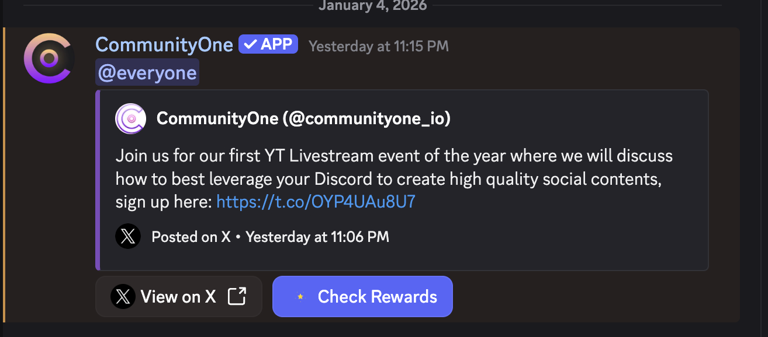
When it comes to connecting Twitter to Discord, most tools stop at one thing: posting tweets. CommunityOne goes several steps further.
Instead of acting as a simple Twitter feed bot, CommunityOne’s Twitter integration is designed as part of a broader community growth and engagement system, making it the strongest overall solution available today.
Why CommunityOne Ranks #1
CommunityOne is built for communities that care about outcomes, not just automation.
While other bots answer the question “How do I post tweets in Discord?” CommunityOne answers a more important one:
“What should happen inside Discord when we post something on Twitter?”
This shift in perspective is what sets it apart.
Key Features and Capabilities
- Twitter → Discord synchronization. Automatically reacts to Twitter activity without manual reposting.
- Engagement-driven automation Tweets can trigger structured actions inside Discord instead of passively sitting in a channel.
- Hype Engine integration Twitter activity can be tied to quests, campaigns, or engagement loops, turning announcements into participation.
- Noise control Designed to avoid spam and focus only on high-value content with AI.
- Scales with the community Works just as well for early-stage servers as it does for large, active communities.
How to Set Up CommunityOne
CommunityOne's setup is platform-driven rather than command-based:
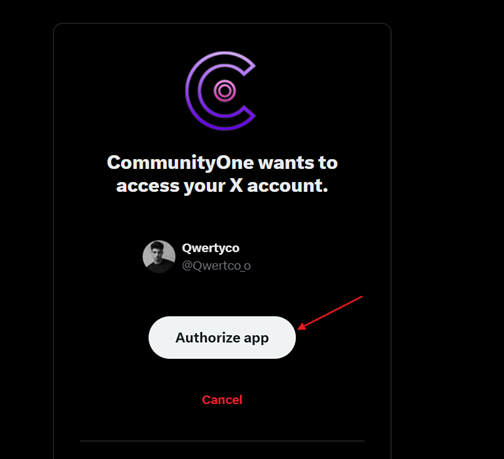
- Connect your Twitter (X) account.
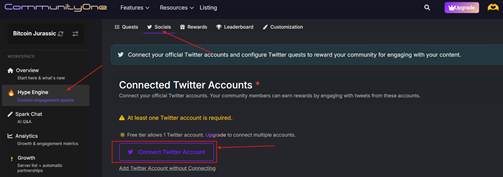
- Define what Twitter activity should trigger inside Discord.
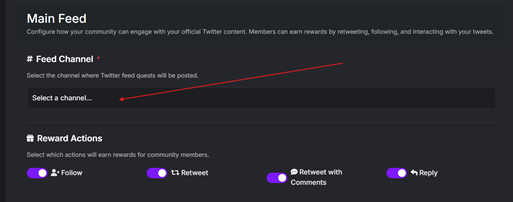
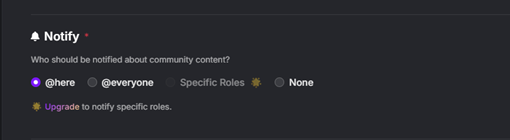
- Choose channels and engagement logic.
- Activate and monitor from a unified dashboard.
No fragile scripts, no constant reconfiguration.
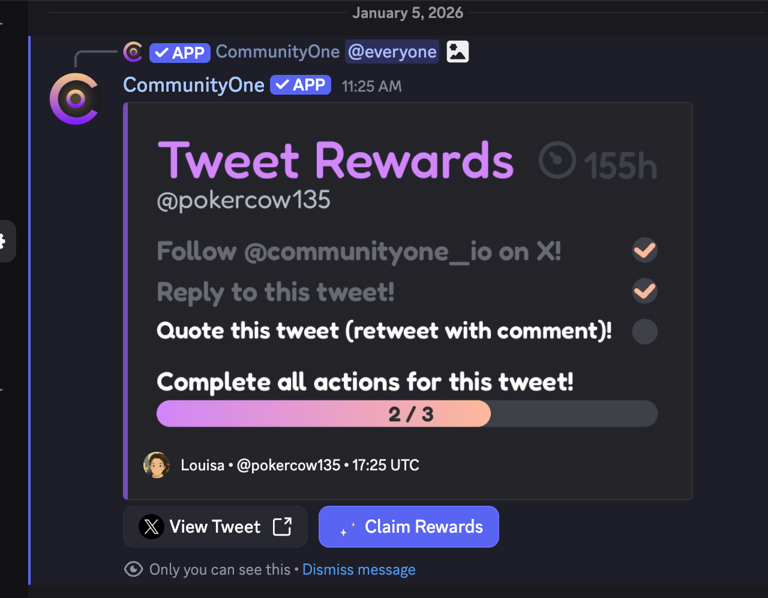
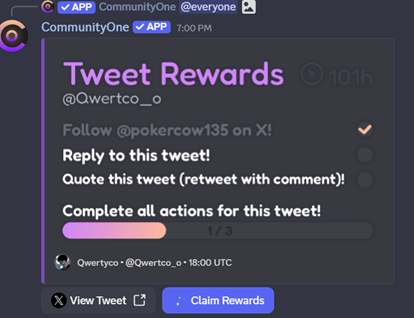
Reward Actions: Currently, we support Follow, Reply, Retweet, Retweet w Comments as rewardable actions. Once a user completes the action and clicks the "Check Reward" button, we will automatically grant them points.
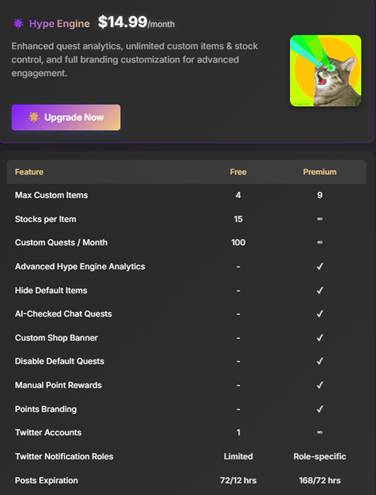
Pricing
- Set Up
Pros and Cons
Pros
- Goes far beyond basic tweet posting.
- Built for engagement, not vanity metrics.
- Stable, platform-level integration.
- Ideal for long-term community growth.
Cons
- Overkill for servers that only want raw tweet mirroring.
- More powerful than needed for servers that only want basic tweet reposting.
Real Use Case Example for CommunityOne Twitter Integration
Server Type: Web3 community Goal: Increase Twitter engagement and Discord participation
How it’s used:
- Official tweets are posted to the Main Feed with rewards for retweets and replies
- Community members earn points by engaging on Twitter
- Member tweets are highlighted in #community-content with shorter reward windows
- Targeted roles receive notifications without spamming the entire server
Result: Twitter announcements consistently drive measurable engagement inside Discord instead of being ignored after posting.
Who Should Use CommunityOne?
CommunityOne is best suited for:
- Web3 and crypto communities
- Startups and SaaS teams
- Creator-led communities
- Any server where engagement and retention matter more than simple reposts.
If your goal is growth, not just automation, CommunityOne is the strongest choice available.
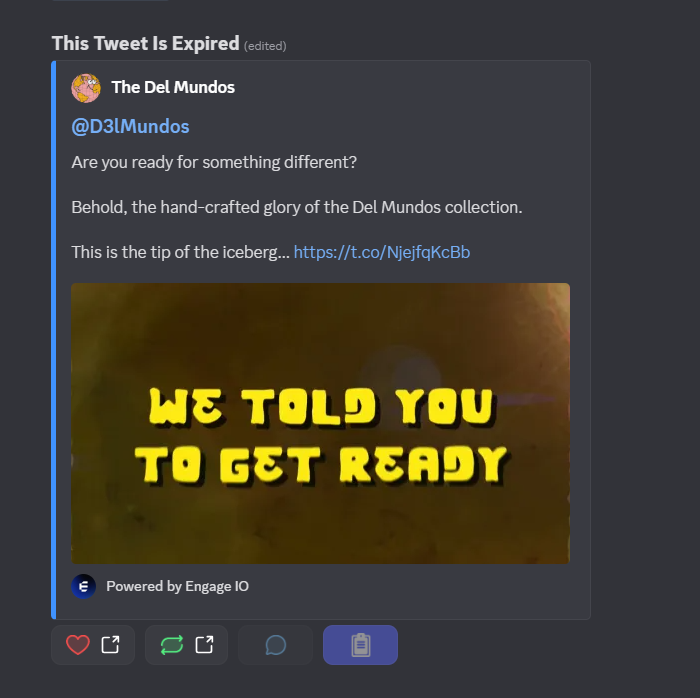
Engages — Campaign-Based Twitter Engagement for Discord Communities
Engages is a Twitter-focused engagement platform designed around short-term campaigns rather than continuous content feeds. It is commonly used by Web3 projects and communities that want to run structured Twitter missions (follow, retweet, reply) and reward users for completing them.
Unlike traditional Twitter feed bots, Engages is not built for ongoing tweet mirroring. Instead, it excels at time-boxed engagement pushes.
Key Features and Capabilities
- Twitter engagement campaigns
- Follow
- Retweet
- Reply
- Like (depending on campaign setup)
- Task-based rewards
- Users complete predefined Twitter actions
- Rewards are granted once actions are verified
- Campaign lifecycle control
- Start and end dates
- Limited-time participation
- Clear objectives
- Discord integration
- Campaigns are promoted inside Discord
- Users return to Discord to claim or verify rewards
Engages is designed to drive bursts of Twitter activity, not passive awareness.
Setup Process (Overview)
engages uses an in-Discord setup command:
- Invite The Engage bot
- Run
/setup(Administrator only)
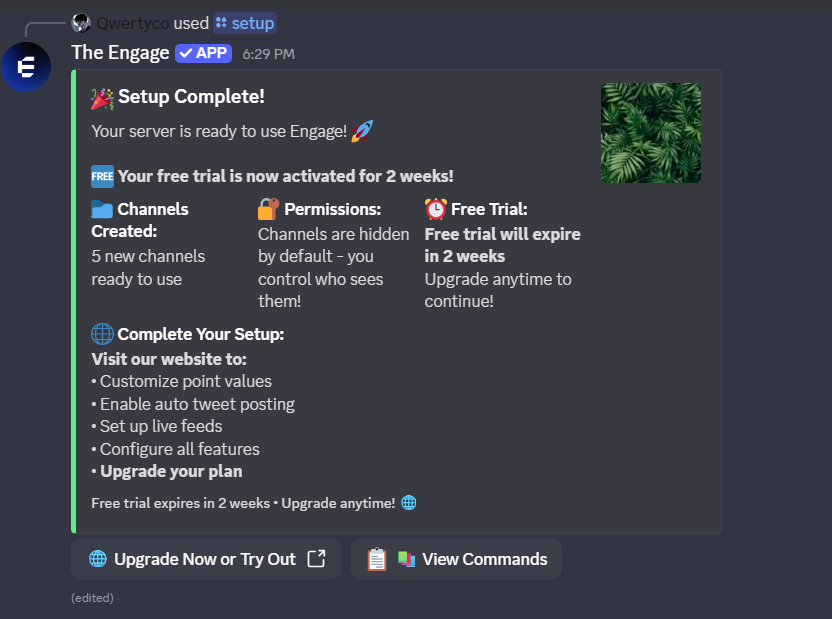
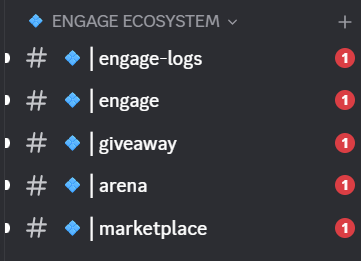
- The bot automatically creates dedicated channels, including:
│logs(activity logs)│information│engage(specific channel for pushing tweets)│giveaway│arena(mini games)│marketplace
- After setup, server settings can be changed using
the engage dashboard
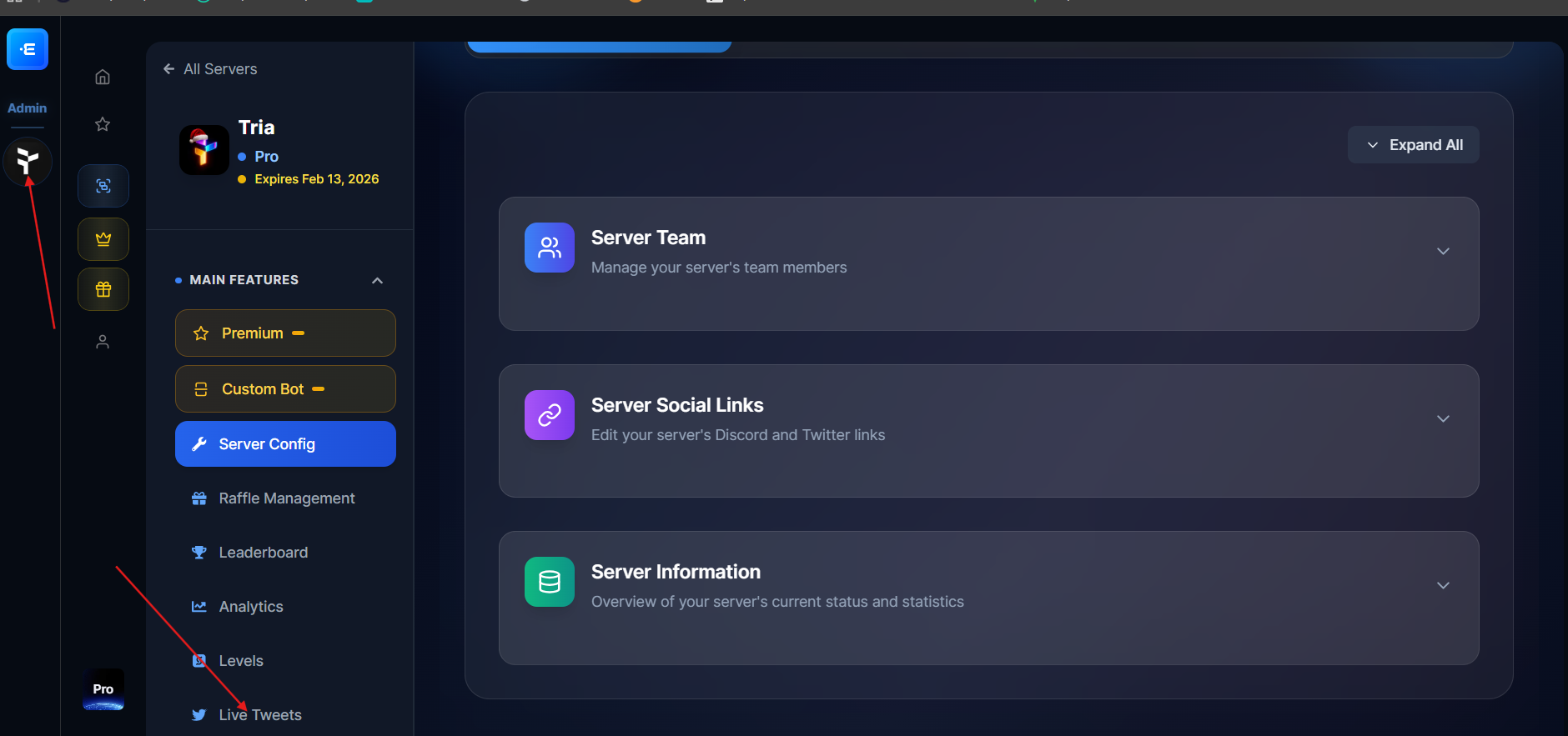
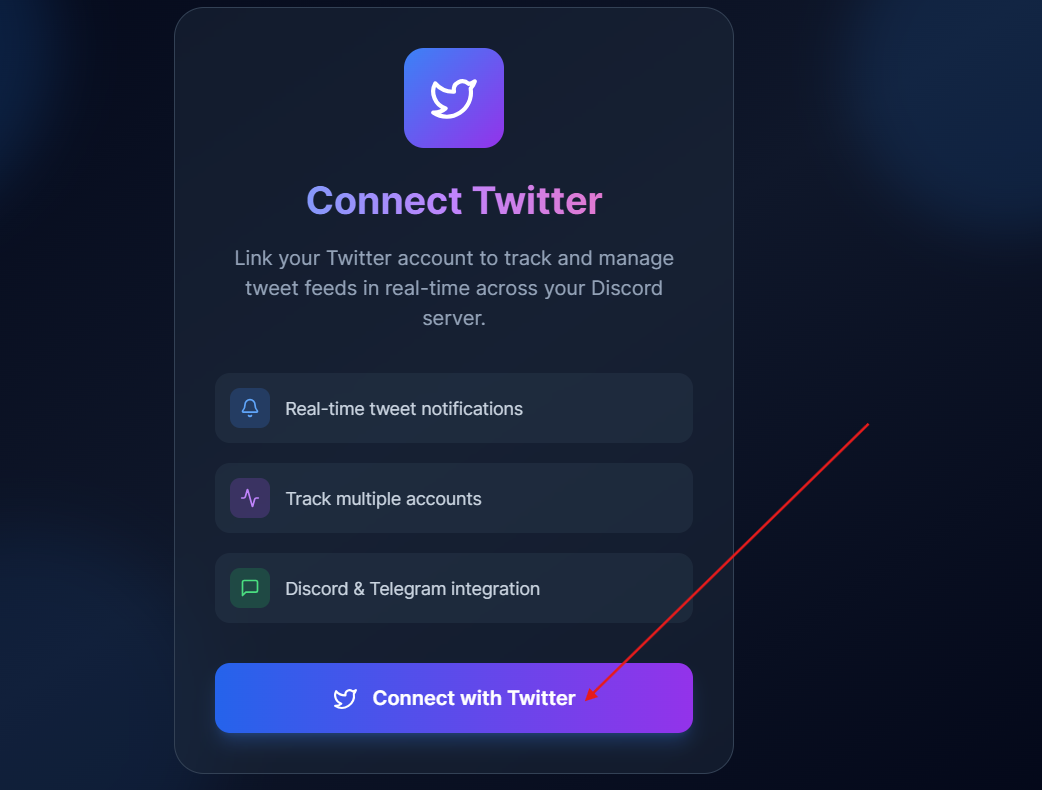
- Connect a Twitter (X) account
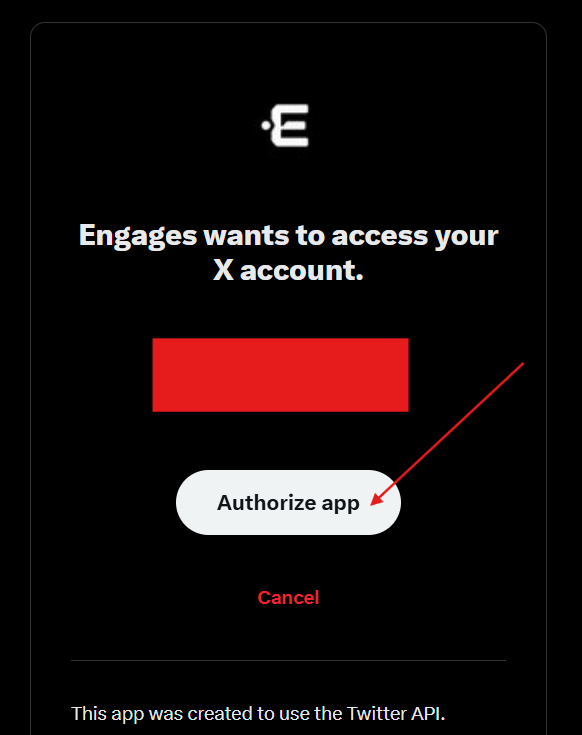
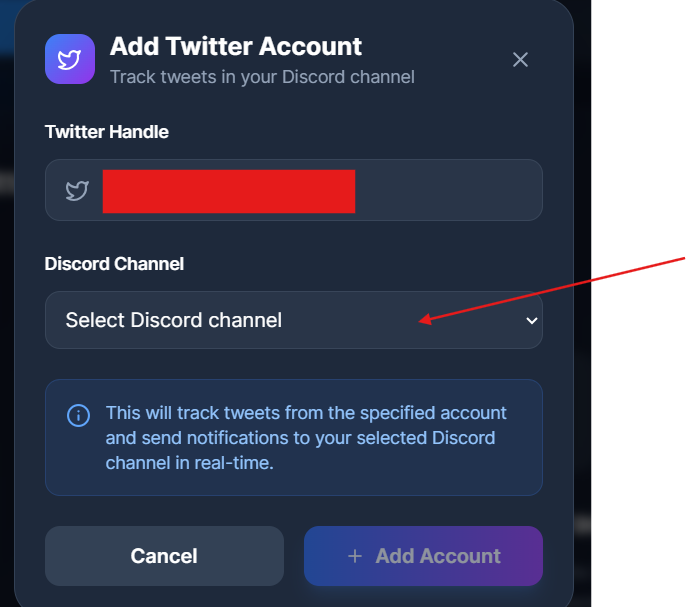
- Choose a Discord channel
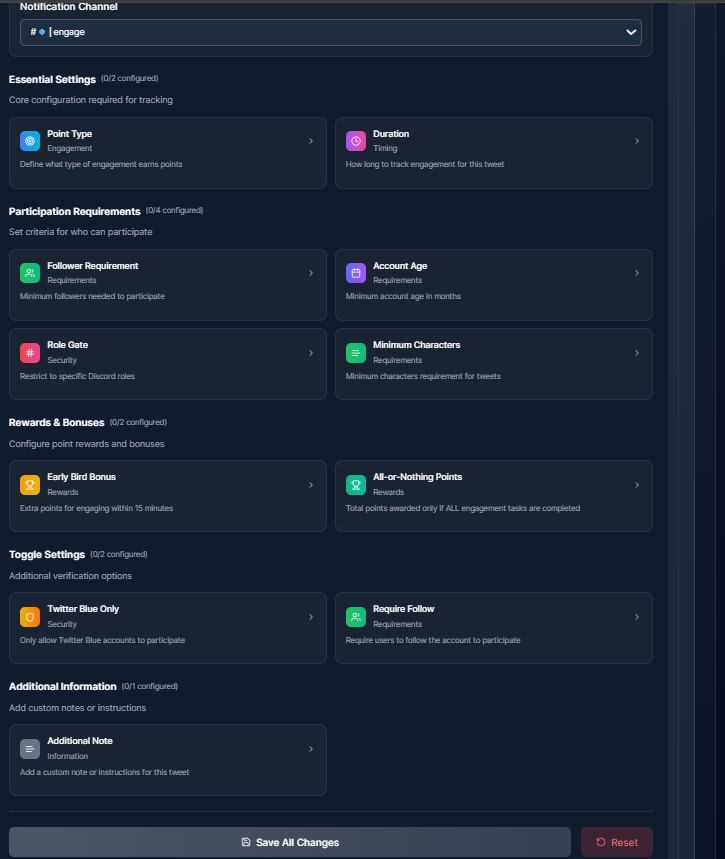
You can setup the reward system after adding the twitter
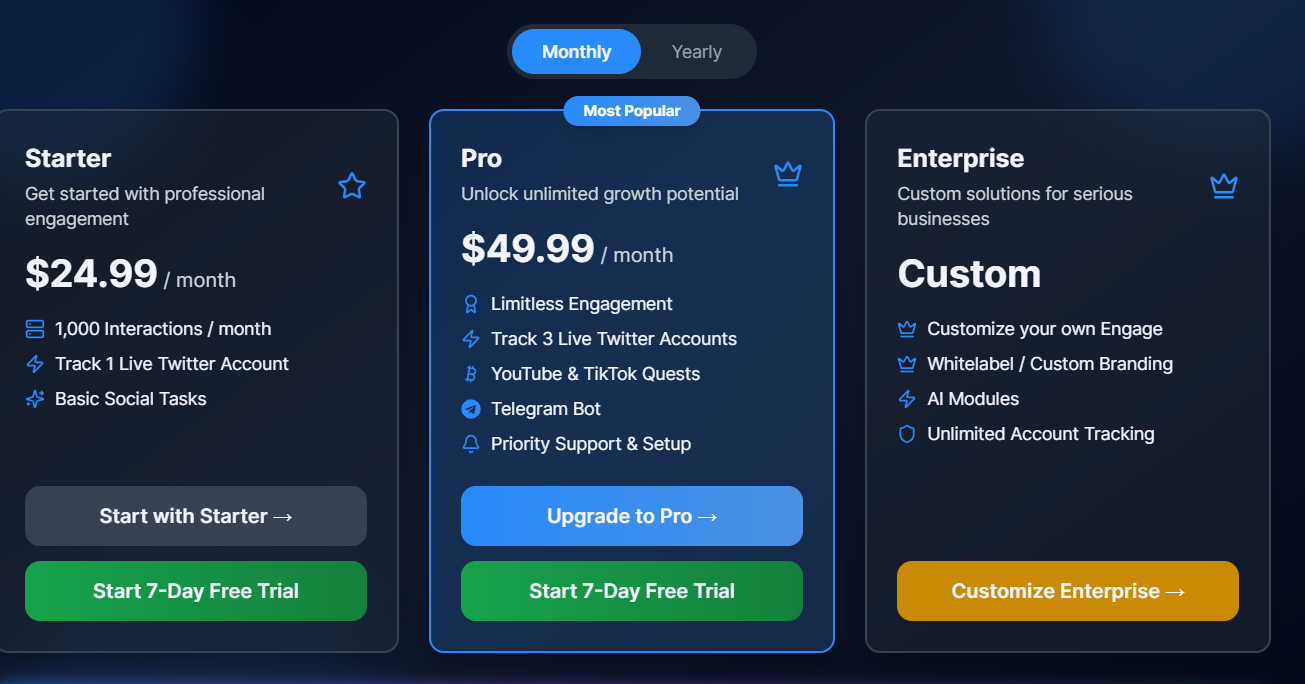
Pricing
- ⚠️ paid or plan-based, depending on campaign scale
Engages is best evaluated as a marketing tool, not a utility bot.
Pros and Cons
Pros
- Excellent for targeted Twitter growth
- Clear, structured campaigns
- Easy for users to understand what to do
- Proven in Web3 and launch scenarios
Cons
- ❌ Not designed for continuous Twitter feeds
- ❌ No always-on tweet mirroring
- ❌ Campaigns require manual setup and management
- ❌ Engagement stops when campaigns stop
Real Use Case Example
Server Type: Web3 project preparing a launch
Goal: Boost Twitter metrics before an announcement
How it’s used:
- A 7-day Twitter campaign is launched
- Users are rewarded for retweets and replies
- Discord activity spikes during the campaign period
Result:
Short-term Twitter engagement increases significantly, but activity drops once the campaign ends.
Engages vs CommunityOne
This is where the difference matters:
- Engages → Best for short-term, campaign-based engagement
- CommunityOne → Best for always-on Twitter → Discord engagement
Engages is ideal for launches, events, and promotions.
CommunityOne is better for keeping Twitter integrated into your Discord every day, with feeds, rewards, expirations, and community content.
Many mature communities eventually use campaign tools and always-on tools together, depending on their strategy.
When Engages Is the Right Choice
Choose Engages if:
- You want structured Twitter campaigns
- Engagement is time-bound
- You’re running launches or marketing pushes
If your goal is ongoing engagement without constantly rebuilding campaigns, a feed-based reward system will be more sustainable.
TweetShift — Best Traditional Discord Twitter Feed Bot
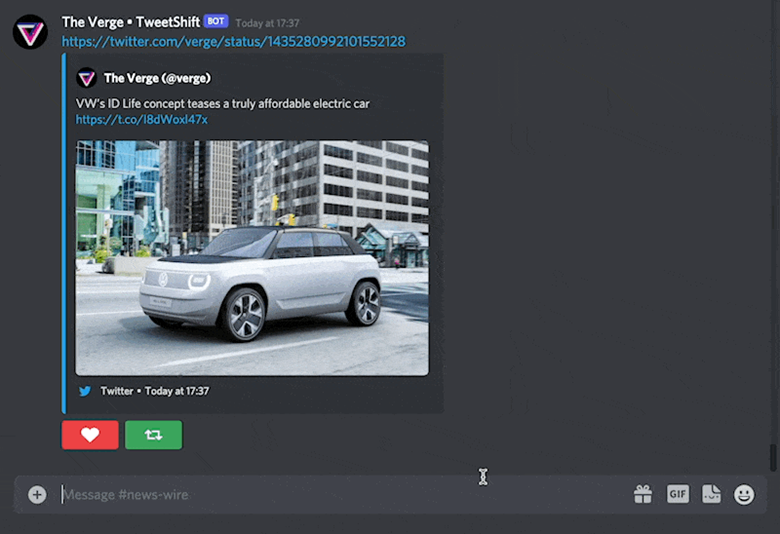
TweetShift is one of the most established traditional Twitter feed bots for Discord. Its focus is simple and clear: dependable, professional-grade tweet delivery with strong filtering options.
For servers that want clean announcements without engagement mechanics, TweetShift remains a solid option.
TweetShift Features and Capabilities
- Real-time Twitter → Discord posting Tweets are delivered quickly with minimal delay.
- Native tweet embeds Supports images, videos, links, and rich previews.
- Advanced filtering
- Include or exclude retweets.
- Ignore replies.
- Keyword-based filtering
- Multiple feeds per server Different Twitter accounts can post to different Discord channels.
TweetShift focuses entirely on announcement quality and reliability.
Setup Process (Overview)
TweetShift is configured via a web dashboard rather than Discord commands.
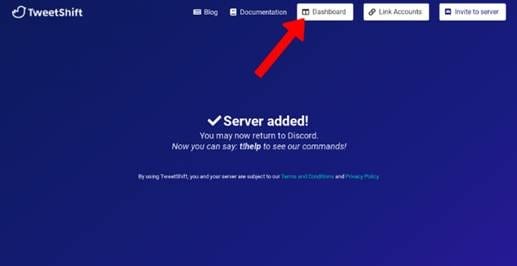
- Invite TweetShift to your server
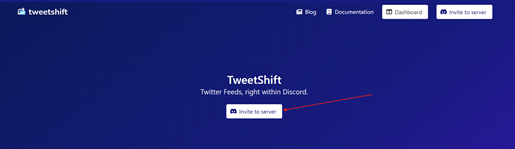
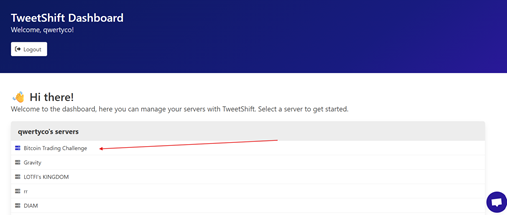
- Log in to the TweetShift dashboard
- Connect a Twitter (X) account
- Choose a Discord channel
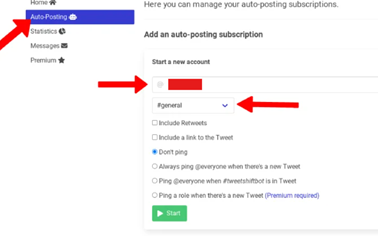
- Configure filters (retweets, replies, keywords)
- Activate the feed
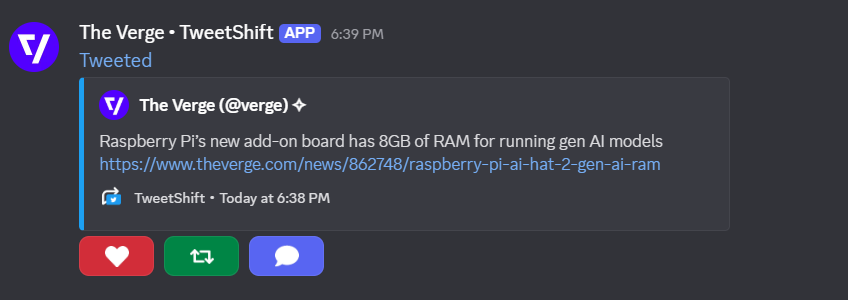
The setup is straightforward but assumes basic familiarity with Discord permissions.
Pricing
- ❌ No free plan only free trial
- Paid subscription required
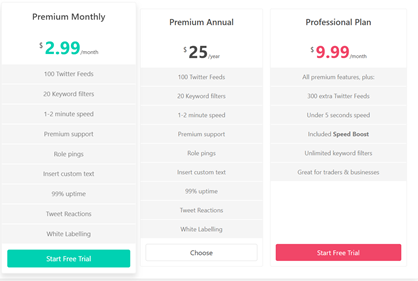
This makes TweetShift more suitable for teams that already budget for tooling.
Pros and Cons
Pros
- Very reliable delivery
- Clean, professional tweet embeds.
- Strong filtering capabilities
- Widely used and trusted.
Cons
- No free tire
- No reward system or engagement features
- Tweets are passive content only.
Real Use Case Example
Server Type: SaaS company Discord Goal: Broadcast product updates from Twitter
How it is used:
- Official company Twitter is connected to a read-only #announcements channel.
- Retweets and replies are filtered out.
- Tweets are posted automatically with clean embeds.
Result: Discord members stay informed about releases and updates, but interaction happens manually in separate channels.
When TweetShift Is the Right Choice
TweetShift is best suited for:
- Announcement-only servers
- Professional or corporate Discords
- Teams that prioritize stability over engagement
- Communities that do not need rewards, quests, or automation logic.
If your main requirement is “post tweets, reliably, without extras”, TweetShift does exactly that.
MEE6 — Basic Twitter Alerts
MEE6 is one of the most widely used Discord bots, known primarily for moderation, leveling, and general server management. It also offers basic Twitter (X) notification features for servers that want simple alerts without adding another bot.
MEE6’s Twitter integration is intentionally lightweight and designed for announcement visibility, not engagement or automation.
Key Features and Capabilities
- Twitter → Discord notifications
Automatically posts new tweets from selected Twitter accounts into Discord channels. - Simple configuration
Twitter alerts are managed directly from the MEE6 dashboard. - Channel-based posting
Choose specific channels for Twitter announcements. - Part of the MEE6 ecosystem
No need to invite or manage a separate Twitter-only bot.
Setup Process (Overview)
MEE6’s Twitter alerts are configured entirely from its web dashboard.
- Invite MEE6 to your Discord server
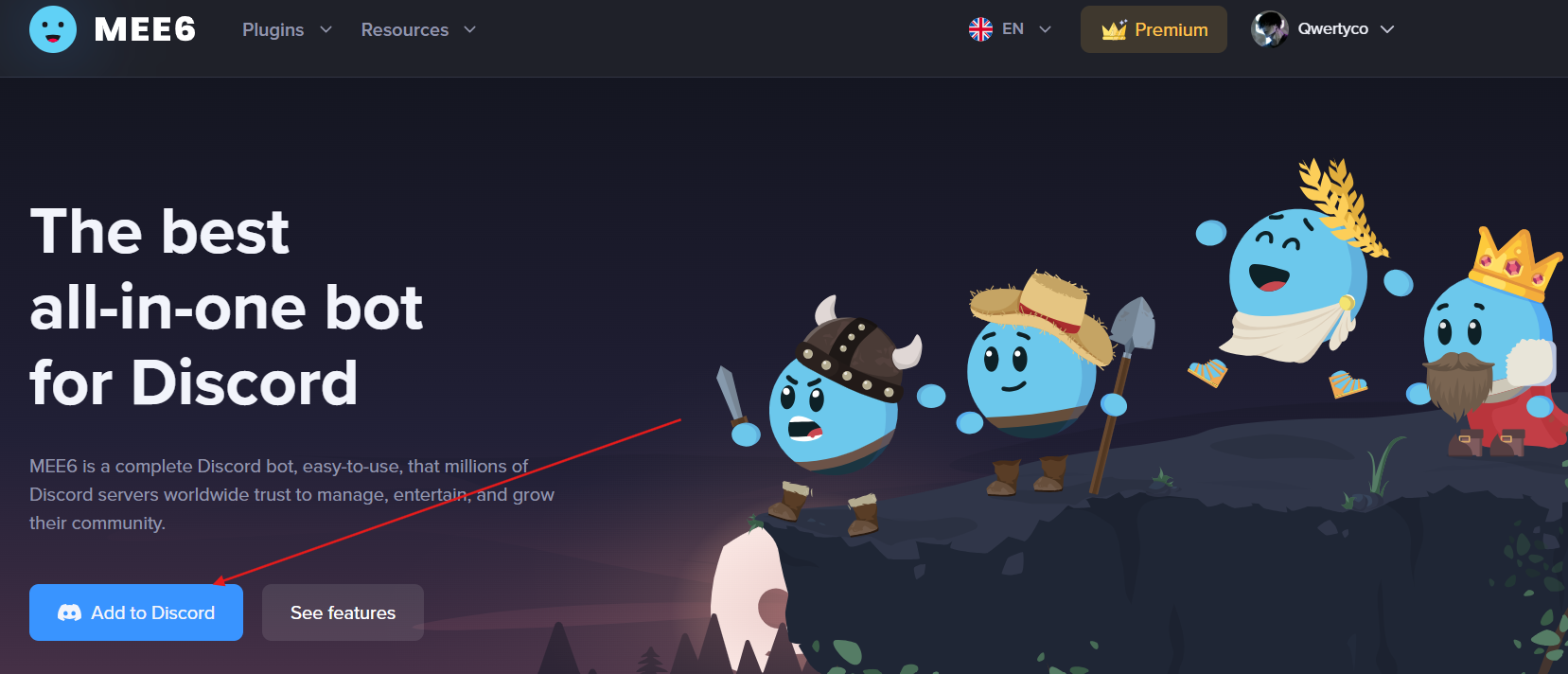
- Open the MEE6 dashboard
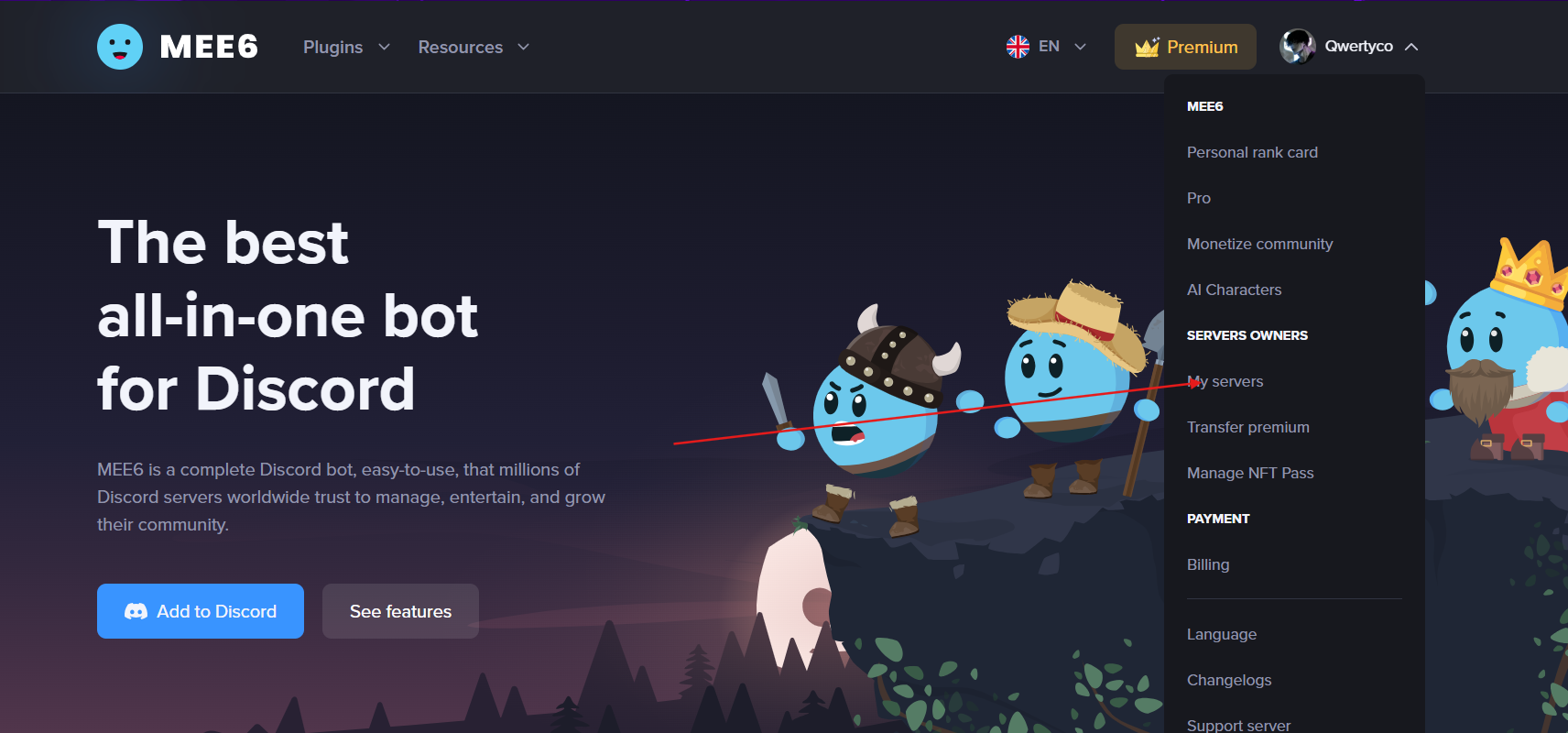
- Navigate to Social Alerts
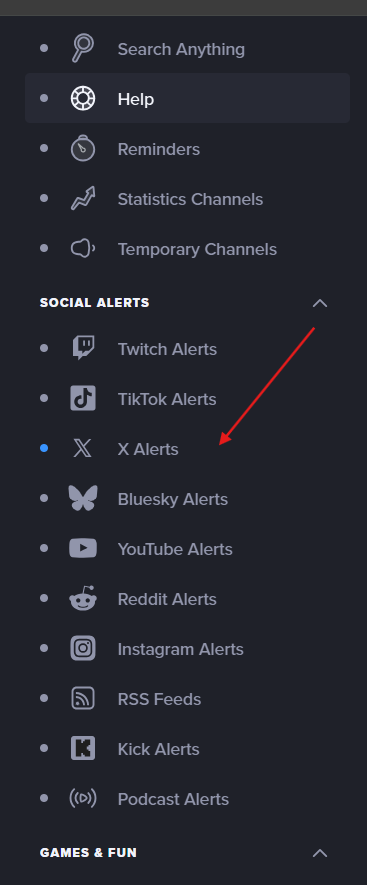
- Enable Twitter notifications
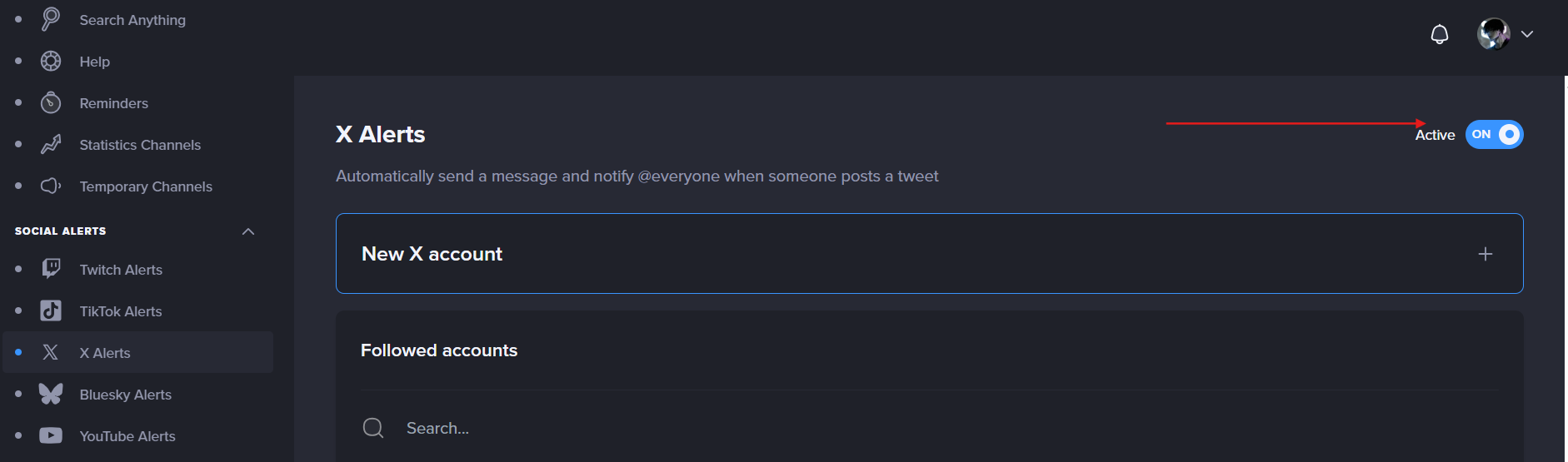
- Connect the Twitter (X) account
- Select the target Discord channel
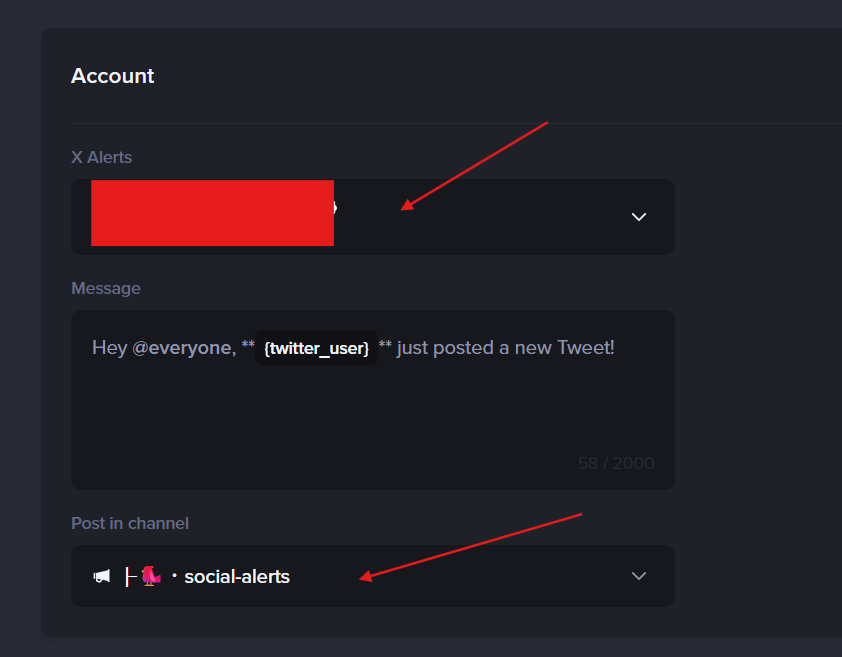
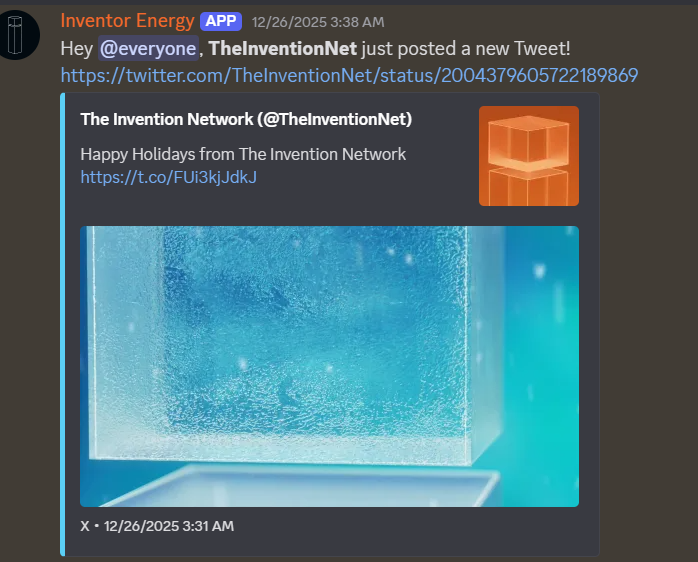
The setup is straightforward and familiar to anyone already using MEE6.
Pricing
- ⚠️ Twitter alerts are part of MEE6 Premium
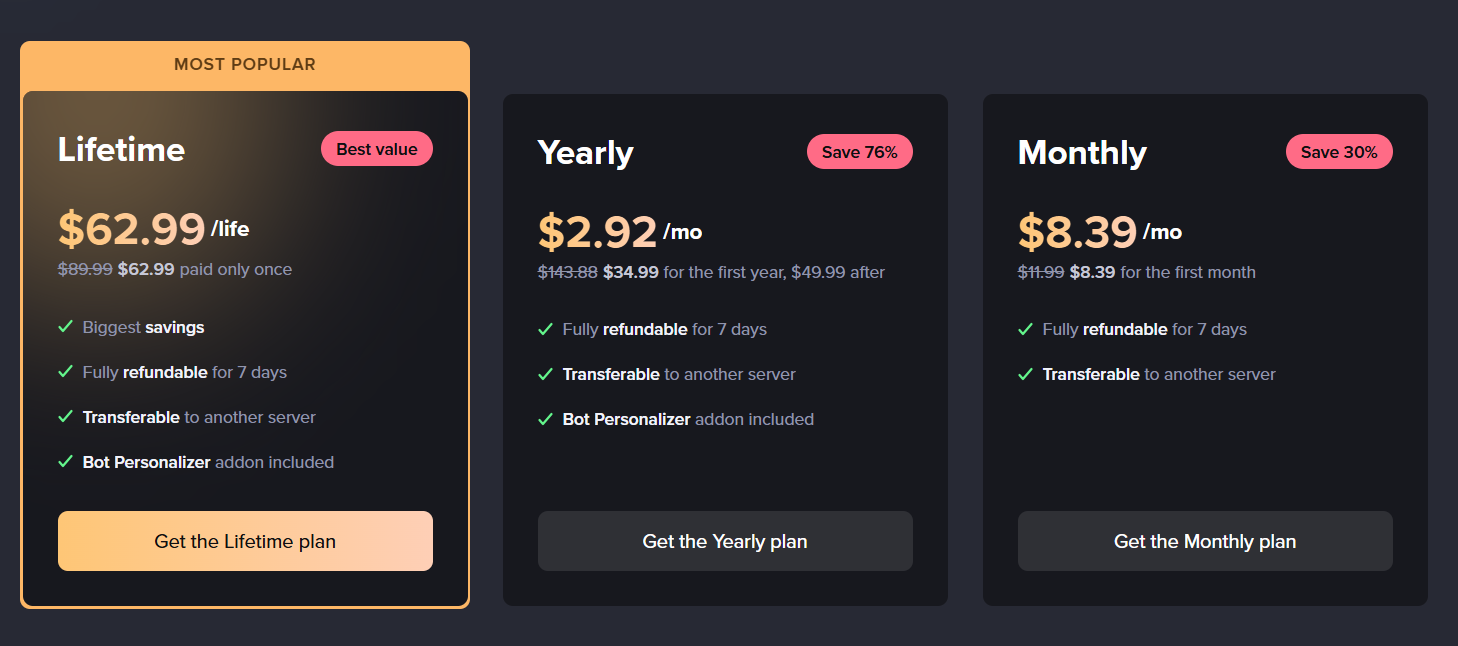
This makes MEE6 less appealing if Twitter integration is your primary goal.
Pros and Cons
Pros
- Very easy to use
- Trusted and widely adopted bot
- No additional bot required if MEE6 is already installed
- Clean, simple Twitter alerts
Cons
- ❌ No advanced filtering
- ❌ No reward or engagement actions
- ❌ No campaign logic or automation
- ❌ Twitter integration is not the core focus
Real Use Case Example
Server Type: Medium-sized gaming or creator Discord
Goal: Share official Twitter announcements
How it’s used:
- MEE6 posts tweets from the official Twitter account into
#announcements - Members read updates but engagement happens manually in chat
Result:
Announcements are visible, but Twitter activity does not translate into structured Discord engagement.
When MEE6 Is the Right Choice
MEE6 is a good option if:
- You already use MEE6 for moderation or leveling
- You only need basic Twitter alerts
- You prefer a single all-in-one bot
However, for communities that want filtering, rewards, campaigns, or engagement tracking, MEE6’s Twitter functionality quickly reaches its limits.
Readybot — Free Twitter/X Feed to Discord Bot
Readybot is a versatile feed bot that supports posting updates from Twitter (now X) into Discord channels, along with other social media and news sources.
Key Features and Capabilities
- Automatic tweet notifications — bring X/Twitter posts directly into Discord channels.
- Multi-source feeds — includes YouTube, Reddit, Twitch, RSS, and more alongside Twitter.
- Customizable templates — premium message templating with names/appearance settings.
- Free tier — basic Twitter feed supports available at no cost to server admins.
Readybot provides a more modern alternative to generic Twitter feed bots, letting you aggregate posts into one consolidated feed.
Setup Process
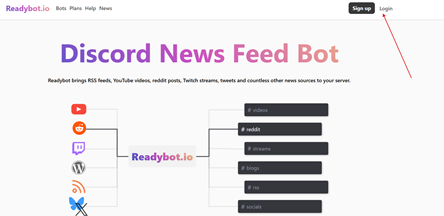
- Invite Readybot to your Discord server.
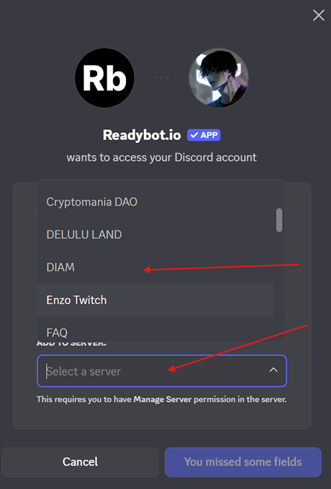
- Use the invite link and select your server.
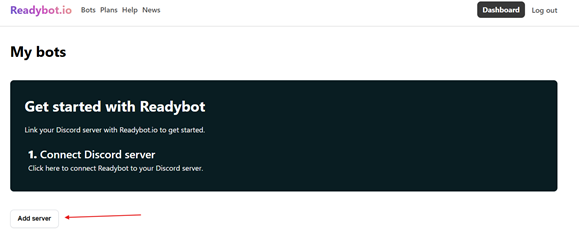
- Authorize and configure feeds
- In the dashboard or commands, add Twitter/X accounts you want to monitor.
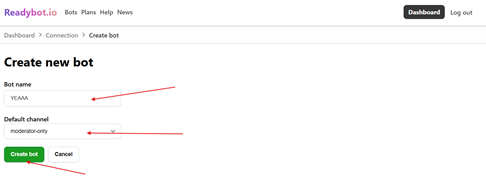
- Choose a channel
- Decide where tweet updates will be posted.
- Customize appearance. (if premium)
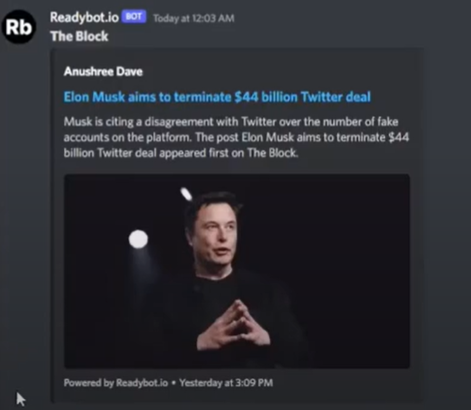
- Adjust how messages display inside Discord (optional, premium).
Pricing
- Free tier available
- Includes basic Twitter/X feed posting.
- Premium features
- Advanced templates and role mention.
- Faster update intervals, additional feeds
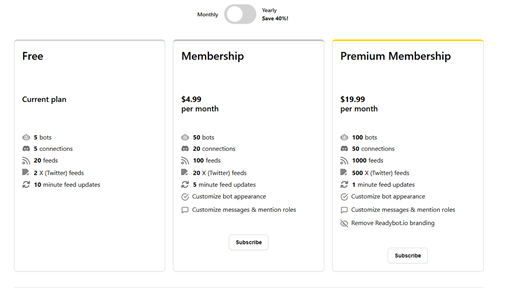
This free level makes it a strong budget option compared to bots that require paid tiers.
Pros & Cons
Pros
- Free and easy to set up.
- Supports multiple social sources beyond Twitter.
- Good for broad content aggregation
Cons
- Not focused solely on Twitter/X
- Less advanced filtering than dedicated bots like TweetShift
- Limited engagement features (no rewards)
Real Use Case Example
Server Type: Community news hub Goal: Share social updates from Twitter & other platforms in one consolidated feed
How it is used:
- Readybot posts tweets from select accounts into #updates.
- Also includes YouTube and RSS feeds for the same topic.
- Members see multi-platform notifications in one place.
Result: Members do not have to switch between apps Twitter/X and other feeds show up directly in Discord.
Comparison Matrix — Top 5 Discord Twitter Bots
Below is a side-by-side view of key features, performance characteristics, and usage profiles to help you compare the top 5 bots we covered.
| Feature / Metric | CommunityOne | Engages | TweetShift | MEE6 | Readybot |
|---|---|---|---|---|---|
| Native tweet embeds | ✅ | ❌* | ✅ | ✅ | ✅ |
| Filtering (replies/RT/keywords) | Advanced | N/A | Advanced | Basic | Basic |
| Rewards / quests | ✅ | ✅ | ❌ | ❌ | ❌ |
| Best at announcements | ⭐⭐⭐ | ⭐⭐ | ⭐⭐⭐⭐⭐ | ⭐⭐⭐ | ⭐⭐ |
| Best at engagement | ⭐⭐⭐⭐⭐ | ⭐⭐⭐⭐ | ⭐ | ⭐ | ⭐ |
| Ease of setup | Easy | Medium | Medium | Easy | Easy |
| Free tier | ✅ (1 acct) | Plan-based | ❌ | Premium | ✅ |
Recommendations by Server Type
Different Discord servers have different goals. Some only need clean announcements. Others want engagement loops, quests, or growth mechanics. Here’s how the tools compare in real scenarios.
Announcement-Only Servers
Example: Company updates, product launches, official news
Best choice: TweetShift
Why:
- Reliable delivery
- Clean tweet embeds
- Strong filters (retweets/replies/keywords)
- Built for professional broadcast-style announcements
Growth & Engagement-Focused Communities
Example: Web3 projects, startups, creator servers
Best choice: CommunityOne
Why:
- Rewards Twitter/X actions (follow, reply, retweet, quote retweet)
- Turns tweets into participation loops instead of passive posts
- Supports Main Feed + Community Feed strategies
- Free for 1 Twitter account
Quest-Driven Campaigns (Gamification Inside Discord)
Example: Communities running engagement missions, events, Spaces promos
Best choice: Engages (Engage Discord)
Why:
- Built for Twitter/X quests inside Discord (tweet engagement missions, Spaces, broadcasts)
- Strong for time-based pushes and gamified participation
- Best when you want “missions” instead of a simple tweet feed
Servers Already Using an All-in-One Bot
Example: Gaming servers, creator communities, general-purpose Discords
Best choice: MEE6
Why:
- Simple Twitter/X alerts with familiar setup
- No need to introduce another bot if MEE6 is already central
- Best for basic visibility, not advanced filtering or rewards
Small or Early-Stage Servers
Example: New communities, small projects, side communities
Best choice: Readybot
Why:
- Free tier available
- Quick setup
- Supports Twitter/X plus other feeds (YouTube, Reddit, RSS, etc.)
- Minimal maintenance for small teams
Internal Teams & Automation Use Cases
Example: Staff alerts, ops notifications, internal tooling
Best choice: Zapier / IFTTT
Why:
- Flexible automation workflows
- Works well for simple “notify a channel when X happens” use cases
- Best for internal alerts (not optimized for Discord community engagement)
Recommendations by Server Size
👥 Small Servers (Under 1,000 Members)
Priorities: simplicity, free tools, fast setup
Recommended:
- Readybot (simple + free)
- CommunityOne (if engagement matters and you want rewards)
👥 Medium Servers (1,000–10,000 Members)
Priorities: reliability, filtering, reduced noise
Recommended:
- TweetShift (announcements and clean feeds)
- CommunityOne (engagement + growth loops)
- MEE6 (only if already installed and you want basic alerts)
👥 Large Servers (10,000+ Members)
Priorities: scalability, control, structured engagement
Recommended:
- CommunityOne (best for sustained engagement + controlled notifications)
- TweetShift (great as a dedicated announcement feed)
- Engages (useful for campaigns and structured missions during events)
Large servers benefit most from controlled notifications, reward expirations, and engagement mechanics—not just raw tweet mirroring.
Final Guidance
Before you choose a tool, ask one question:
Do I want tweets to be seen — or acted on?
- If you only care about visibility → traditional feed bots work
- If you care about participation, growth, and retention → you need rewards, quests, or engagement layers
Once you’re clear on that, the right choice becomes obvious.
Conclusion and Recommendations
Choosing the right Discord Twitter bot is not about picking the tool with the longest feature list, it’s about selecting the solution that best aligns with your community’s goals.
Some servers only need reliable tweet announcements. Others want to turn Twitter activity into real engagement inside Discord. Understanding that difference is the key to making the right choice.
🏆 Best Overall Discord Twitter Bot
CommunityOne Twitter Integration
- Best for growth-focused communities
- Only solution with built-in Twitter reward actions
- Supports follow, reply, retweet, and retweet-with-comment rewards.
- Advanced notification and expiration controls
- Free for 1 Twitter account
Ideal if: You want tweets to drive engagement, not just visibility.