Understanding Discord GIF Emoji Size Limits

Key Takeaways
- Discord GIF emojis must not exceed a file size of 256KB.
- The recommended dimensions for Discord emojis are 32x32 pixels for optimal clarity and compatibility.
- Discord stickers have larger recommended dimensions (320x320 pixels) compared to emojis.
- Tools like Canva, Crello, and EZGIF can assist in creating and resizing custom emojis to meet Discord's specifications.
TL;DR: To create custom Discord GIF emojis, ensure they are under 256KB and ideally 32x32 pixels, using online tools for resizing and compression.

Turn your Discord emojis into organic community growth. Try our bot for free!
✨ Invite our botUnderstanding Discord GIF Emoji Size Limits
Discord emojis add fun and personality to chats. But did you know they have size limits? Understanding these limits is crucial for creating custom emojis.
Discord GIF emojis, in particular, have specific requirements. These ensure they load quickly and don't slow down the platform.
This guide will help you navigate the world of Discord emoji dimensions. You'll learn about size limits and how to create your own emojis.
Whether you're a server admin or a casual user, this information is valuable. Let's dive into the details of Discord GIF emoji size limits.
What Are Discord Emojis and GIF Emojis?
Discord emojis are small images used to express emotions and reactions in chats. They bring conversations to life and make interactions more personal.
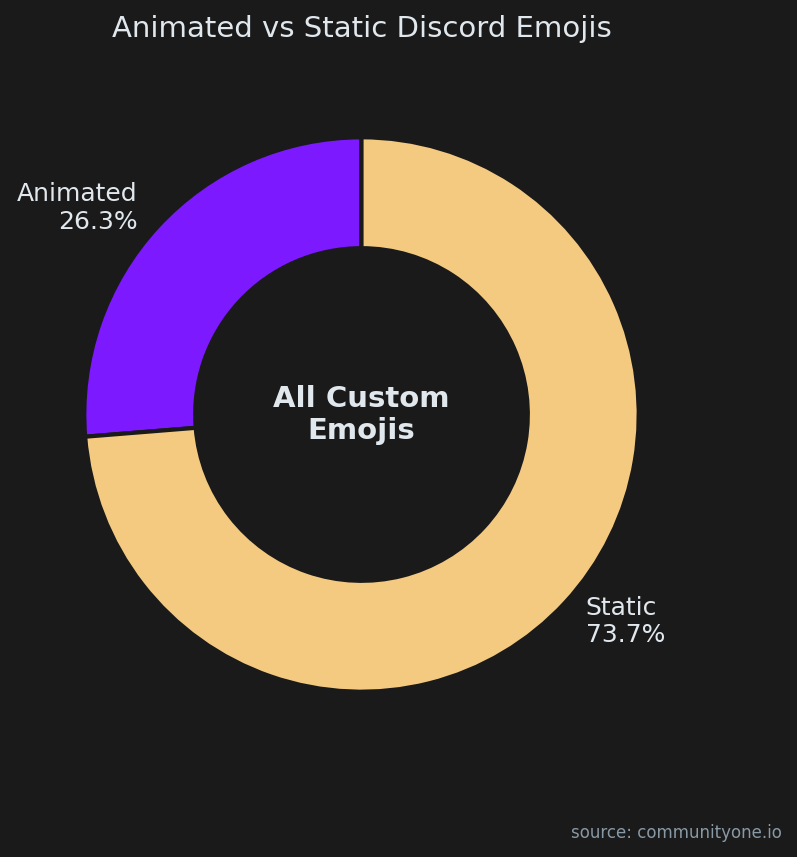
While static emojis are the default for many new communities, our database reveals that 26.3%% of all custom emojis uploaded to active servers are animated GIFs. This highlights a strong user preference for motion and dynamic reactions in chat, making it well worth the effort to learn how to optimize GIF file sizes for your community.
Two main types of emojis exist on Discord: static and GIF. Static emojis are simple, unmoving images. They convey clear expressions succinctly.
GIF emojis, however, add animation to the mix. These moving images can transform a simple chat into an engaging experience.
Creating GIF emojis involves selecting motion-filled images that fit Discord's limits. This animation adds a new dimension to communications.
In summary, Discord's emoji options offer flexibility and creativity. Users can choose static or animated formats to enhance their messaging. By understanding the distinctions between these types, you can better customize your Discord presence.
Discord Emoji Size Limits and Dimensions
When creating or uploading emojis to Discord, it's essential to know the size limits. Oversized emojis won't upload, frustrating users.
The maximum size for Discord emojis, including GIFs, is 256KB. Ensure the file size does not exceed this limit to avoid issues.
Emojis also have recommended dimensions, enhancing clarity and appearance across devices. Ideally, emojis should be 32x32 pixels.
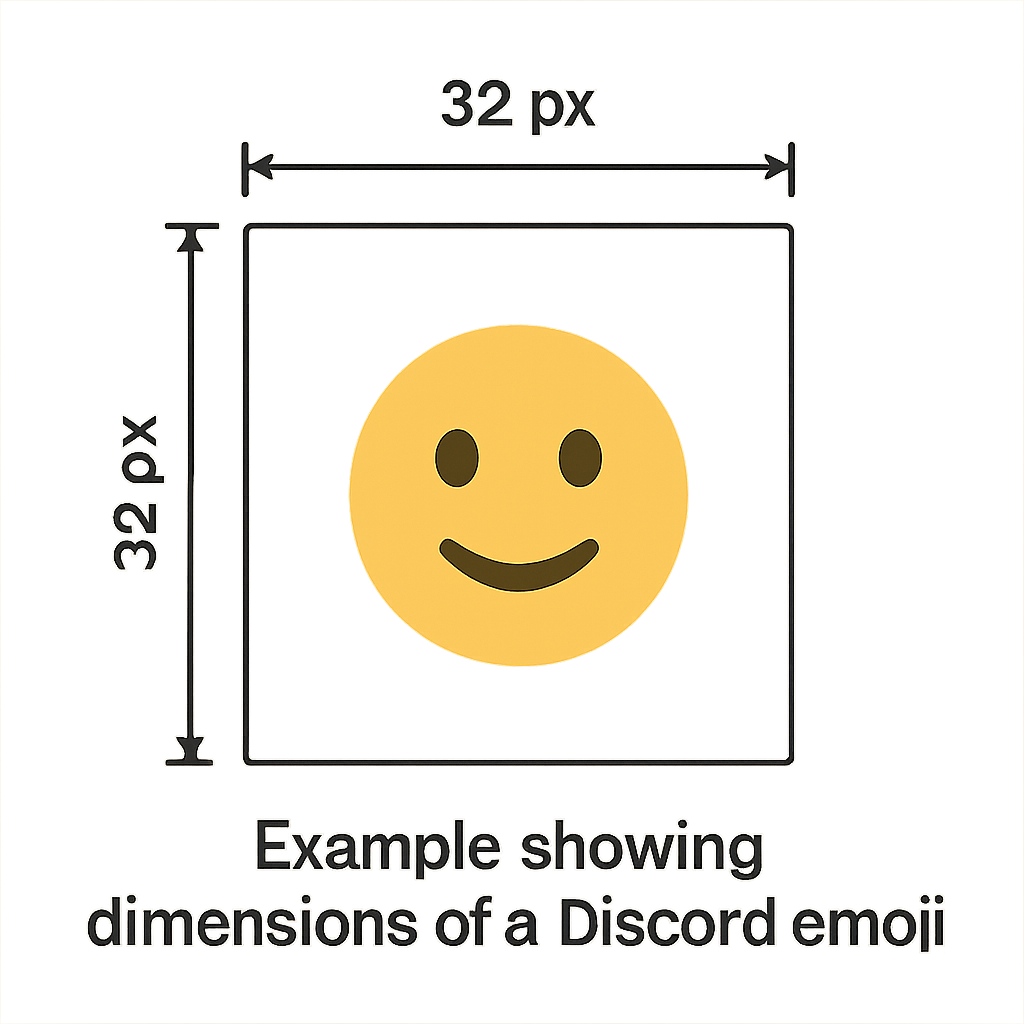
These constraints ensure emojis load quickly and maintain server performance. Large files can disrupt smooth user interactions.
Remember, efficient size management prevents lag and improves communication. Familiarize yourself with these specifications to avoid upload errors.
With these guidelines, you can craft visually appealing emojis that enhance your Discord experience. Following these metrics elevates your server's functionality and aesthetic.
Maximum Discord Emoji Size
Discord imposes a maximum emoji size to safeguard server efficiency. The limit is set at 256KB. Exceeding this will prevent uploads.
Ensuring your emoji files remain within this limit is crucial. A tool for compressing images can help.
Here are tips for maintaining proper file size:
- Use image compression software.
- Check file size before uploading.
- Avoid overly detailed or complex designs.
Adhering to these steps keeps your emojis within limits. It guarantees smoother interactions on Discord.
Recommended Discord Emoji Dimensions
Discord's recommended dimensions for emojis stand at 32x32 pixels. This size ensures visibility and compatibility across devices.
Adhering to these dimensions optimizes the appearance and function of your emojis. It also prevents distortion or pixelation.
To achieve the best results, consider these suggestions:
- Use vector graphics for resizing.
- Test your emoji on various devices.
- Utilize templates for consistency.
Following these tips leads to crisp and clear emojis on Discord. It enhances user experience by providing professional and tidy visuals.
Discord Stickers vs. Emojis: Size and Dimensions
Discord offers both stickers and emojis to express emotions, but they have different size requirements. Emojis are typically smaller, with a focus on quick communication.
Stickers, however, offer more room for detail. They have recommended dimensions of 320x320 pixels, allowing for a richer and more expressive design.
Due to their larger size, stickers can convey more complex emotions and animations. This makes them ideal for special reactions or announcements.
To summarize the differences in size and purpose:
- Emojis: 32x32 pixels, quick and simple.
- Stickers: 320x320 pixels, detailed and expressive.
Understanding these differences helps optimize your Discord content, ensuring it's both effective and engaging. Using both options creatively can enhance interactions within communities.
How to Make Custom Discord Emojis (Static and GIF)
Creating custom emojis on Discord is a fun way to personalize your server. You can design both static and animated GIF emojis to reflect your community’s vibe.
When planning your custom emoji slots, keep in mind that you don't need to fill all of your available slots immediately. Our analytics show the median Discord server actively uses 28 custom emojis, and 28%% of servers operate with fewer than 10. Start with a core set of high-quality, well-compressed GIFs and expand as your community's inside jokes naturally grow.
Start by selecting or creating an image that suits the emotion or message you want to convey. Ensure the image maintains quality when resized to the standard Discord emoji dimensions of 32x32 pixels.
Use image editing software to adjust the image, especially for animated GIFs which need more precision. Tools like Photoshop or online editors can help simplify this process.
Next, ensure the file size does not exceed 256KB. Keeping within these limits ensures the emoji loads quickly without issues.
Finally, upload the emoji to your Discord server. Administrators have the permissions needed to add custom emojis, enriching interactions.
Key steps include:
- Choose a meaningful image.
- Resize appropriately.
- Check file size limits.
- Upload to your server.
Using a Discord Emoji Template or Maker
Discord emoji templates can streamline your creation process. Many tools provide pre-sized templates, ensuring compliance with Discord's size constraints.
If you're unsure what kind of emojis to create first, looking at platform-wide trends can help guide your design process. Across our directory, the most searched and utilized emoji category is 'Black'. Designing custom emojis that fit into this popular theme can instantly boost engagement and reaction usage in your server.
Using an emoji maker can simplify this further by offering ready-made designs. These platforms often feature drag-and-drop capabilities, giving you creative freedom.
Some of the most popular tools include:
- Canva: Offers various templates and design tools.
- Crello: Another easy-to-use option with extensive graphics.
- Emoji Maker: Focused specifically on creating custom emojis.
These resources make it simple to express your unique style, while guaranteeing that your emojis fit Discord's requirements.
Steps for Making Discord GIF Emojis
Creating Discord GIF emojis involves several steps to maintain both quality and functionality. Start by selecting a short, looping GIF that captures the desired emotion.
Next, ensure the GIF meets the size limit of 256KB, using a GIF compressor if needed. This step is crucial for smooth uploads and quick loading.
To create and upload a Discord GIF emoji:
- Choose a short, repetitive GIF.
- Compress if over 256KB.
- Edit to 32x32 pixels.
- Upload to your server.
Editing the dimensions to 32x32 pixels may need precise adjustments. Tools like GIPHY or EZGIF can assist in resizing GIFs effectively.
Finally, upload the completed GIF emoji to your Discord server, enhancing interaction with animated expressions that catch attention.
Tools for Resizing and Converting Emoji Images
Creating visually appealing Discord emojis often requires resizing or converting your images. Various tools exist to help meet Discord's size requirements efficiently.
Online converters are especially handy. They allow you to adjust image dimensions and file size without requiring extensive design skills.
These tools often offer simple interfaces with drag-and-drop features, making the process quick and straightforward.
Some popular options include:
- EZGIF: Ideal for editing and converting GIFs.
- Photopea: A versatile online photo editor.
- ImageMagick: Offers robust editing capabilities for experienced users.
These tools ensure your emojis comply with Discord's requirements, providing a smooth user experience.
Remember to double-check the image quality post-conversion. This ensures the final emoji is both visually appealing and functional within the Discord platform.
Discord Emoji Size Converter and Resizer Tools
Utilizing specific size converter and resizer tools streamlines the emoji creation process, saving time and effort. These tools specialize in adapting images to Discord's specifications.
They often support multiple file types, making them versatile choices for any image format you have.
Key converters include:
- TinyPNG: Compresses and optimizes PNGs efficiently.
- GIMP: Offers comprehensive resizing options.
- iLoveIMG: Simple and effective for quick image alterations.
Engage these tools to ensure your emojis meet the necessary size constraints while maintaining visual integrity, enhancing your server's appeal.
Tips for Optimizing Discord GIF Emojis
Optimizing Discord GIF emojis ensures they load quickly while maintaining good quality. Use concise GIFs with limited frames to reduce file size.
Keep colors and details simple to prevent pixelation. For better results, stick to primary colors and avoid gradients where possible.
When preparing GIFs, consider these tips:
- Use compression tools to minimize file size.
- Test the emoji in Discord before finalizing.
- Adjust the frame rate to balance quality and speed.
These practices help maintain performance and visual appeal, enhancing your Discord experience.
Common Issues and Troubleshooting
When creating Discord GIF emojis, users may encounter common issues. One frequent problem is exceeding the 256KB file size limit.
If your emoji won't upload, try compressing the file or simplifying the GIF. Use online tools to adjust file size effectively.
Another issue can be low image quality after resizing. Ensure you start with a high-quality image and retain important details.
Consider these steps to resolve issues:
- Double-check file dimensions and size.
- Use recommended resizing tools.
- Re-upload the emoji after adjustments.
Frequently Asked Questions About Discord Emoji Sizes
What is the maximum size for Discord emojis?
The maximum size for Discord emojis is 256KB. This applies to both static and animated emojis. Keeping within this limit ensures quick loading times and smooth performance on Discord servers.
What are the ideal dimensions for Discord emojis?
The ideal dimensions for Discord emojis are 32x32 pixels. These dimensions ensure that the emojis are clear and recognizable in the chat. Larger images can be resized using online tools to meet these requirements.
Can I use any image format for Discord emojis?
Discord primarily supports PNG and GIF formats for emojis. Other formats might not work correctly when uploading. Ensure your emoji files are saved in compatible formats before uploading.
How can I resize images to fit Discord's requirements?
Use image editing tools or online converters to resize your images for Discord. These tools can help adjust both file size and dimensions to meet platform requirements.
Conclusion: Enhancing Your Discord Experience with Custom Emojis
Custom emojis add personality to Discord chats. They allow users to share more expressive content. Understanding size limits and dimensions is essential in creating effective emojis.
Experimenting with custom emoji creation can be rewarding. It allows for unique server personalization. Engage your community with fun and lively emojis to enrich interactions.