Effective Strategies for Discord Server Growth

Key Takeaways
- Transform a stagnant Discord server into a thriving community by adopting the "Digital Clubhouse Philosophy," focusing on organization, value, and genuine connection.
- Structure your server with clear categories and essential starter channels to prevent new member confusion and encourage participation.
- Define a unique value proposition to differentiate your server from generic hubs and give members a compelling reason to join and stay.
- Optimize the onboarding experience with a custom welcome screen and clear calls to action to reduce day-one churn.
- Utilize roles as "security badges" for organization and belonging, and implement strategies like the Icebreaker Method to increase active participation and plug the "leaky bucket" of member retention.
TL;DR: Grow your Discord server by creating an organized, valuable, and welcoming "digital clubhouse" that prioritizes member retention and genuine connection over sheer numbers.

See exactly where new members drop off in your server. CommunityOne Analytics tracks onboarding completion, active member rates, and retention in one dashboard. Free to start.
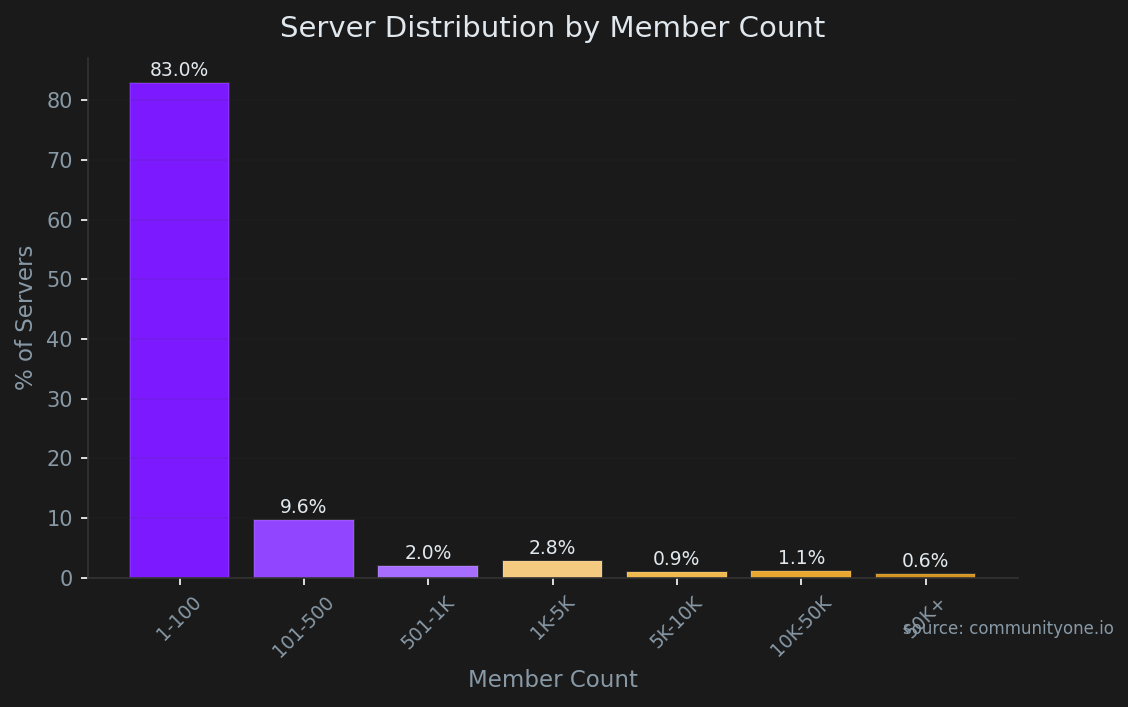
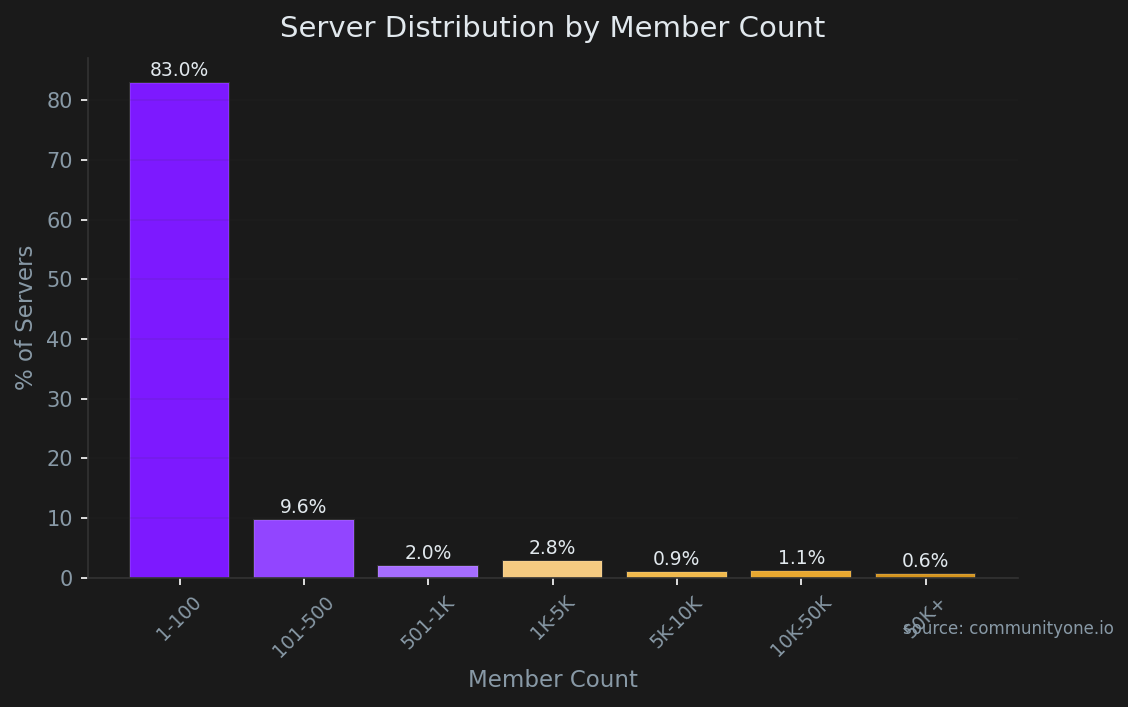
✨ Invite our bot83% of Discord servers never break 100 members. Not because the owners gave up, but because they built the wrong thing first. They optimized for channels and invite links before they had a reason for anyone to stay. This guide covers the exact structure, onboarding path, and retention plays that separate the 17% from everyone else.
Transforming that quiet space into an active hub requires adopting the "Digital Clubhouse Philosophy." Rather than viewing your server as a mere collection of text channels, imagine it as a physical community center with designated rooms for specific activities. According to basic social dynamics, members will only participate if the environment feels inviting, intuitively organized, and genuinely valuable to their daily routine. Treating your main chat channel like a cozy living room rather than a sterile waiting area completely changes how newcomers interact the moment they log in.
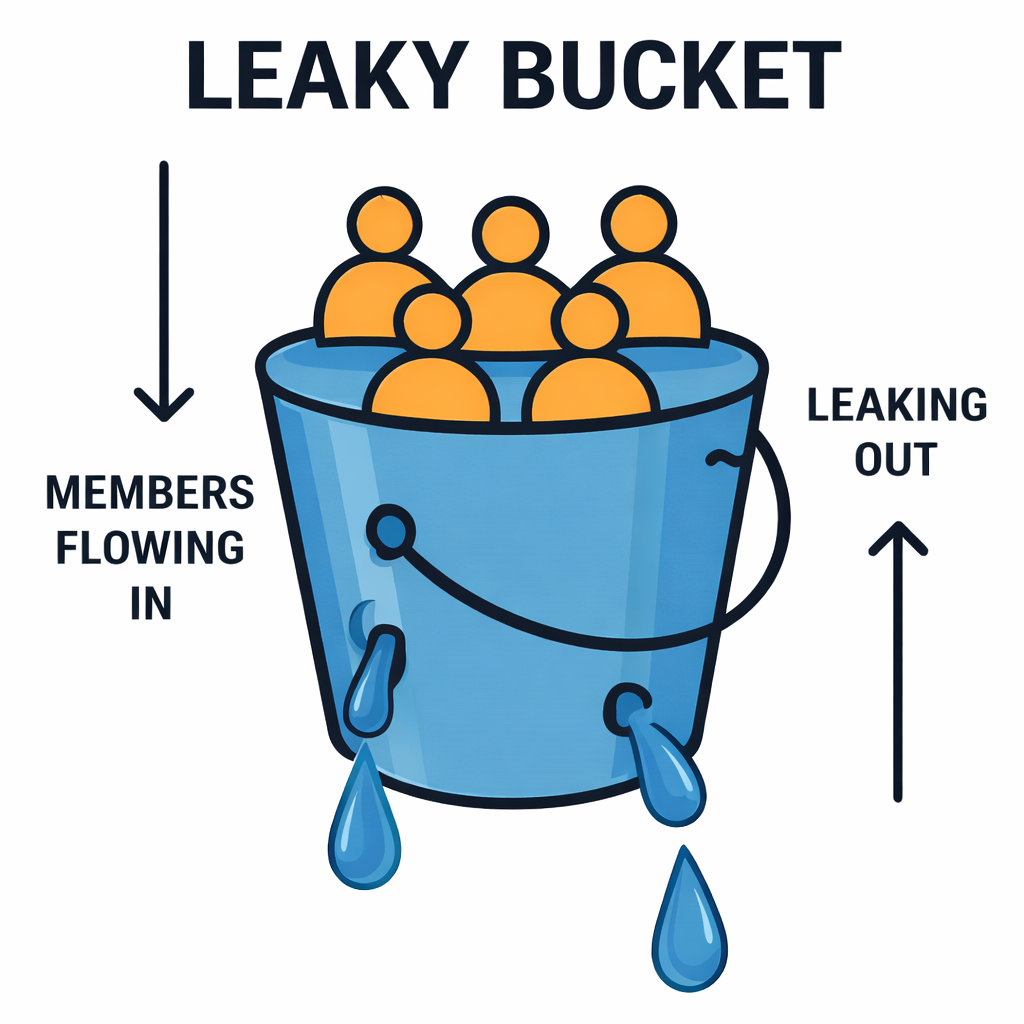
Pouring energy into blindly inviting hundreds of new people won't work if your foundational community experience is broken. Industry data reveals that user retention is far more critical than simple acquisition, a dynamic perfectly illustrated by the "Leaky Bucket" concept. There is no benefit to pouring fresh members into a bucket that has gaping holes in the bottom. Fixing the conversational flow, establishing clear roles, and creating an engaging vibe patches those holes so that the people you attract actually decide to stick around.
Sustainable success relies on consistent patience rather than chasing gimmicky hacks to artificially inflate your member count. Mastering organic discord community building strategies means abandoning the search for a magic button and focusing instead on cultivating genuine human connections. By repairing the underlying structural flaws in your server and treating your earliest members like welcomed guests, you naturally foster a thriving ecosystem that shifts your digital space from a forgotten ghost town into a bustling daily destination.
Creating Your 'Digital Clubhouse': Why Clear Channel Structures Stop New Member Confusion
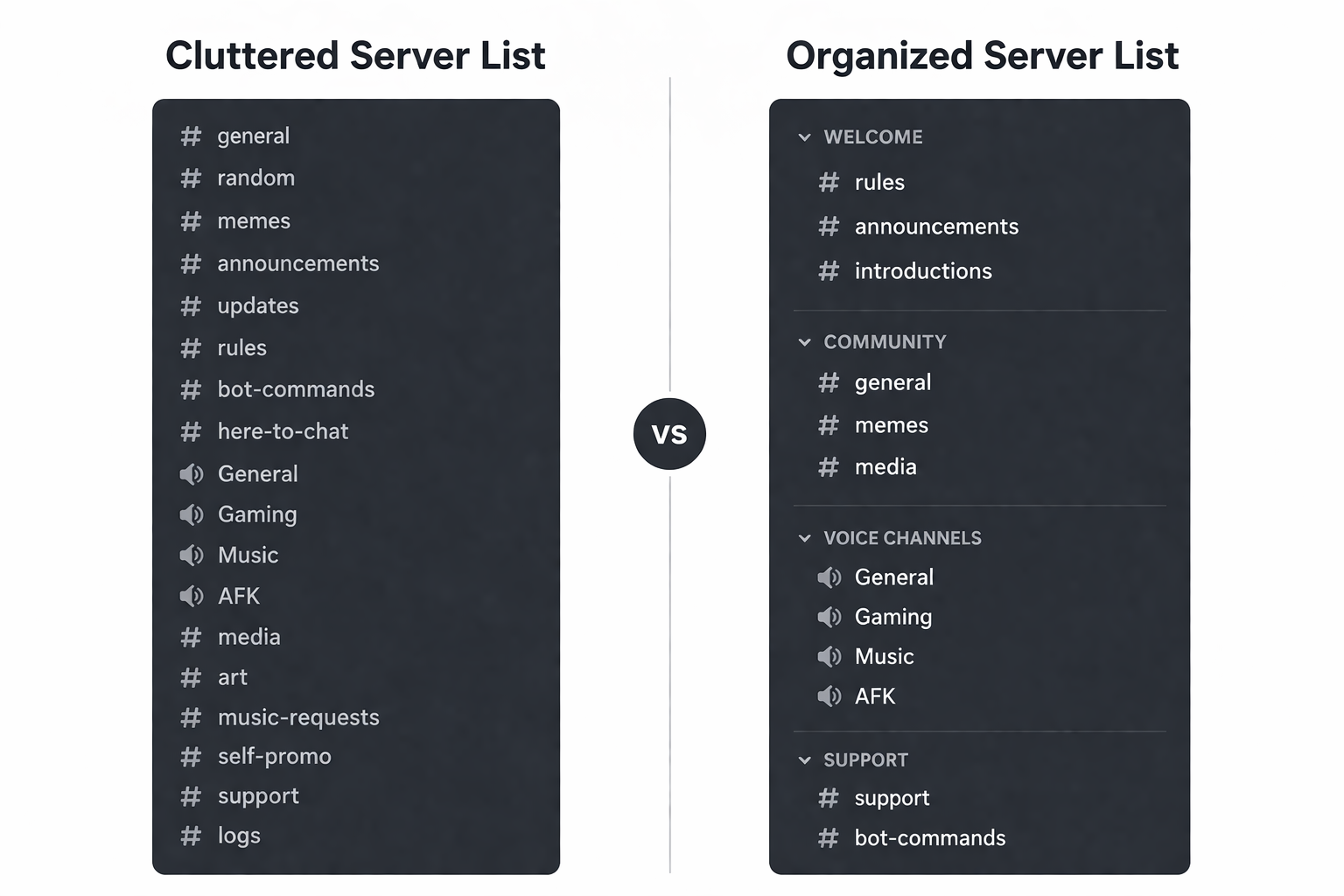
Have you ever walked into a massive building without any signs and instantly felt overwhelmed? That same feeling hits new members when they join a server filled with dozens of random, disorganized chat rooms. To apply effective discord server growth tips, you need to treat your community like a physical clubhouse by using categories as hallways and channels as the individual rooms. Instead of dumping everything into one long, confusing list, group your channels logically so visitors instantly understand exactly where they are supposed to hang out.
When structuring your server, it helps to understand the broader ecosystem and what kinds of Discord communities are actually thriving. Based on our server listing data, the most popular community type is gaming (19% of servers). However, 86% of servers have fewer than 500 members, highlighting that most communities are still in their crucial growth phase. If you're looking for inspiration on how top communities organize their channels, checking out our guide on the best Discord server lists can provide great examples. Additionally, as you build out these rooms, ensuring your foundation is secure is critical—don't miss our comprehensive guide on how to protect your Discord server.
Keeping your layout incredibly simple early on prevents "channel paralysis" and encourages shy guests to actually speak up. One of the most reliable community building strategies is to launch with just five essential starter channels:
- #rules: The front door where expectations are clearly set.
- #announcements: The bulletin board for your important updates.
- #introductions: The lobby where new faces can safely say hello.
- #general: The main living room for casual, everyday conversation.
- #help: The front desk for community questions and support.
Once your server is organized and easy to navigate, you face the next big hurdle: giving people a definitive reason to stay.
Defining Your Unique Value Proposition: Why People Should Join Your Server Instead of a Thousand Others
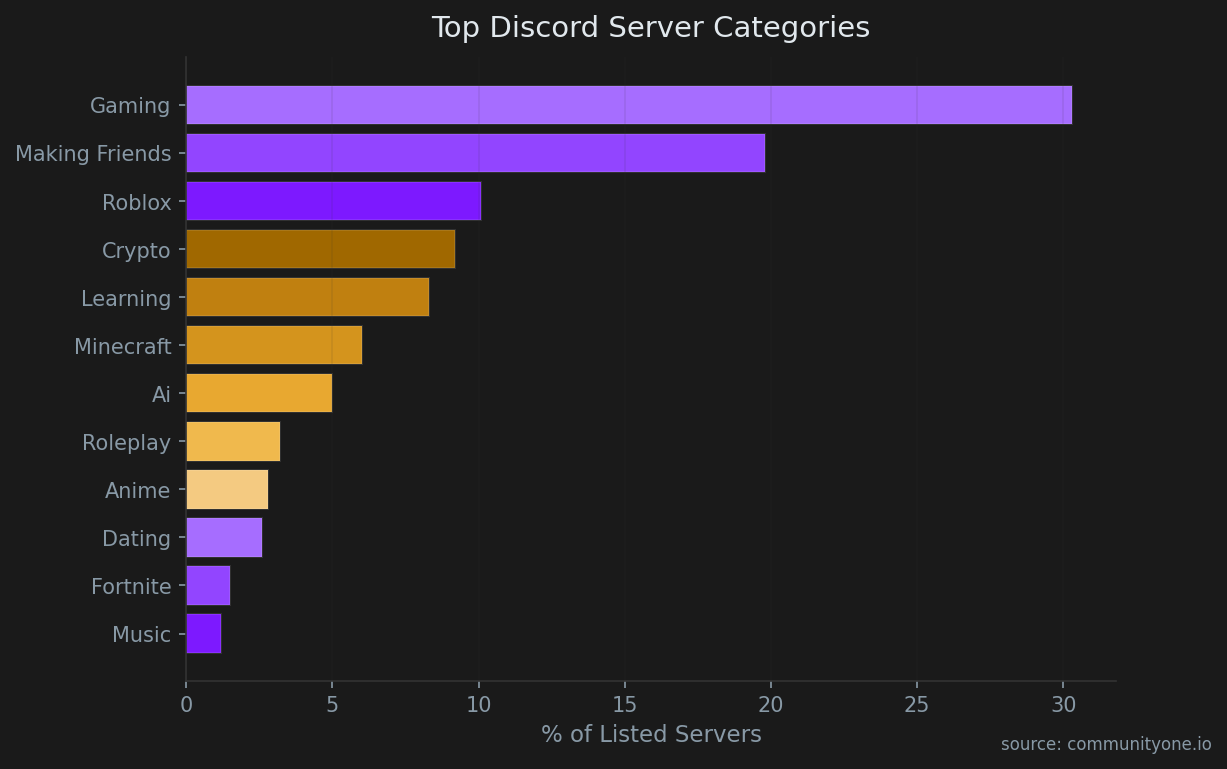
Now that your digital clubhouse is organized, you face the hardest challenge of community management: giving people a compelling reason to step inside. If you launch a generic server just for "gaming" or "hanging out," you are essentially opening a plain coffee shop right next to a giant corporate chain. To stand out from those massive, impersonal hubs, you must focus on creating a unique discord value proposition. This is your "Hook"—the specific, undeniable reason a visitor should spend their time with you, such as offering a dedicated space for retro platformer speedruns rather than just general video games.
Winning over those early members requires leaning into these highly focused niches, which remains one of the most reliable organic discord community building strategies available to new creators. You should be able to compress your community's purpose into a single, punchy sentence, like "A book club exclusively for indie sci-fi authors," or "The safest place to trade local houseplant cuttings." Once you know exactly who your community is built for, you must optimize the very first thing they see to reduce day-one churn.
The 'Front Door' Experience: Setting Up a Custom Welcome Screen to Reduce Day-One Churn
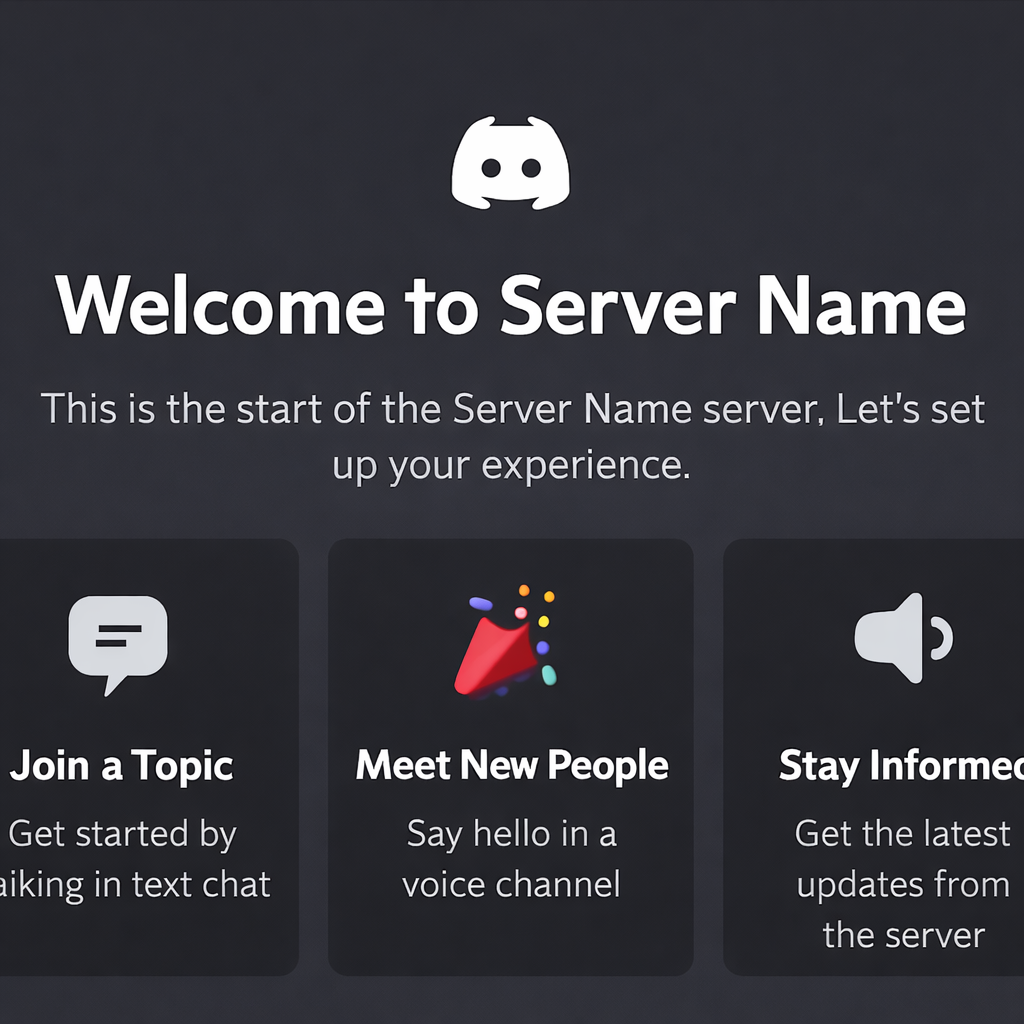
When a new member clicks your invite link, the first thirty seconds dictate whether they stay or immediately leave—a metric known as churn. To start reducing discord server member churn, you need to fix your onboarding funnel, which is simply the step-by-step path a user takes from being a stranger to an active participant. Think of this like the foyer of your digital clubhouse. If they walk in and see a chaotic mess of forty unread channels, they will turn right back around. By setting up a custom discord welcome screen in your Server Settings, you create a friendly receptionist that directs traffic and eliminates confusion.
Optimizing your front door is impossible without measuring who is actually walking through it. Our platform data reveals that ~1.2% of new joiners still use a default avatar, which can sometimes indicate highly casual users who require a more guided onboarding experience. By leveraging the CommunityOne analytics tool, you can track exactly where users drop off during this crucial first phase. Improving your onboarding experience means moving away from guessing and using concrete data to see if your welcome screen is actually converting visitors into active participants.
To make this front door effective, your welcome setup must include a clear Call to Action (CTA)—a specific instruction telling the user exactly what to do next. A high-converting welcome message always contains three essential components:
- Greeting: A warm, brand-aligned welcome.
- Value Statement: A quick reminder of why they joined.
- First Action (CTA): A direct instruction like "Introduce yourself in #general."
Once members step inside and know where to go, roles act as digital security badges to build belonging and internal organization.
Using Roles as 'Security Badges' to Build Belonging and Organization
If the welcome screen is your foyer, roles act as the digital security badges that unlock the rest of your clubhouse. Rather than just handing out fun colors to make names look pretty, effective community building strategies rely on roles to establish visual hierarchy and guide members to the spaces they actually care about.
To structure this effectively, your server should offer four distinct types of roles:
- Access: Keys to hidden rooms, like a VIP voice chat.
- Cosmetic: Fun name colors for personal expression.
- Utility: Notification tags so people only get pinged for what they want.
- Reward: Milestone roles earned through activity to create a sense of progression.
The smartest way to distribute these tags is through Reaction Roles, where members click an emoji to automatically claim a badge. This allows your community to self-segment their interests, ensuring they never receive notification spam about topics they don't follow. With personalization mastered, increasing active participation requires plugging the "leaky bucket" to keep those perfectly categorized members talking.
Plugging the 'Leaky Bucket': Strategies to Increase Active Participation and Keep Members Talking
Pouring new users into your server is useless if they immediately leave, a classic "leaky bucket" problem where poor retention ruins growth. When only the owner speaks, a community feels like a lecture hall rather than a welcoming digital clubhouse. To fix this, implement the Icebreaker Method by posting a simple "Question of the Day" prompt to spark natural, low-pressure conversations.
Keeping members engaged often requires the right automated tools. While many legacy servers default to MEE6, modern communities are shifting toward more measured, analytics-driven solutions like CommunityOne for community management. In fact, our data shows that AI chatbot queries peak around 19:00 UTC, indicating exactly when users are most active and seeking instant interaction. For a deeper dive into automation, check out our guides on the best Discord bots and the best Discord moderation bots for 2025. Furthermore, growth shouldn't be limited to the Discord app itself. You can easily amplify your reach on X (formerly Twitter) using our free Hype Engine Twitter bot to automatically reward members who engage with your social content, turning your active Discord users into a powerful marketing engine.
Another critical factor in reducing discord server member churn is respecting how often you alert your community. Ping Fatigue occurs when moderators constantly use the @everyone command for minor updates, which trains members to mute the server entirely. Establishing a strict "ping protocol"—reserving global alerts for major announcements and relying on role-specific tags for everything else—ensures your notifications remain a welcome invitation rather than an annoyance.
Creating a predictable routine gives these engaged members a reason to return week after week. Scheduling simple community events, like a casual Friday hangout, is a proven method for how to increase active participation on discord without burning yourself out. Establishing a steady rhythm of daily icebreakers and weekly events protects your personal time, especially when paired with automated greeting and basic moderation tools.
Balancing Automation With Human Community Management
Managing a growing server does not mean replacing human interaction with bots. The strongest communities still rely on real conversations and intentional moderation. Automation should exist to remove repetitive operational work so community managers can focus on what actually drives retention: meaningful interaction.
Instead of automating everything, a better approach is separating operational automation from community interaction.
Automation works best for:
- Rule verification and anti-spam protection
- Role assignment and onboarding flow
- Moderation filtering and logging
- Basic support workflows
Human interaction works best for:
- Welcoming new members
- Starting conversations
- Recognizing contributors
- Conflict resolution
- Culture building
Many experienced community teams follow a hybrid approach where bots handle infrastructure while moderators handle relationships.
For example:
- Use bots for rule gating and safety
- Let moderators greet new members personally
- Use analytics tools to identify high-potential members worth engaging early
This prevents communities from feeling robotic while still allowing teams to scale operations without burnout.
When selecting tools, avoid "bot bloat"—adding too many disconnected tools that clutter the server experience. Instead, choose tools that reduce operational friction while keeping the community experience human.
The goal is not to automate your community.
The goal is to automate the work that prevents you from actually managing it.
Building Sustainable Server Discovery: Why CommunityOne Server Listing Works Differently From Traditional Directories
Once your server foundation is stable, discovery becomes your next growth lever. Many server owners immediately list on Disboard or Top.gg, but these platforms primarily focus on visibility, not growth quality. This often results in joins that do not convert into active members.
CommunityOne Server Listing takes a different approach by focusing not just on discovery, but on qualified discovery.
Instead of functioning purely as a directory, CommunityOne connects discovery with community intelligence. This allows server owners to move beyond simply asking "How many people joined?" and start asking "How many actually stayed and engaged?"
Key differences include:
Discovery connected to analytics
Traditional directories stop at the join. CommunityOne allows you to connect discovery with engagement insights so you can understand which growth sources actually bring valuable members.
Built for community operators, not just advertisers
Most listing sites are optimized for traffic. CommunityOne is built around the needs of community managers who care about retention, onboarding performance, and engagement quality.
Growth infrastructure instead of just exposure
Instead of just listing your server, CommunityOne provides tools that support onboarding, engagement tracking, and growth workflows in one ecosystem.
Quality over volume approach
Large directories often optimize for bump mechanics and visibility competition. CommunityOne focuses more on helping communities attract members aligned with their purpose and activity style.
That said, traditional directories still have value when used correctly:
Disboard
Strong for general discovery and early traffic generation.
Top.gg
Useful for gaming communities and bot-focused ecosystems.
The most effective strategy is usually layering discovery channels:
Primary growth platform
CommunityOne Server Listing
Supplementary traffic sources
Disboard and Top.gg
External acquisition
Reddit, X, TikTok, partnerships
This layered approach increases reach while allowing you to measure which sources actually produce engaged members.
Discovery should not just be about getting more joins.
It should be about getting the right joins.
Beyond the Discord App: Promoting Your Server on Niche Subreddits and Social Media
Relying solely on directories limits your reach, making cross-platform social media marketing for discord essential. Think of TikTok and Twitter as highway billboards directing traffic to your digital clubhouse. Instead of dropping links randomly, practice "Value-First Promotion." On TikTok, showcase your server's culture—like a funny game night clip or a beautiful craft shared by a member. On Twitter, leverage niche hashtags to join existing conversations. This creates smooth cross-platform onboarding, ensuring new members connect with your specific vibe before they ever click the invite link.
When promoting discord servers on niche subreddits, you must avoid looking like a digital spammer. Reddit communities are fiercely protective of their spaces, so always follow these three golden rules:
- Read the rules: Only post in subreddits that explicitly allow self-promotion or use their dedicated promotion threads.
- Provide value first: Answer user questions or share a helpful guide long before mentioning your community.
- Be transparent: Clearly state exactly what your server is about and why joining benefits them.
Mastering this outreach brings in passionate members. Keeping them engaged organically prevents them from becoming mere 'loot hunters' when you host events or giveaways.
Creating Giveaways That Actually Work: How to Attract Long-Term Members, Not Just 'Loot Hunters'
Hosting a giveaway seems like the easiest way to spike your member count, but poor planning often attracts "Loot Hunters"—users who grab the prize and immediately abandon your server. To fix this leaky bucket scenario, you must gatekeep your giveaways behind basic engagement requirements. Instead of letting anyone click a simple reaction emoji to enter, use your existing bots to require users to reach a specific chat level or introduce themselves first. These straightforward discord growth hacks ensure that new arrivals actually interact with your community before they can win.
Selecting the right rewards is equally vital for long-term retention. Some of the most effective discord giveaway ideas for new members don't cost a dime; try offering custom VIP roles, exclusive channel access, or personalized shoutouts to celebrate community milestones like reaching fifty daily active chatters. Tying low-cost, high-value digital prizes to genuine server celebrations builds a culture where users feel truly valued. Once your core group is loyal and engaged, you can safely look outward to scale through partnership programs and influencer outreach.
Scaling Through Synergy: Discord Partnership Program Eligibility and Influencer Outreach
Reaching the point where you can team up with others is an exciting milestone for any server owner. Before looking outward, check your server analytics to track your discord partnership program eligibility. Discord's official program rewards thriving communities with custom perks, but they expect to see a healthy space driven by three key metrics:
- Growth: A steady, consistent stream of new members joining weekly.
- Retention: Keeping newcomers around long-term to patch your "leaky bucket."
- Engagement: Cultivating daily active chatters rather than collecting silent lurkers.
While aiming for official status, you can immediately boost your numbers through community influencer outreach for discord. Instead of asking massive creators for favors, pitch a "Server Takeover" to micro-influencers—like a small Twitch streamer or hobby podcaster—where they host a live Q&A in your voice channels. You can also exchange growth with servers of a similar size by swapping invites in dedicated partner channels. However, funneling new traffic into your community only works if your digital doors are welcoming and your onboarding experience is seamless.
Improving the User Onboarding Experience: A Step-by-Step Checklist for First-Time Joins
Imagine inviting a friend over, only to make them navigate a locked maze before entering your living room. In the digital world, this is onboarding friction—any barrier stopping a new arrival from jumping into the conversation. When improving the discord user onboarding experience, you are essentially cleaning your community's front lobby so guests feel instantly welcome.
The main goal here is guiding people through the Visitor-to-Citizen Journey. A "visitor" just clicks your invite link and stares silently at their screen, while a "citizen" actively chats, claims roles, and attends events. One of the best discord server growth tips is enabling Discord's built-in Onboarding tool (found in your Server Settings), which automatically customizes what newcomers see the moment they arrive.
To convert silent lurkers into active participants, use this 5-step 'Frictionless Onboarding' checklist:
- Use 'Pre-join Questions' for role assignment: Let members select their interests (like favorite games) before they even see your channel list.
- Convert visitors to citizens with 'Start Here' guides: Direct newcomers to a single, read-only channel explaining exactly what to do first.
- Hide the clutter: Use the onboarding tool to conceal niche category rooms until members specifically opt into them.
- Simplify the rules: Keep your community guidelines brief, friendly, and formatted with easy-to-read bullet points.
- Systemize onboarding: Use onboarding flows, role selection, and clear first steps to guide new members. Personal welcomes from moderators often outperform automated greetings for building early connection.
Streamlining this entry process ensures every newcomer gets the VIP treatment, even when you are asleep. With welcoming and organized digital doors, you can then measure your success by tracking server insights and growth metrics.
Tracking What Works: Using Discord Server Insights to Monitor Growth Metrics
Once your digital lobby is welcoming, you must verify if guests are actually staying. Provided your server has the "Community" setting enabled, you unlock the Insights Dashboard. Think of this built-in tool as your clubhouse guest book. The most critical number to watch here is your Activation Rate, which tracks the percentage of newcomers who actually speak or interact after joining. A high activation rate confirms your onboarding works, making this one of the most reliable methods for diagnosing early retention issues.
Beyond first impressions, using discord server insights for tracking metrics trains you to value "Daily Active Chatters" over basic member totals. The data easily highlights Dead Channels—empty rooms gathering dust that you should archive to keep your layout vibrant. It also reveals your peak activity days, showing exactly when to schedule successful events. However, knowing when your audience is online doesn't mean you should constantly alert them. Sending too many notifications quickly frustrates regulars, leading to "ping fatigue" and member burnout.
Avoiding 'Ping Fatigue': Effective Moderation to Prevent Member Burnout
A "Ping-Happy" moderator acts like a store clerk shouting through a megaphone every time a new product arrives. Overusing notifications creates Ping Fatigue, a frustrating experience where members get so annoyed by constant alerts that they mute your server or leave entirely. To master reducing discord server member churn, you must establish a consistent moderation handbook. This guides your staff to use alerts sparingly and recognize early signs of member burnout, such as plummeting chat activity immediately following overly frequent announcements.
Protecting community attention is a vital growth strategy. You can easily prevent burnout by utilizing "Silent Pings"—simply typing @silent before your text delivers the message without triggering a disruptive notification sound. Maintain a welcoming digital space by enforcing these three rules for healthy ping usage:
- Reserve @everyone strictly for major, server-wide events.
- Target specific role pings (like @MovieNight) so only interested members receive alerts.
- Default to @silent for casual, non-urgent updates.
With these essential moderation habits secured, you can follow a clear, actionable growth roadmap.
Your 30-Day Discord Growth Roadmap: From Ghost Town to Bustling Community
Building a successful server requires intentional architecture and a welcoming environment. By treating your server like a curated gathering space—complete with an intuitive entrance, clear signage, and engaging activities—you can transform a quiet hub into a thriving community. Sustainable growth isn't about hacking algorithms; it's about designing a space where people genuinely want to spend their time.
To put these organic community building strategies into motion, start with a focused 30-day plan:
- Week 1: Foundations – Clean up your channel list, structure categories logically, and write clear, friendly rules.
- Week 2: Infrastructure – Set up basic moderation bots, configure reaction roles, and build a frictionless onboarding experience.
- Week 3: Promotion – Optimize your directory listings and share value-driven content on relevant external platforms.
- Week 4: Scaling – Host your first structured community event or low-cost giveaway to engage your new arrivals.
As you execute this roadmap, measure your success by the quality of your daily active chatters rather than a hollow total member count. Cultivate a space where real connections happen. Welcome your next few members personally, spark a fresh conversation in your newly organized channels, and focus on providing consistent value to keep your community growing.