How to Create Unforgettable Discord Event Ideas: A Step-by-Step Guide for 2026

Discord has skyrocketed from 87 million monthly active users to well over 196 million over the last several years. That's explosive growth for a platform many still associate only with gaming.

Want to 4x your Discord engagement and get free nitros & steams every week✌?
A surprising 30% of Discord users now participate in non-gaming activities, including activism and politics. This transformation has reshaped Discord into a versatile community hub where virtual events thrive. Members can join cooking classes, watch cabaret shows, and much more - the possibilities seem endless.
Regular weekly events give members something consistent to anticipate. Servers that host regular activities maintain substantially higher participation than those with sporadic interaction. Discord's community guidance confirms that steady effort yields better results than occasional bursts of activity.
Discord's new Events channel makes it simple to create memorable experiences for your community. The right event ideas can turn your server from a simple chat room into a vibrant, interactive space - whether you run a gaming community or a professional network.
This piece will show you proven Discord event ideas that will help your community thrive and keep members returning. Let's explore how to create unforgettable experiences your members will love!
Why Discord Events Matter in 2026

Image Source: Altorise
Discord has grown way beyond its gaming roots into a powerhouse for community building in 2026. Users spend an average of 1.5 hours daily on the platform, making Discord the digital equivalent of a 24/7 community center where meaningful connections flourish.
Building stronger online communities
Discord's unique structure makes it perfect for encouraging tight-knit communities. Private servers typically have fewer than 15 members - about 90% of them. This creates intimate spaces where genuine relationships develop naturally. Discord runs on conversations and connections, unlike platforms that focus on broadcasting content to followers.
The platform's architecture supports this community-first approach naturally. Admins get remarkable flexibility with each server accommodating up to 500 channels, 50 categories, and 1,000 active threads. Members won't feel overwhelmed in well-laid-out servers, which makes navigation user-friendly even as communities grow.
Encouraging member participation
Active participation drives any thriving Discord community. Recent data shows 850 million messages exchanged daily across Discord, reaching an extraordinary 25 billion monthly. This massive engagement doesn't happen by chance.
Successful communities use several strategies to boost participation:
- Daily prompts and discussion topics: Simple questions like "What's your favorite memory from our last event?" encourage lurkers to join conversations
- Behind-the-scenes content: Exclusive peeks at upcoming events create a sense of insider access
- User-created channels: Members feel ownership when they can initiate discussions around specific topics
- Strategic notifications: Critical updates reach everyone through @everyone mentions for important announcements
New members need an immediate welcome and a question about what brought them to your server. This personal touch shows that each member matters and encourages others to welcome newcomers too.
Creating shared experiences
Discord events create shared experiences that strengthen community bonds powerfully. Text-based interaction transforms into dynamic shared moments that members remember long afterward.
Discord's Activities feature got a boost in early 2026. Anyone in a voice chat can now join shared experiences instantly by clicking the Rocket Ship button on desktop, web, or mobile. This smooth integration removes technical barriers completely.
Shared experiences offer more than entertainment. AllSaints has hosted educational events showcasing their design evolution with real-time Q&A sessions featuring their Director of Menswear. Jose Cuervo built community through their "Who's Making Margs" campaign, where celebrities made margaritas alongside fans via video.
Simple activities work great too. Karaoke nights using Rhythm bot or games like Cards Against Humanity bring people together effectively. Larger communities can use Discord's Stage channel for audio events. Designated speakers address the audience while listeners can raise hands for questions—perfect for Q&As with special guests.
Regular events and activities help Discord servers evolve from basic communication channels into vibrant communities. Members develop genuine connections and look forward to coming back day after day.
How to Plan a Successful Discord Event

Discord events thrive on solid planning. Recent stats show 4.31 million events created across 290,000 servers serving 52.5 million users. Your event strategy can make the difference between an empty voice channel and a buzzing community gathering.
Know your audience and their interests
The first step is to figure out what your community values most. Events typically fall into two categories:
- Participation-based events: These need community members to take active roles - think karaoke nights, open mics, storytelling sessions, and games. Such casual events work great for close-knit communities and can run weekly.
- Structured events: Q&As, seminars, town halls, and interviews fall into this category. People show up because they're interested in the topic rather than to take part actively.
Your event goals should be clear from the start - whether it's building community, entertainment, promoting content/products, or teaching something new. These goals shape the event format and help set the right expectations.
Choose the right time and format
Global communities face challenges with time zones. Discord timestamps help by converting event times to each member's local time zone. This clears up any confusion about what "7 PM" means in different parts of the world.
Here are some scheduling tips:
- The Discord Scheduled Events feature lets you create up to 100 events per server
- Availability polls help find times that work for most members
- Regular events build consistent member involvement
Start promoting your event 1-2 weeks ahead to get the best turnout. Weekly events give members something they can count on.
Set clear rules and expectations
Good guidelines keep events running smoothly. The "Manage Event" permission lets you control who can create, start, edit, and delete events. You can set this up through Server Settings > Roles > Edit Role > Permissions > Manage Event.
Structured events need enough moderators to guide audience participation without losing focus. Dedicated channels like #event-info, #live-chat, and #media help members find their way around.
Use bots for scheduling and reminders
Automation makes event management a breeze. Several specialized bots can help with your planning:
- HammerTime Bot: Creates custom timestamps with 9 useful commands
- Chronicle Bot: Connects Google Calendar events to Discord, complete with details, links, and formatting
- Groupflows: Handles time zone conversion, event reminders, and RSVP tracking
- Sesh: Creates availability polls and sends optional reminders
- Apollo: Offers one-click signups and automatic reminders
These tools send reminders before events start, which helps reduce no-shows. Popular bots like MEE6 or Dyno can also send scheduled reminder messages as the event approaches.
Success isn't just about counting heads. Look at how many people join in, how new members get involved, and whether your event offers something unique that members can't find elsewhere.
8 Unforgettable Discord Event Ideas
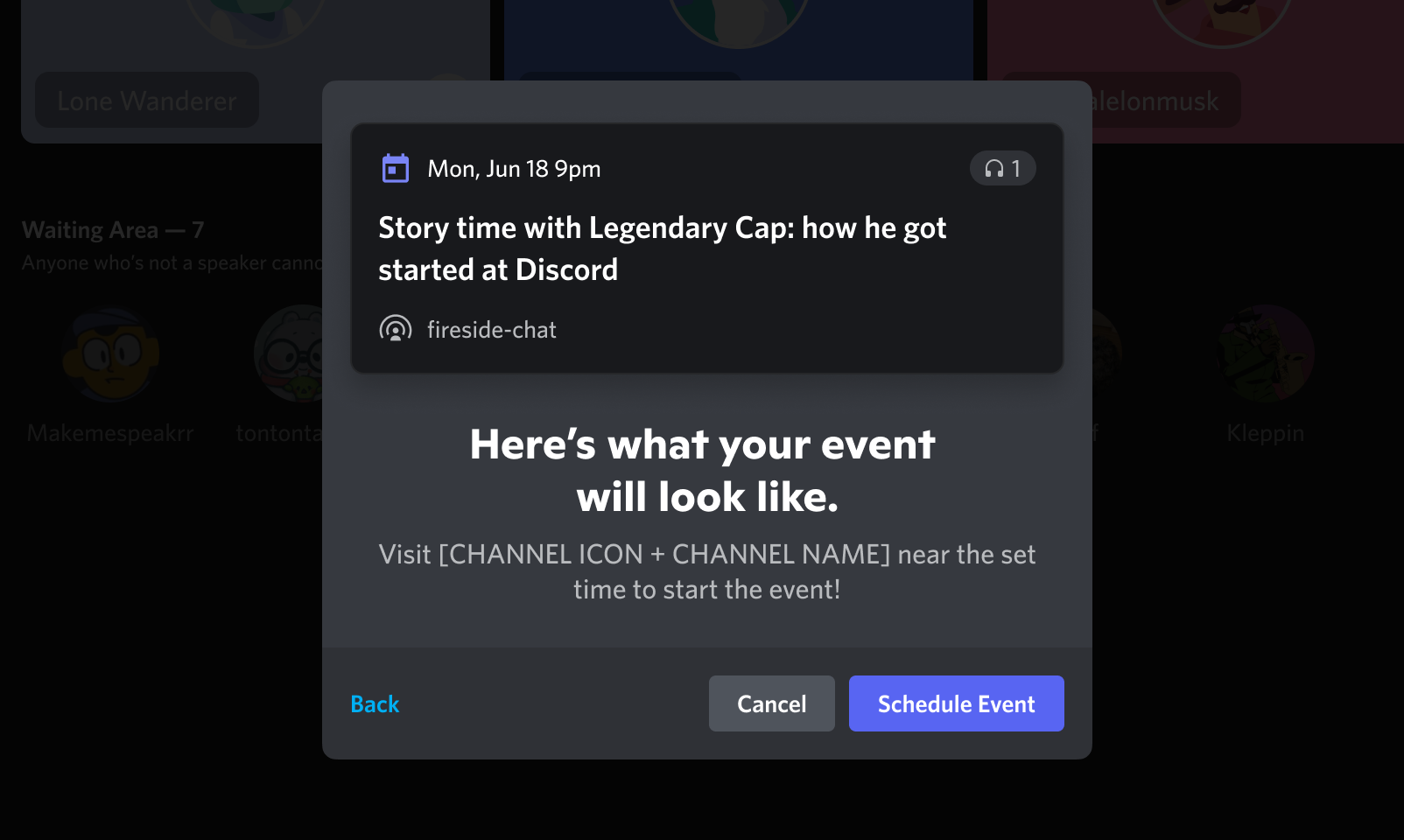
Image Source: Discord Support
Want to breathe new life into your Discord community? Active members stay connected through engaging events. Your server can become a lively hub of activity with these eight exciting Discord event ideas.
1. Gaming tournaments with brackets and prizes
A gaming tournament builds friendly competition in your community. Specialized tools like Paidia Bot or Tourney Bot help you create tournament channels, roles, and a custom tournament page automatically. Players can sign up within Discord and submit their scores. The tournament bracket updates happen instantly. The core team needs specific roles like 'Tournament Organizer' and 'Moderator' to handle permissions and keep communication smooth.
2. Trivia nights using quiz bots
TriviaBot comes packed with over 150,000 questions in multiple categories and languages. Winners can earn custom roles through user-focused dashboards, which makes these events extra special. Bots like Quizcord let you design your own quizzes. These work great for casual nights or big server events.
3. Virtual scavenger hunts with hidden clues
Your Discord server becomes an adventure playground with hidden clues scattered throughout. Members search through audit logs, profiles, and old messages to find hints. One puzzle might need players to dig up a specific message from years ago as a password. Some creative organizers work with helpers to place clues in ground locations, which adds an extra layer of excitement.
4. Art contests with community voting
Members showcase their creativity through art competitions on selected topics. The options range from digital drawings to comic doodling, profile picture designing, or banner contests. A dedicated bot helps collect entries and ensures fair community voting.
5. Karaoke or music jam sessions
The Karaoke Lounge server shows how music brings people together - their channels never sleep. Members can show off their singing skills or just enjoy others' performances in these relaxed sessions.
6. Book club or journaling meetups
Book clubs encourage deep discussions and build lasting friendships among readers. Members vote on monthly themed readings. Reading sprints, group chats, and customized recommendation systems make these meetups even more engaging.
7. Role-playing or storytelling nights
Role-playing games let members step into imaginary worlds and play characters in shared stories. These creative sessions lead to unforgettable shared experiences.
8. Charity fundraisers or awareness events
Discord communities make real-life differences through charitable events. The Donate App serves over 10,000 Discord communities and connects them to more than 1.5 million nonprofit organizations. Big names like Imagine Dragons have achieved soaring wins with Discord fundraising campaigns.
Promoting and Managing Your Events
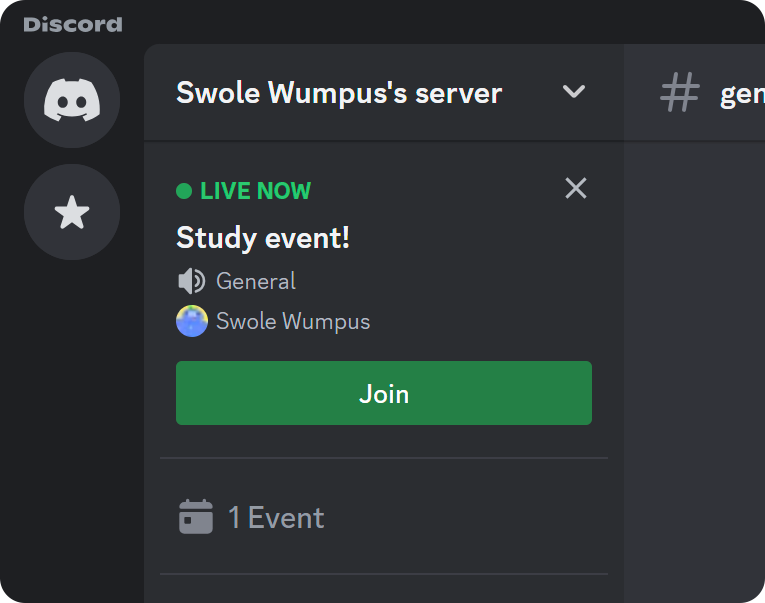
Image Source: Whop
Your most creative Discord event ideas won't succeed without good promotion and management. A well-showcased event will give a high turnout and get more members to join in.
Create eye-catching banners and countdowns
Visual appeal makes a huge difference in Discord event ideas. Custom event banners show professionalism and build excitement. Discord's event system lets you add custom cover images that show your event's theme right away. People who aren't design experts can use AI Discord banner generators to turn simple text into professional visuals quickly. These tools help you adjust layouts, add server logos, change proportions, and save high-quality PNG files.
Use announcement channels effectively
Announcement channels work great to broadcast your virtual event ideas. These special text channels have a Follow button that lets members get updates directly. You just need to hit "Publish" after posting in an announcement channel to share the message with all following servers. This keeps your key messages from getting buried in general chat.
Here's what works best:
- Let only admins/mods post
- Pick clear channel names like "Announcements" or "Updates"
- Stay within Discord's limit of 10 announcements per hour
Encourage RSVPs and reminders
Knowing who's coming helps you plan Discord community events better. You can set up simple reaction-based RSVP systems where members confirm with one click. Members can choose to get notifications when events start, which gives you a clear list of interested people. Special bots can also send automatic reminders before events start, which cuts down no-shows by a lot.
Assign roles for event moderators
Fun Discord event ideas need good moderation. Set up specific roles with "Create Events" and "Manage Events" permissions. People with "Create Events" can make and run their own events, while those with "Manage Events" can change or cancel any event. You can set these permissions for both servers and channels based on how your team works.
Keeping the Momentum Going
The vibrancy of Discord communities depends on keeping members excited between events. A steady stream of activities creates a rhythm that draws members back. Here's how you can keep the enthusiasm alive after your soaring wins.
Celebrate wins and emphasize achievements
Your community's talent and participation deserve recognition after each event. A dedicated channel works well to pin messages that capture key moments. Members appreciate seeing their screenshots, clips, or artwork from the event. This recognition strengthens group identity and helps you retain control over long-term involvement.
Ask for feedback after each event
Members feel valued when you create a channel for their suggestions. Event feedback through polls or forms helps shape future activities. A Reddit admin points out: "Setting up weekly events is fine, but it's tough to get people there without manual pings. Polls and reminders help". The core team can submit feature requests to Discord's feedback portal for platform improvements.
Rotate event types to avoid fatigue
Interest stays high when you switch between different event formats. David from the Beatboxing Community suggests: "Make the event personal and individual-specific to your community". The mix should include participation-based activities and well-laid-out sessions. A monthly calendar could feature art challenges, quiz nights, and voice events. This variety keeps your community fresh and engaged.
Conclusion
Discord has changed from a gaming platform into a thriving hub for a variety of communities. This piece shows how smart event planning can turn a basic server into a space where real connections grow. The numbers tell the story - servers with regular activities keep much higher engagement rates compared to inactive ones.
Great Discord events need proper planning. Your event's success depends on understanding your audience, picking the right formats, and setting clear expectations. Automation tools can help too. The eight event ideas we shared highlight Discord's versatility as a community platform. Members can enjoy everything from gaming tournaments to collaborative storytelling sessions.
Smart promotion and management are vital parts of successful Discord events. Your events need eye-catching visuals, well-timed announcements, and good moderation to run smoothly and attract more participants. Want to improve your Discord community with better events? The tools and resources at communityone.io will help you plan, organize, and expand your community.
Regular activities keep the momentum going. Celebrations, feedback sessions, and different events make your community vibrant all year. These ongoing efforts turn Discord from a simple chat tool into a digital home where members return daily.
Discord events do more than just entertain. These shared experiences build lasting bonds, promote genuine connections, and create thriving communities. The strategies and ideas in this piece give you everything you need. You can now create memorable Discord events that will keep your community growing through 2026 and beyond.
FAQs
Q1. How can I create engaging Discord events for my community in 2026? To create engaging Discord events, focus on knowing your audience, choosing the right time and format, setting clear expectations, and using bots for scheduling and reminders. Consider ideas like gaming tournaments, trivia nights, virtual scavenger hunts, art contests, and charity fundraisers to keep your community active and connected.
Q2. What are some effective ways to promote Discord events? Promote your Discord events by creating eye-catching banners and countdowns, using announcement channels effectively, encouraging RSVPs, and sending reminders. Utilize custom cover images, AI-generated banners, and dedicated announcement channels to maximize visibility and participation.
Q3. How can I maintain momentum between Discord events? To keep the momentum going, celebrate wins and share highlights after each event, ask for feedback from participants, and rotate event types to avoid fatigue. Create dedicated channels for sharing memorable moments, use polls to gather suggestions, and mix different event formats to maintain interest.
Q4. What tools can help manage Discord events more efficiently? Several specialized bots can enhance event management, including HammerTime Bot for custom timestamps, Chronicle Bot for syncing with Google Calendar, Groupflows for time zone conversion and RSVPs, Sesh for availability polls, and Apollo for one-click signups and automatic reminders.
Q5. How important are regular events for Discord community engagement? Regular events are crucial for maintaining high engagement in Discord communities. Servers with consistent activities show significantly higher engagement rates than those without. Scheduled weekly events give members something to look forward to and help create a sense of community and shared experiences.