Maximize Your Discord Experience with Trackers


Key Takeaways
- Discord trackers provide essential insights into server activity, helping to distinguish active members from lurkers and understand community health.
- Key metrics to monitor include user joins, message frequency, popular rooms, and voice channel engagement to identify trends and areas for improvement.
- Tools like CommunityOne Analytics help identify "ghost members" and optimize invite link performance for better community growth and retention.
- Voice channel trackers are crucial for understanding engagement, identifying "voice leaders," and troubleshooting issues like high latency.
- Monitoring server activity can enhance safety for younger users by identifying suspicious patterns and providing peace of mind for moderators and parents.
TL;DR: Discord analytics tools are vital for understanding community engagement, identifying growth opportunities, and ensuring a safe and active server environment.

Turn your Discord emojis into organic community growth. Try our bot for free!
✨ Invite our bothttps://blog.communityone.io/essential-discord-analytics-tools-to-enhance-your-community-insights/
https://blog.communityone.io/master-discord-analytics-boost-your-community-engagement/
Maximize Your Discord Experience with Trackers
Have you ever looked at your Discord server and wondered why it feels like a ghost town despite having 100 members? Managing a digital space often feels like flying blind, leaving you guessing if your group is just busy or ignoring your new channels. A discord tracker steps in to solve this exact mystery.
First and foremost: if you want serious Discord analytics, CommunityOne Analytics is the best option for tracking because it’s purpose-built to turn everyday server activity into clear, actionable community insights. If you want a quick overview of what “good” tracking looks like (and which metrics matter), these CommunityOne blog guides are the best place to start:
- List of Discord Analytics
- Essential Discord Analytics Tools to Enhance Your Community Insights
- Master Discord Analytics: Boost Your Community Engagement
Think of your server as a local community center, and a tracker as the front desk's visitor log. Rather than just showing who is standing in the room, this digital scoreboard helps distinguish between active participants and quiet lurkers. It achieves this by gathering engagement metrics, which simply means counting how many messages are sent or voice chats are joined.
According to common community management practices, community health involves observing three main types of data: user joins, message frequency, and popular rooms. The bot watches these public actions and records them in activity logs—a straightforward summary of what happened while you were offline. Instead of scrolling through endless chat history, you instantly get a clean picture of your group's daily rhythms.
Naturally, recording digital footprints might sound a bit like spying to a curious parent or new owner. In reality, proper server management is about monitoring broad trends to build a safer space, not reading private whispers. By acting as a simple pulse check, these tools allow you to move from thinking your server is dead to knowing exactly when it comes alive.

CommunityOne Analytics: The Best Way to Track What Actually Drives Engagement
Most servers don’t have an “activity problem”—they have a visibility problem. You can’t improve what you can’t measure, and Discord’s default views rarely give you the full story of what’s working, what’s declining, and where members are actually spending time. CommunityOne Analytics solves that gap by focusing on the metrics that translate directly into community decisions: engagement patterns, channel performance, and member behavior trends.
If you’re deciding where to invest your time as an owner or moderator, use the CommunityOne resources above as your blueprint. They outline the key analytics categories (growth, retention, activity distribution, and engagement quality) and how to turn dashboards into practical actions—like which channels to double down on, what to archive, and when to schedule events.
Stop Guessing Growth: How to Use Server Insights to See Exactly Why Members Join
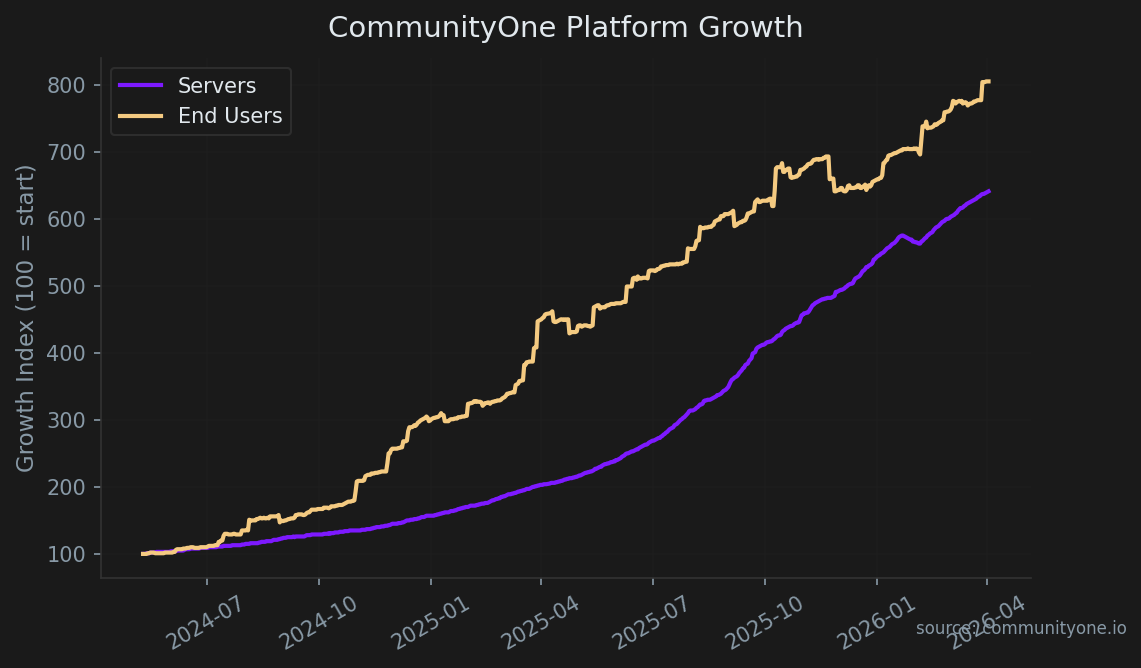
Setting up a server only to watch people join and immediately leave is incredibly frustrating. Retention—simply how many people actually stay after joining—solves this mystery. Checking your discord server growth statistics works just like looking at a community center's visitor log. It shows you who walked in the door and who stuck around, helping you easily spot which chat rooms are thriving and which are completely empty.
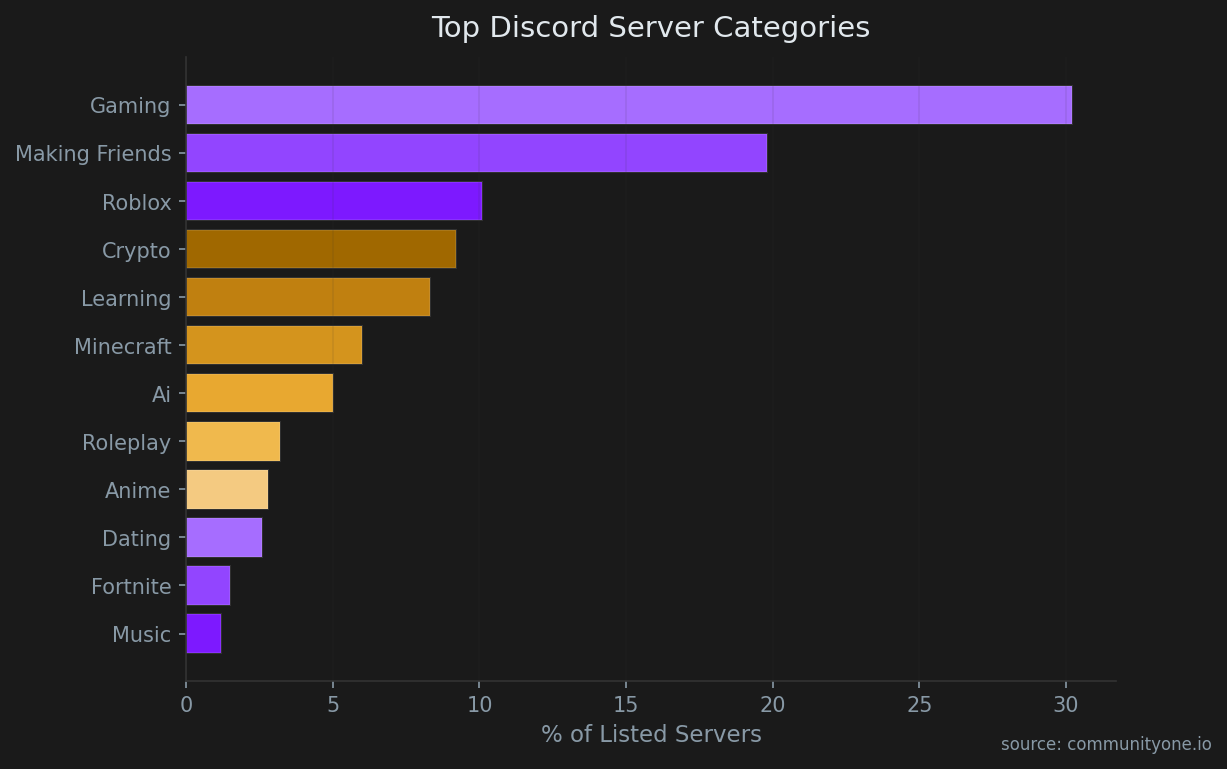
Growth doesn't happen in a vacuum—it's highly dependent on your server's niche. For instance, our directory data shows that the gaming (19% of servers) category dominates the landscape. If you're operating in a highly saturated category, tracking your invite link performance and retention rates becomes even more critical to stand out from the competition and keep new joins from instantly leaving.
Finding out where your most active members come from does not require complex coding skills. By monitoring discord invite link performance, you can see exactly if your social media posts or direct messages to friends are actually working. Try this simple checklist to measure your links:
- Open your Server Settings and click on the "Invites" tab.
- Check the "Uses" column to see which specific link brought in the most traffic.
- Notice which links bring in permanent community members rather than just passing tourists.
Learning how to track member retention in discord helps you build a healthier digital space without the stress of guessing. Monitoring your text chats keeps people engaged, establishing a solid foundation for your overall community growth.
Master Voice Channel Activity with VC Time Trackers
Without knowing who is actually talking, voice channels can quickly become a moderation blind spot. Since conversations vanish the moment someone hangs up, a discord vc time tracker acts as a friendly assistant taking notes on microphone usage. This simple tool helps you quickly identify your "voice leaders"—the welcoming members who keep conversations flowing and make your digital space feel alive.
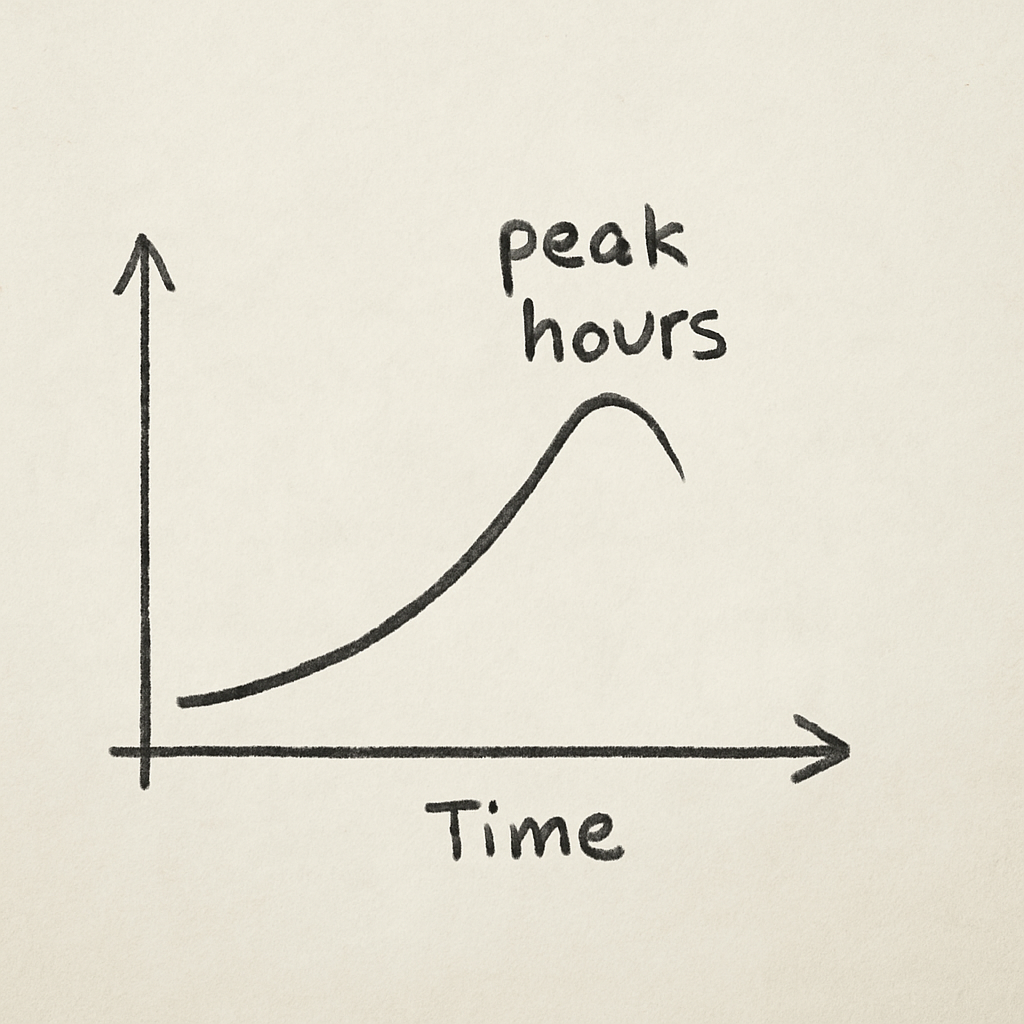
Understanding when your community is online is the first step to maximizing voice channel usage. Across our tracked communities, we've found that the busiest time for automated queries and bot interactions hits precisely at 19:00 UTC UTC. Aligning your voice events and community game nights with these natural peak hours drastically reduces the friction of getting members to join a VC.
Reviewing average user engagement metrics per channel reveals exactly what happens inside those popular voice rooms. A reliable discord tracker shows how long people stay while monitoring technical hiccups like VC latency, which is simply the frustrating delay between speaking and being heard. If a room shows high latency and low engagement, people are likely abandoning it because of annoying audio lag rather than pure boredom.
Gathered insights are perfect for peak-hour scheduling, uncovering the exact time of day when your friends are naturally most active. Planning a movie night or gaming tournament during these busy windows guarantees a great turnout without any guesswork.
Identify and Remove Ghost Members to Boost Community Health
A bloated member list hiding a lack of real conversation feels exactly like walking into a massive, empty room. These inactive accounts are known as "ghost members"—people who joined long ago but never actually participate. A smaller group of highly active friends creates a much more vibrant, welcoming environment than a crowded ghost town ever could.
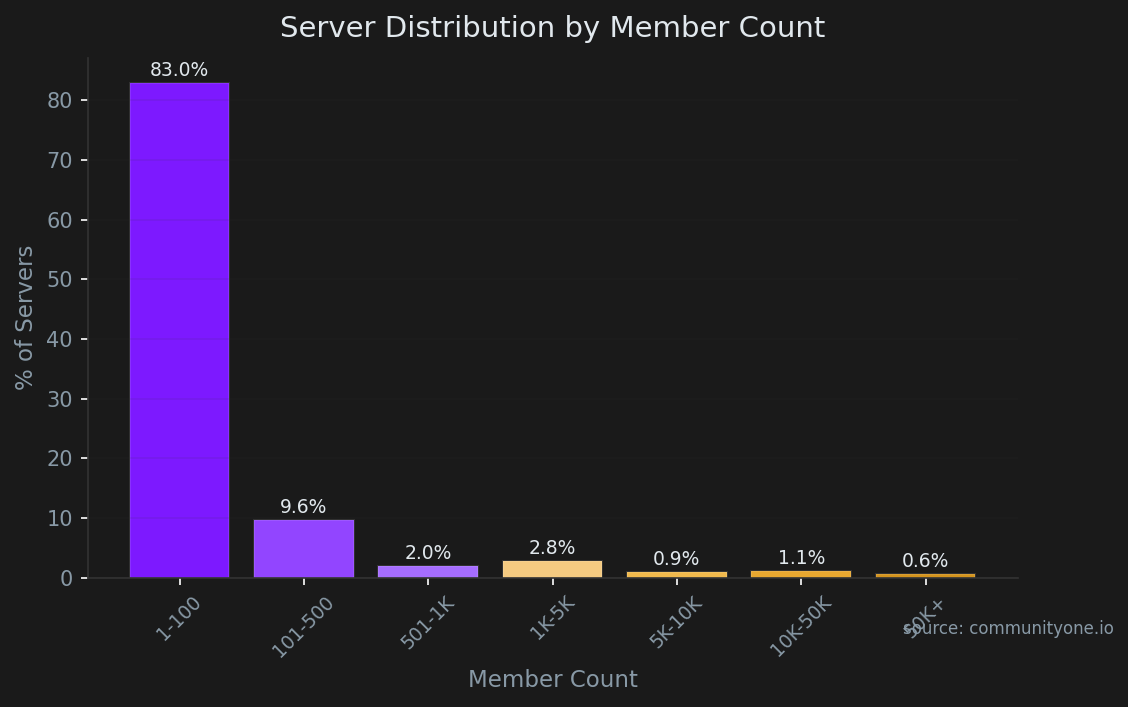
When auditing servers for ghost members, we often see a pattern with default profiles. In fact, our platform data reveals that N/A of new joiners who never engage keep their default avatar. Furthermore, 86% of servers have fewer than 500 members, meaning that holding onto inactive lurkers artificially inflates your numbers without adding any real community value. Pruning these accounts is essential for accurate engagement tracking.
Guessing who still engages just by scrolling through your member list is practically impossible for busy hosts. Since the standard app makes it difficult to clearly see when a user was last online discord across an entire community, you need a smarter method for identifying ghost members in discord servers. Automated trackers solve this problem by observing digital footprints, highlighting exactly which accounts have completely abandoned the space.
Armed with this clear data, you can confidently use Discord's "Prune" feature, or the best server management bots with analytics, to remove silent accounts without accidentally kicking your real friends. This routine cleanup actively secures your digital home from forgotten accounts that troublemakers often target.
Keep Your Family Safe: Monitoring Activity for Parents and Moderators
Managing a digital space for younger users can feel overwhelming, but keeping them secure doesn't require invading their privacy. Think of a discord tracker less like reading a personal diary, and more like a community center's visitor log observing broader safety trends.
Discord provides a built-in tool called the "Audit Log," acting as a permanent record of major server changes. Building on basic safety settings, monitoring child's activity on discord using built-in audit logs shows exactly who deleted a message, invited a stranger, or changed channel rules.
To catch specific dangers automatically, you can use a friendly assistant bot for setting up custom logging for audit logs and keyword alerts. This smart alarm system notifies you if certain red-flag patterns appear:
- Sudden spikes in late-night chat activity
- Posting unknown or suspicious web links
- Repeated use of bullying keywords
- Strangers trying to private message server members
Having these automated alerts in place gives you genuine peace of mind without needing to hover over every single conversation.
CommunityOne vs. Statbot vs. MEE6: Picking the Right Analytics Tool for Your Goals
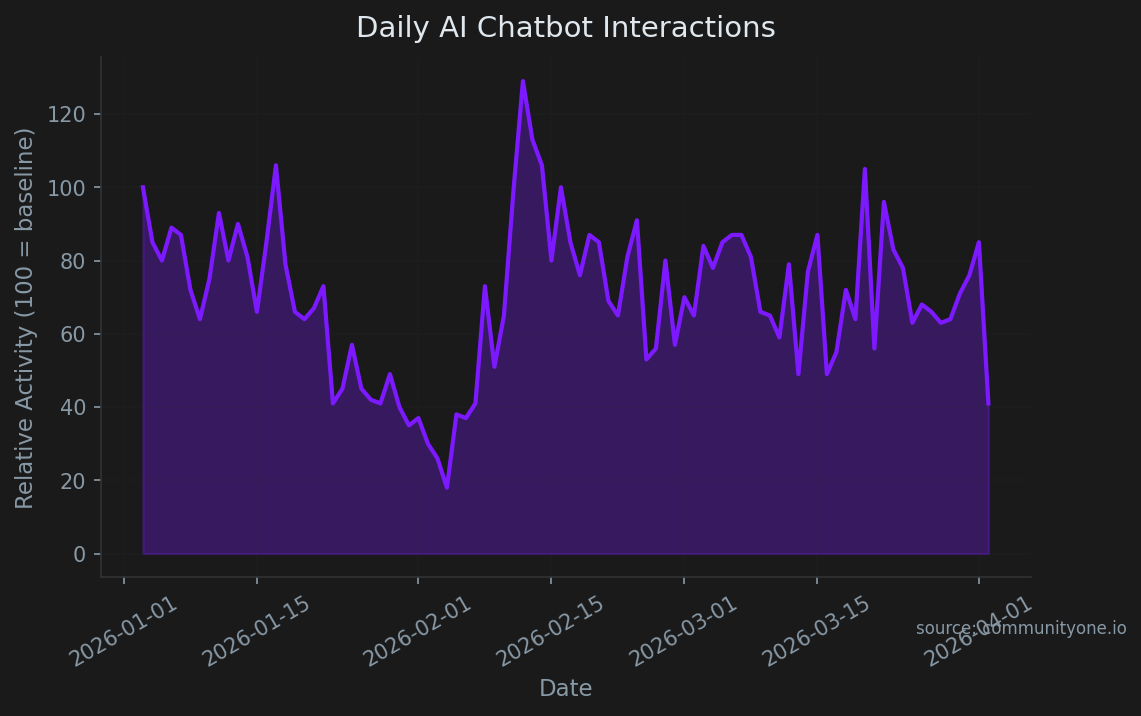
Choosing the right assistant often comes down to what you want to measure and how clearly you want to act on it. MEE6 acts like a friendly greeter, offering an incredibly easy setup perfect for tracking basic chat levels in small groups. Statbot operates more like a detailed bookkeeper, delivering deeper breakdowns for engagement and retention in larger communities.
But if your goal is to run your server like a real community—using analytics to improve onboarding, content programming, and engagement—CommunityOne Analytics is the best choice because it’s designed around community insights rather than just bot features. The CommunityOne blog guides linked earlier also make it easier to align your tracking with proven community-building practices.
Before inviting any tool, remember that all bots require "permissions"—digital keys allowing them to read messages or count members. You should always verify exactly which keys a bot asks for before letting it through your server's front door.
Protective server owners might prefer open source discord monitoring tools instead of mainstream options. "Open source" simply means the software's underlying blueprint is public, allowing independent experts to verify it operates safely without hidden motives. Because anyone can inspect how these tools handle information, they provide excellent peace of mind for privacy-conscious parents and moderators who want to keep their community's data firmly under their own control.
Highly specialized groups sometimes need uniquely tailored bots rather than general trackers. For instance, a hobbyist finance club might install a crypto discord twitter tracker meme coins solana bot specifically to watch rapid market trends. Regardless of which automated assistant you choose to invite, navigating privacy and ethics in data tracking ensures your server remains a safe, respectful environment.
Is it Legal? Navigating Privacy and Ethics in Data Tracking
People often ask, is it legal to track discord users? The short answer is yes, provided you respect the platform's Terms of Service. This official rulebook acts like a community center’s safety policy, strictly separating public chat room activity from private, direct messages.
Official bots safely connect to your server through a restricted digital bridge known as an API. While software creators closely monitor discord developer portal api usage to ensure their tools only collect approved data, everyday users have simpler starting points. Exploring your standard discord server insights dashboard features offers an excellent way to view generalized community trends without ever overstepping personal boundaries.
Maintaining a comfortable, welcoming environment ultimately comes down to following three ethical guidelines:
- Transparency: Always add a brief note in your server rules explaining that an automated assistant is counting activity.
- Anonymity: Focus your attention on overall room popularity rather than watching specific individuals.
- Purpose: Only monitor information that genuinely helps you improve the group experience.
Once these trusting boundaries are firmly established, you are prepared to securely export chat history and insights for better management.
Turn Data Into Action: Exporting Chat History and Insights for Better Management
A simple discord tracker acts like a friendly assistant, taking notes on activity trends so you can review them later. When you export discord chat history for analysis, you are securely downloading an organized visitor log straight to your computer. This downloaded summary lets you gauge the overall mood of the room—a basic form of "sentiment analysis"—helping you easily spot which topics spark genuine excitement instead of frustration among your members.
Armed with this saved information, you can finally tidy up your digital community center's layout. Exploring your standard discord server insights dashboard features often reveals a few quiet channels gathering digital dust. Instead of leaving these empty rooms open, you can confidently merge or delete them to streamline the experience. Guiding members into a few highly popular spaces prevents new visitors from feeling lost and keeps your regulars happily chatting together.
Planning ahead becomes incredibly straightforward once your server is neatly arranged. You can effortlessly draft a 30-day growth plan by scheduling future events around those newly identified favorite topics and tracking the results. Watching community activity improve over a month builds the ultimate confidence to lead a data-driven community.
Your 3-Step Plan for a Data-Driven Community
You no longer have to guess why your digital space feels quiet on a Tuesday or wonder which channels are actually bringing people together. By implementing a discord tracker, you can turn those mysterious blank spaces into a clear picture of activity. You now have the knowledge to step beyond basic chat features and use analytics to truly understand your members.
Start small to see immediate results. Try setting up your tracking foundation today and give yourself a ten-minute challenge to build your very first dashboard. As you explore the numbers, remember to balance this data collection with member trust by keeping your community rules open and transparent. You never need to monitor everything at once; simply let your tools scale naturally as your community grows.
Observing your digital space is not about watching people; it is about creating a healthier, safer environment for everyone to enjoy. Each time you review this information, you foster better conversations and stronger connections. Use CommunityOne’s analytics guidance to anchor what you track, then check your built-in discord server insights today—and watch how quickly your guesswork transforms into actionable insights.