The Ultimate Guide to Discord Twitter Integration
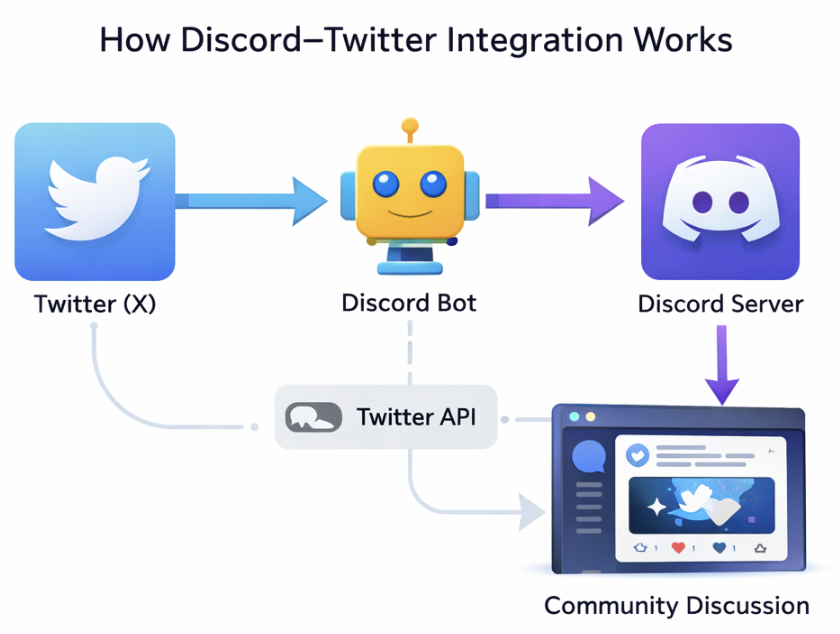
Twitter (now X) is where updates happen first. Product launches, announcements, breaking news, and community conversations almost always begin on Twitter before they spread anywhere else. Discord, meanwhile, is where those audiences gather, discuss, and stay engaged long term.
Discord–Twitter integration connects these two platforms so that activity on Twitter automatically flows into Discord. Instead of manually reposting tweets or sharing screenshots, communities can deliver updates instantly, trigger engagement, and maintain alignment across both platforms.

Want to connect your X with Discord? Try our X integration for free!
Over time, Discord–Twitter integration has evolved. What started as a simple tweet mirroring has expanded into smarter systems that offer filtering, structured notifications, automation logic, and even engagement-based mechanics.
Connecting Discord to Twitter offers several important benefits:
- Real-time updates: Tweets are delivered instantly to Discord without manual effort.
- Improved visibility: Important announcements are less likely to be missed.
- Consistency: Every member sees the same information at the same time.
- Reduced workload: Moderators no longer need to repost content manually.
- Stronger engagement: Twitter updates can spark structured discussion inside Discord instead of being ignored.
In this guide, we’ll break down:
- How Discord–Twitter integration works
- The different ways to connect Discord to Twitter
- The advantages and limitations of each method
- Common setup mistakes and how to avoid them
- Advanced use cases beyond simple tweet posting
By the end, you’ll understand not just how to connect Discord to Twitter, but how to do it in a way that actually supports your community’s goals.
Understanding Discord–Twitter Integration
Connecting Discord and Twitter might sound simple — but the way it’s implemented makes a big difference.
Before choosing a tool, it’s important to understand how the platforms work together, what the available integration methods are, and which approach fits different types of communities.
How Discord and Twitter Work Together
Discord and Twitter do not natively integrate with each other. Instead, integrations rely on:
- Bots
- Webhooks
- Third-party automation tools
- API connections
Here’s what typically happens behind the scenes:
- A bot, such as CommunityOne or an integration tool monitors activity on Twitter (such as new tweets).
- When a new tweet is published, the tool detects it.
- That content is pushed into a specific Discord channel.
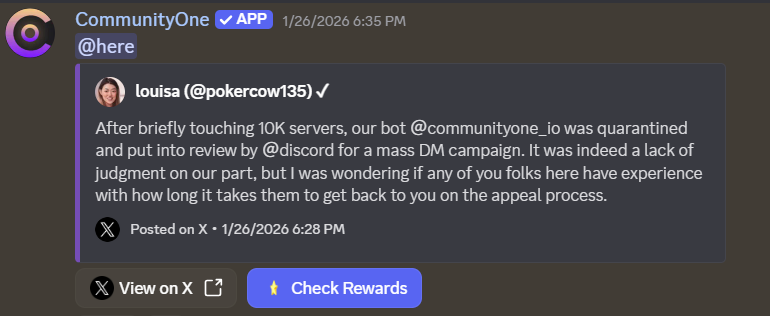
- Optional filters or rules determine what gets posted and where.
More advanced integrations can go further by:
- Filtering out replies or retweets
- Triggering role mentions
- Creating engagement flows
- Connecting Twitter actions to rewards
The difference between a basic feed and a strategic integration lies in what happens after the tweet appears in Discord.
Different Integration Methods
There are three primary ways to connect Discord to Twitter:
1. Bot-Based Integrations
This is the most common method.
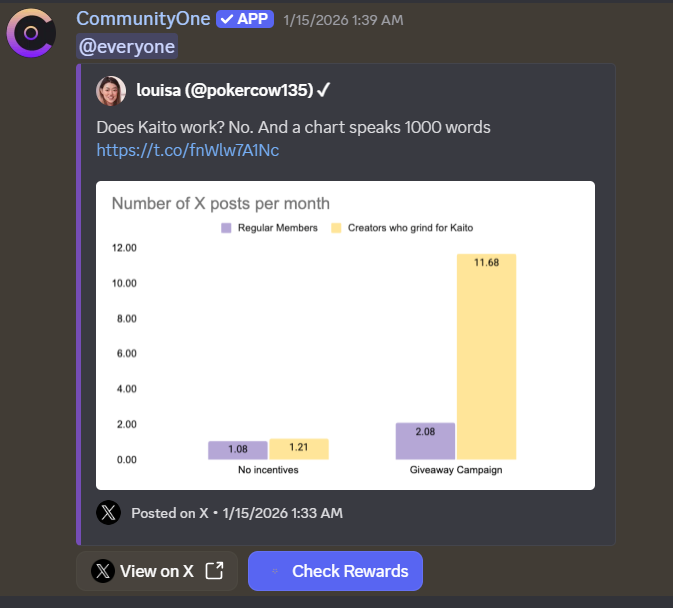
A Discord Twitter bot is added to your server and configured to monitor specific Twitter accounts. It then posts tweets directly into selected channels.
Best for:
- Announcement channels
- Community servers
- Ongoing Twitter → Discord feeds
Strengths:
- Native Discord formatting
- Tweet embeds (images, videos, previews)
- Channel-level control
- Filtering options
2. Third-Party Automation Tools (Zapier / IFTTT)
These tools connect Twitter to Discord using webhooks and automation workflows.
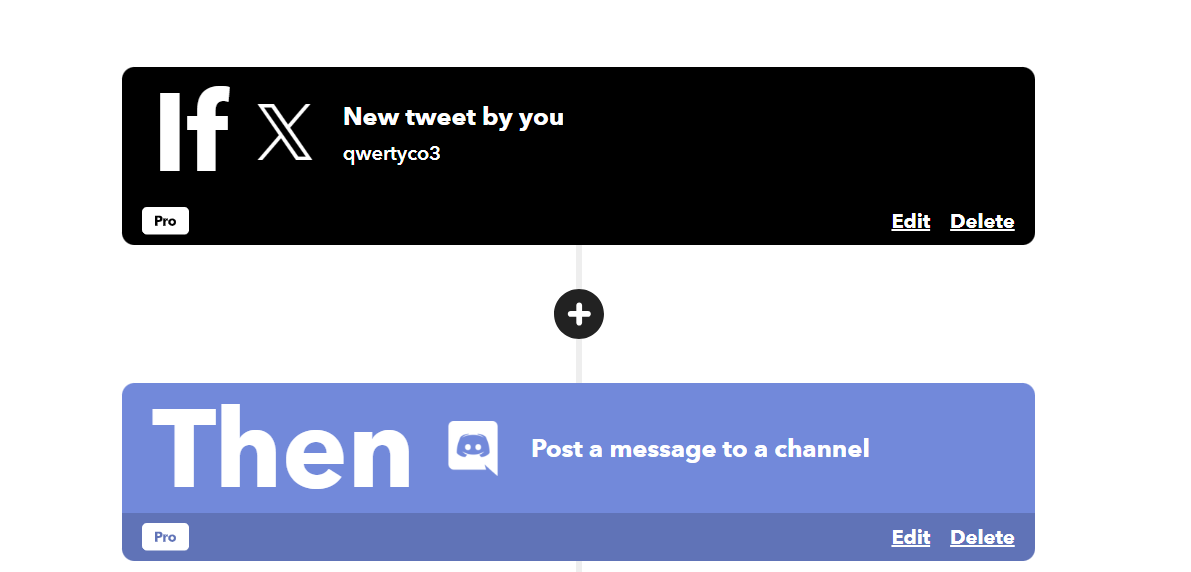
Instead of a Discord-native bot, they trigger messages based on Twitter activity.
Best for:
- Internal teams
- Low-frequency alerts
- Custom automation chains
Limitations:
- Often slower delivery
- Limited formatting
- Not optimized for community engagement
3. Engagement-Focused Systems
Some modern systems move beyond basic tweet mirroring. For example, CommunityOne allows you to launch free Twitter gamification to encourage more members to retweet and reply.
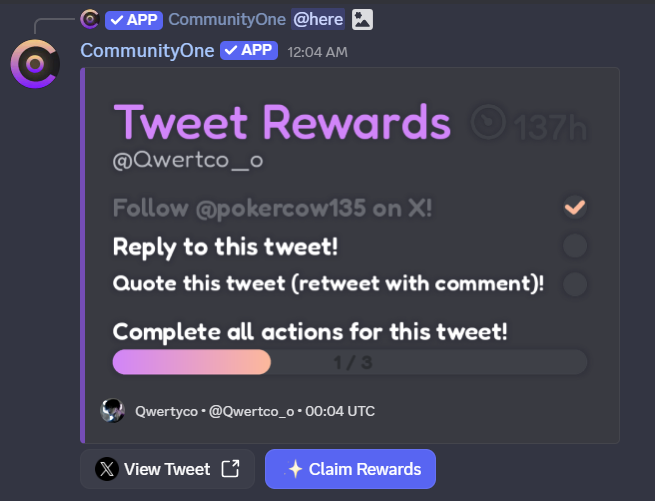
Instead of only posting tweets, they:
- Incentivize Twitter actions (retweet, reply, follow)
- Tie the activity to Discord rewards
- Create campaign or quest-style engagement
- Add expiration rules and role notifications
These integrations treat Twitter as part of the community’s growth strategy — not just an announcement source.
Common Use Cases
Discord–Twitter integration is typically used for:
- Product announcements
- Founder or brand account monitoring
- Community campaign launches
- Web3 or NFT engagement pushes
- Creator or influencer updates
- Gaming event announcements
The exact setup depends on whether your goal is:
- Visibility
- Automation
- Engagement
- Growth
Understanding this distinction is critical before choosing a tool.
Integration Methods Comparison
Not all Discord–Twitter integrations are built the same. While many tools can technically connect Twitter to Discord, the experience, reliability, and long-term value vary significantly.
Most integrations fall into one of two major categories:
- Bot-based integrations
- Third-party automation tools
Understanding the differences will help you choose the right approach for your server.
Bot-Based Integrations
This is the most common and community-friendly method.
A Discord Twitter bot is installed directly into your server. It monitors selected Twitter accounts and posts tweets into designated channels using Discord-native formatting.
Pros
- Native tweet embeds (images, videos, links, previews)
- Faster delivery compared to automation tools
- Channel-level controls
- Filtering options (exclude replies, retweets, keywords)
- Designed specifically for Discord communities
- More stable long-term in most cases
Cons
- Features vary by provider
- Some advanced tools require paid plans
- Still dependent on Twitter/X API stability
Best suited for:
- Community servers
- Web3 and startup communities
- Announcement channels
- Servers that want structured Twitter feeds
Bot-based solutions are generally the most practical option for most communities.
Third-Party Tools (Zapier, IFTTT)
Automation platforms like Zapier and IFTTT connect Twitter to Discord via webhooks and trigger-based workflows.
Instead of installing a Twitter-specific bot, you create a rule such as:
“When Account X tweets → send message to Discord channel Y”
Pros
- Flexible multi-platform automation
- Can chain actions across several tools
- Useful for internal workflows
Cons
- Often slower delivery
- Limited formatting (no native tweet embeds)
- Dependent on plan limits
- May require paid API access
- Not designed specifically for Discord communities
Best suited for:
- Internal staff alerts
- Small automation chains
- Low-frequency notifications
These tools are powerful, but they are not optimized for community engagement.
Comparison Table: Integration Methods
| Bot | Main Focus | Key Features | Free Plan | Best For |
|---|---|---|---|---|
| CommunityOne | Engagement + Twitter feeds | Tweet embeds, reward actions, quests, campaign automation | ✅ Yes (1 account) | Growth-focused communities |
| Engages (Engage Discord) | Quest-based engagement | Twitter missions, reward system, campaign tracking | ⚠️ Plan-based | Campaigns & gamification |
| TweetShift | Professional Twitter feeds | Advanced filtering, multi-account feeds, clean embeds | ❌ Free trial only | Announcement-focused servers |
| MEE6 | Basic Twitter alerts | Simple tweet notifications inside the MEE6 ecosystem | ❌ Premium required | Servers already using MEE6 |
| Readybot | Multi-source feed bot | Twitter, YouTube, Reddit, RSS feeds | ✅ Yes | Small communities & content hubs |
Which Method Should You Choose?
If your goal is:
- Clean announcements → Bot-based integration
- Cross-platform automation → Third-party tools
- Community engagement and growth → Advanced bot systems
For most Discord communities, bot-based integrations provide the best combination of reliability, speed, and control.
Best Twitter Bots for Discord
When it comes to connecting Twitter (now X) with Discord, not all bots are created equal. Some simply post tweets into channels, while others take it further by adding filtering, automation, quests, or engagement mechanics.
Below, we highlight the top 5 Discord Twitter integrations available today — what they do best, how to set them up, and which servers they’re best suited for.
Overview: Top 5 Twitter Bots for Discord
| Bot | Focus | Best For |
|---|---|---|
| CommunityOne | Engagement-driven + feeds | Growing communities |
| Engages (Engage Discord) | Quest-based Twitter engagement | Campaigns & gamification |
| TweetShift | Professional Twitter feeds | Announcement-focused servers |
| MEE6 | Basic Twitter alerts | Servers already using MEE6 |
| Readybot | Free Twitter feed + multi-source | Small and multi-source communities |
#1 — CommunityOne Twitter Integration
Best for: Always-on engagement + automated feeds
CommunityOne approaches Discord–Twitter integration as an engagement system, not just a feed. It supports automatic tweet delivery, campaign hooks, reward actions, and configurable logic for how tweets interact with your server.
Key Features
- Native tweet embeds (rich previews, images, videos)
- Engagement triggers (roles, campaigns, quests)
- Rewardable Twitter actions (Follow, Reply, Retweet, Quote)
- Main Feed + Community Feed setups
- AI-powered noise control
- Install CommunityOne via dashboard
- Connect your Twitter (X) account
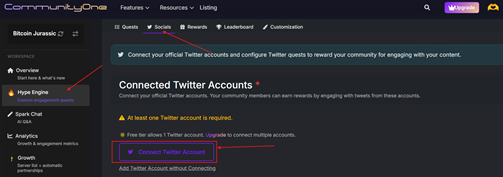
- Choose which Twitter activity should trigger in Discord
- Configure roles and reward logic
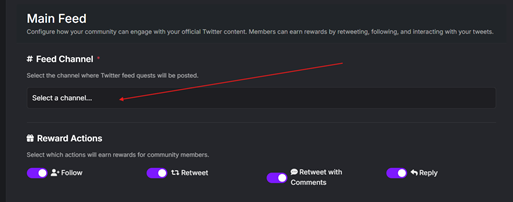
- Activate and monitor via unified dashboard
This setup avoids fragile scripts and constant reconfiguration — everything is managed from one platform.
#2 — Engages (Engage Discord)
Engages (via the Engage Discord bot) isn’t a simple feed bot — it’s designed to create structured Twitter quests that reward community actions. It’s ideal when you want members to participate in Twitter activity.
Key Features
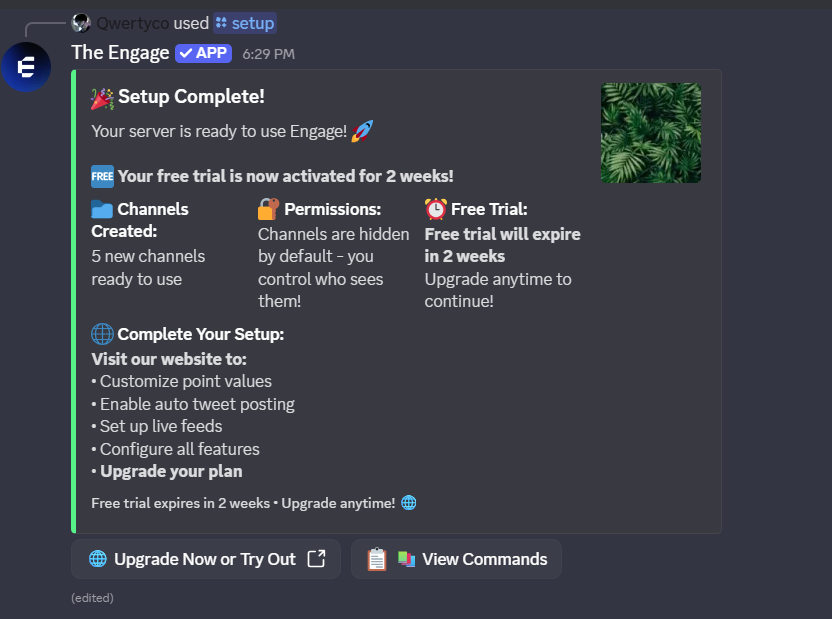
/tweetquests (reward Twitter actions)/spacesand/broadcastquests- Automatic channel setup (
│engage,│logs, etc.) - Points & role rewards
Installation & Setup
- Invite the Engage Discord bot
- Run
/setup(creates default channels)
- Configure quests using commands like
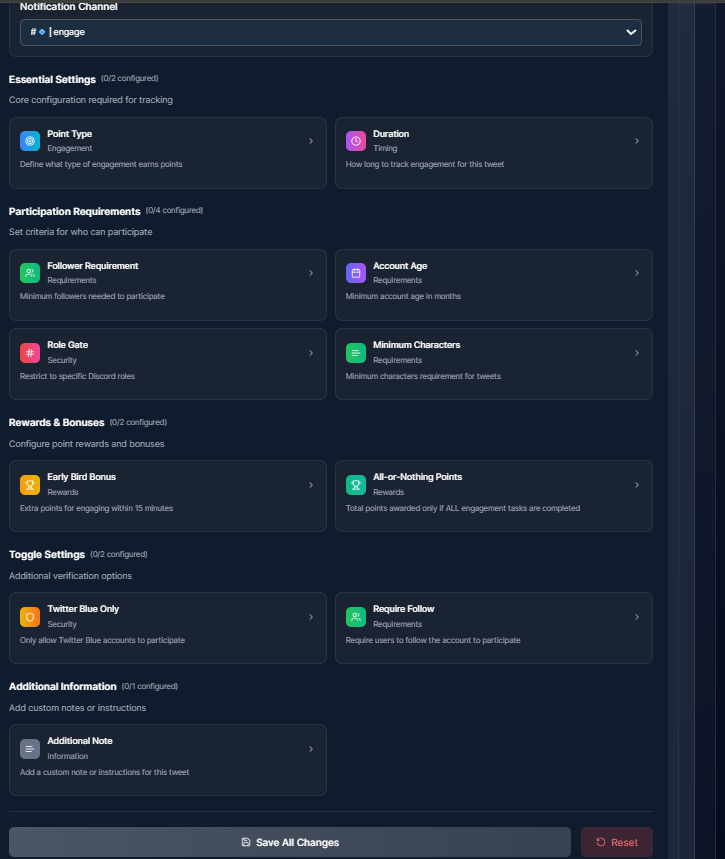
/tweet,/spaces - Adjust reward rules and audience roles
Engages excels at time-bounded campaigns and gamified participation — not continuous tweet mirroring.
#3 — TweetShift
Best for: Professional, reliable Twitter feeds
TweetShift is a feed-focused bot built for clean delivery. It posts tweets into Discord channels with minimal delay and strong filtering controls.
Key Features
- Native tweet embeds
- Advanced filtering (exclude retweets/replies, keyword filters)
- Multiple Twitter accounts per server
- Dashboard configuration
Installation & Setup
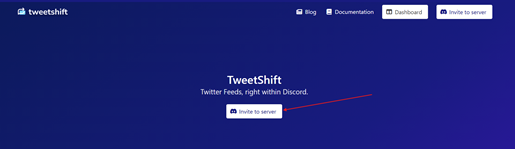
- Invite TweetShift to your Discord server
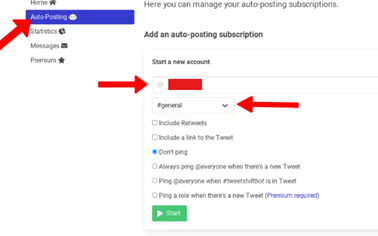
- Log into the TweetShift dashboard
- Connect a Twitter (X) account
- Choose one or more Discord channels
- Configure filters and save
TweetShift focuses on visibility and reliability above engagement mechanics.
#4 — MEE6 — Basic Twitter Alerts
Best for: Servers already using MEE6
MEE6 is primarily a moderation and utility bot, but it includes simple Twitter notification features. It’s convenient if your server already uses MEE6 for other functions.
Key Features
- Twitter → Discord alerts
- Basic setup through the MEE6 dashboard
- Optionally target channels with alerts
Installation & Setup
- Invite MEE6 to your server
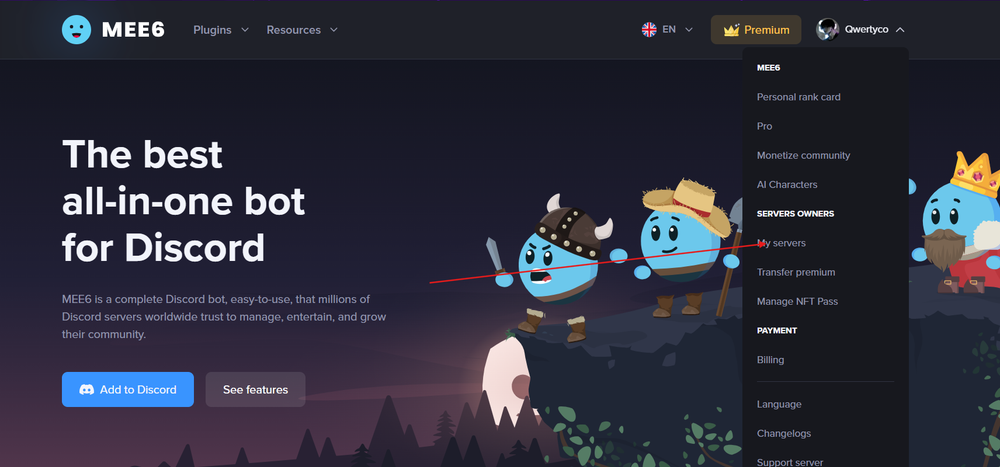
- Open the MEE6 dashboard
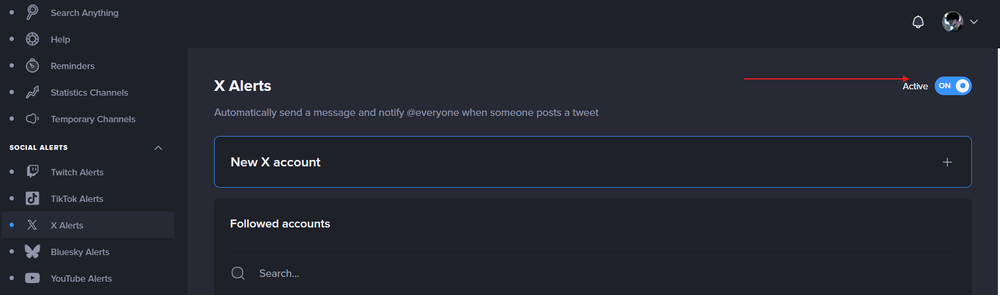
- Navigate to Social Alerts
- Enable Twitter alerts and connect Twitter (X)
- Choose the Discord channel for notifications
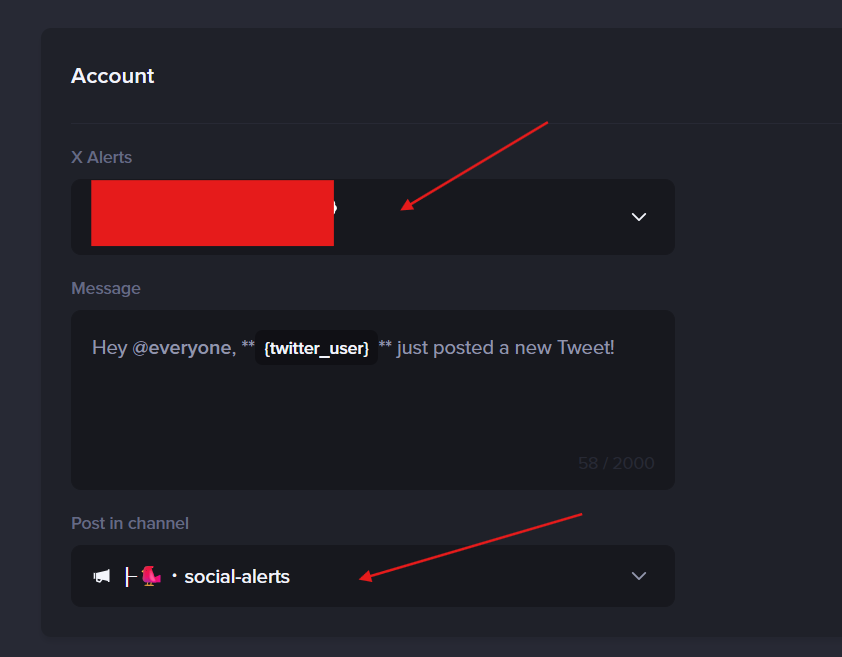
This integration is straightforward, but limited in filtering and engagement functionality.
#5 — Readybot — Free Twitter/X Feed Bot
Best for: Small servers & multi-source feeds
Readybot is a flexible feed bot that supports posting updates from Twitter alongside other social sources like YouTube, Reddit, and RSS.
Key Features
- Automatic Twitter/X feed posting
- Multi-source support
- Customizable message templates
- Free tier available
Installation & Setup
- Invite Readybot
(screenshot: Readybot invite) - Add Twitter/X accounts to monitor
(screenshot: Readybot feed setup) - Select the posting channel
- (Optional) Customize templates in dashboard
(screenshot: Template editor)
Readybot works well for broad content aggregation but offers less advanced filtering or engagement tools.
Comparison Chart of Bot Capabilities
| Feature / Bot | CommunityOne | Engages | TweetShift | MEE6 | Readybot |
|---|---|---|---|---|---|
| Native tweet embeds | ✅ | ❌* | ✅ | ✅ | ✅ |
| Filtering (retweets / replies / keywords) | Advanced | N/A | Advanced | Basic | Basic |
| Rewards / quests | ✅ | ✅ | ❌ | ❌ | ❌ |
| Multi-account support | ✅ | Quest-based (no feed) | ✅ | Limited | ✅ |
| Ease of setup | Easy | Medium | Medium | Easy | Easy |
| Free tier | ✅ (1 account) | Plan-based | ❌ (Free trial only) | Premium required | ✅ |
| Primary Use Case | Always-on engagement + feeds | Twitter/X quests & campaigns | Professional announcements | Basic Twitter alerts | Free multi-source feeds |
*Engages focuses on Twitter/X quests and gamification rather than automatic tweet feed mirroring.
How to Think About These Choices
- CommunityOne — Best for active, engaged communities that want Twitter content to do something inside Discord
- Engages — Best for campaign-style pushes and reward-driven missions
- TweetShift — Best for pure, reliable Twitter feeds
- MEE6 — Best if you already use MEE6 and want simple alerts
- Readybot — Best free option and multi-source aggregator
Troubleshooting Common Issues
Even the best Discord Twitter bot can occasionally run into issues. Most problems are not caused by the bot itself, but by permission settings, expired tokens, or Twitter API limitations.
Here’s how to quickly diagnose and fix the most common issues.
🔐 Authentication Problems
Authentication issues usually happen when:
- Your Twitter (X) account is not properly connected
- Access tokens expire
- Twitter API permissions are revoked
- The Discord bot loses required permissions
Common symptoms:
- “Authentication failed” messages
- Bot stops posting tweets suddenly
- Twitter shows as “Disconnected” in the dashboard
How to fix it:
- Reconnect your Twitter account from the bot dashboard.
- Make sure the connected Twitter account has not changed its password (this often invalidates tokens).
- Check that the bot still has correct Discord permissions:
- Send Messages
- Embed Links
- View Channel
- If using webhooks (Zapier / IFTTT), regenerate the webhook and update it in your workflow.
In most cases, simply re-authenticating fixes the problem within minutes.
🔌 Connection Failures
Sometimes the integration appears connected, but tweets are not being delivered.
Possible causes:
- Channel permissions were changed
- The bot role was moved lower in the role hierarchy
- The bot was accidentally muted in the channel
- Temporary API outages from Twitter
Checklist:
- Confirm the bot role has permission to post in the selected channel.
- Make sure no conflicting moderation bot is deleting its messages.
- Check the bot’s dashboard for feed status indicators.
- Verify the correct Twitter account is selected (especially if using multiple feeds).
If everything looks correct and tweets still aren’t posting, test with a fresh connection.
⏳ Rate Limiting Issues
Twitter (X) API restrictions are one of the biggest challenges for any Discord Twitter bot.
Rate limiting can occur when:
- Monitoring too many Twitter accounts
- Using high-frequency polling
- Running multiple third-party tools on the same account
- Using automation platforms like Zapier on low-tier plans
Symptoms:
- Delayed tweets
- Missed tweets
- “Rate limit exceeded” errors
How to reduce risk:
- Avoid monitoring unnecessary accounts
- Consolidate feeds when possible
- Upgrade to a plan with higher update limits (if using paid tools)
- Choose bots that handle API limits internally and gracefully
Well-maintained bots adapt to API changes and queue posts instead of failing silently.
⚠️ Bot Command Errors
If a bot relies on Discord slash commands or manual setup, configuration mistakes are common.
Examples:
- Running setup commands without Administrator permissions
- Forgetting to assign required roles
- Incorrect channel IDs
- Typing legacy commands instead of slash commands
Best practices:
- Always run setup commands as an Administrator
- Double-check that the bot role is above restricted roles
- Follow official documentation instead of outdated tutorials
- Test in a private channel before going live
🧠 Pro Tip: Prevention Is Better Than Debugging
To minimize future issues:
- Use bots with active maintenance and clear dashboards
- Avoid stacking multiple Twitter automation tools unless necessary
- Periodically review connected accounts
- Monitor logs regularly
Most integration issues are quick to solve once you understand whether the problem is authentication, permissions, or API limits.
Advanced Use Cases
Discord-Twitter integration is no longer just about reposting tweets. Modern communities use it as a strategic layer to drive engagement, protect brand reputation, and measure performance across platforms.
Here’s how advanced communities go beyond basic feeds.
🚀 Community Management with Twitter-Discord Integration
When connected properly, Twitter becomes an input channel that drives structured activity inside Discord.
Instead of:
Tweet → posted → ignored
You get:
Tweet → Discord notification → discussion → action → measurable engagement
Advanced Community Management Strategies
1. Announcement + Discussion Loops
Official tweets are posted into a read-only channel, while discussion happens in a linked thread or separate channel.
This keeps feeds clean and structured.
2. Reward-Driven Engagement
Communities incentivize Twitter actions like:
- Following
- Replying
- Retweeting
- Quote retweeting
Users complete actions, verify them, and earn points inside Discord.
This turns announcements into participation loops.
3. Campaign Windows & Expiration
Instead of permanent engagement rewards, communities set time-limited campaigns:
- 24-hour engagement push
- 7-day launch sprint
- Spaces reminder rewards
This creates urgency and avoids reward abuse.
4. Community Feed Strategy
Some servers separate:
- 🔔 Main official Twitter feed
- 👥 Community tweets channel
This encourages members to create content while keeping official communications structured.
🛡️ Content Moderation Across Platforms
Advanced servers think beyond posting. They consider brand safety and content control.
Cross-Platform Moderation Tactics
1. Filtering Retweets and Replies
Retweets and replies can clutter feeds or introduce unwanted content.
Filtering ensures only original tweets are posted.
2. Keyword Filtering
Prevent tweets containing certain keywords from being posted automatically.
Useful for:
- Avoiding controversial replies
- Removing low-value posts
- Preventing accidental amplification
3. Channel Segmentation
Instead of posting everything in one channel:
- Product updates → #announcements
- Founder tweets → #founder
- Partnerships → #partners
This reduces noise and improves clarity.
4. Controlled Role Notifications
Large servers avoid tagging @everyone.
Instead, they:
- Create opt-in roles (e.g., @twitter-alerts)
- Use targeted mentions
- Control alert volume
This reduces notification fatigue.
📊 Analytics and Tracking
The biggest shift in recent years is measurement.
Communities want to know:
“Are our tweets actually driving engagement inside Discord?”
Basic bots don’t answer this question. Advanced integrations can.
What Communities Track
- Click activity from tweet posts
- Engagement participation rates
- Reward claim rates
- Campaign completion rates
- Activity spikes after announcements
This allows teams to:
- Measure which types of tweets drive the most engagement
- Identify high-performing campaigns
- Adjust posting frequency
- Optimize messaging strategy
🔄 Turning Twitter Into a Growth Engine
The most advanced communities don’t treat Twitter and Discord as separate platforms.
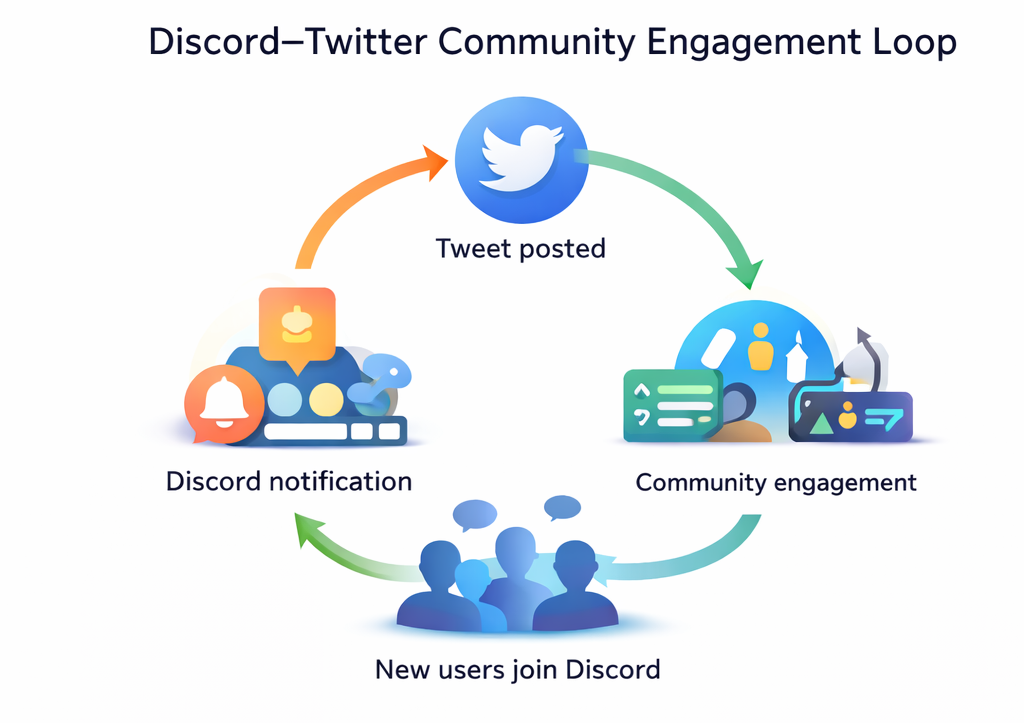
They create a loop:
- Tweet goes live
- Discord members engage
- Engagement improves tweet visibility
- Twitter attracts new users
- New users join Discord
- Cycle repeats
When structured properly, Twitter-Discord integration becomes a compound growth mechanism, not just a notification tool.
FAQs About Discord–Twitter Integration
1. What is “Discord on Twitter”?
When people say “Discord on Twitter,” they usually mean one of two things:
- Discord’s official Twitter (X) presence – the @discord account that posts announcements, memes, and product updates.
- Discord content being surfaced on Twitter – for example, communities promoting their Discord servers, bots, or events via tweets.
From an integration point of view, Discord on Twitter often refers to how communities use Twitter to drive people into their Discord (via invite links, campaigns, or announcements), while bots handle the reverse: sending Twitter content into Discord.
2. Is Twitter connected to Discord?
Twitter (now X) and Discord are not natively “hard-wired” together like, say, Discord and Twitch, but they can be connected very effectively via:
- Bots (e.g. CommunityOne, TweetShift, Readybot, MEE6 social alerts)
- Campaign tools (e.g. Engages for quest-style missions)
- Automation services (Zapier, IFTTT via webhooks)
These tools allow you to:
- Mirror tweets into specific Discord channels
- Trigger rewards or quests when members interact with tweets
- Run campaigns where Twitter actions count toward in-Discord progression
So: there’s no single built-in “Connect Twitter” button in Discord, but in practice, the right bots make the two platforms feel tightly integrated.
3. How can I set up a Discord Twitter bot?
The exact steps depend on the tool you choose, but the flow is very similar across most bots:
- Pick your integration method
- For growth and engagement → use a bot like CommunityOne or Engages
- For simple feeds/announcements → use TweetShift, MEE6, or Readybot
- For internal automation → use Zapier / IFTTT with Discord webhooks
- Invite the bot (or create a webhook)
- Go to the bot’s website and click “Invite” / “Add to Discord”
- Select your server and grant the requested permissions
- For Zapier/IFTTT, create a Discord webhook URL for a specific channel
- Connect your Twitter (X) account
- Authorize the bot/tool via Twitter OAuth
- Choose which account(s) or feeds to track (official account, founder account, community accounts, etc.)
- Choose the target Discord channel
- Example:
#twitter-feedfor all tweets#announcementsfor official posts only#community-contentfor member tweets
- Example:
- Configure filters and behavior
- Decide whether to:
- Ignore retweets or replies
- Only post tweets with media
- Use keywords for more precise filtering
- In CommunityOne / Engages, also configure rewards or quests tied to likes, replies, retweets, etc.
- Decide whether to:
- Test and iterate
- Post a test tweet or use a preview/test button if available
- Check formatting, embeds, and channel noise
- Adjust filters, channels, or reward rules as needed
If your goal is not just to “pipe tweets into Discord” but to turn Twitter into an engagement engine, the process is the same—but you’ll spend more time in the last step configuring rewards, points, and campaigns rather than just pushing raw feeds.
Conclusion and Next Steps
Discord and Twitter (X) are two of the most powerful platforms for modern communities — but they serve different roles.
- Twitter is where updates go public.
- Discord is where conversations, loyalty, and long-term engagement happen.
Connecting the two properly transforms scattered announcements into structured growth.
Summary of Your Integration Options
Depending on your goals, here’s the quick recap:
- Want simple tweet mirroring?
Use a traditional feed bot like TweetShift, MEE6, or Readybot. - Want campaign-style Twitter engagement?
Use Engages to run structured, time-limited missions. - Want always-on engagement that turns tweets into measurable participation?
Use CommunityOne’s Twitter integration with reward actions and feed logic.
There is no single “best” tool for every scenario — but there is a best tool for your strategy.
The key question remains:
Do you want tweets to be seen — or acted on?
That distinction determines everything.