Chatbot for Website: The Startup & Gaming Community Guide

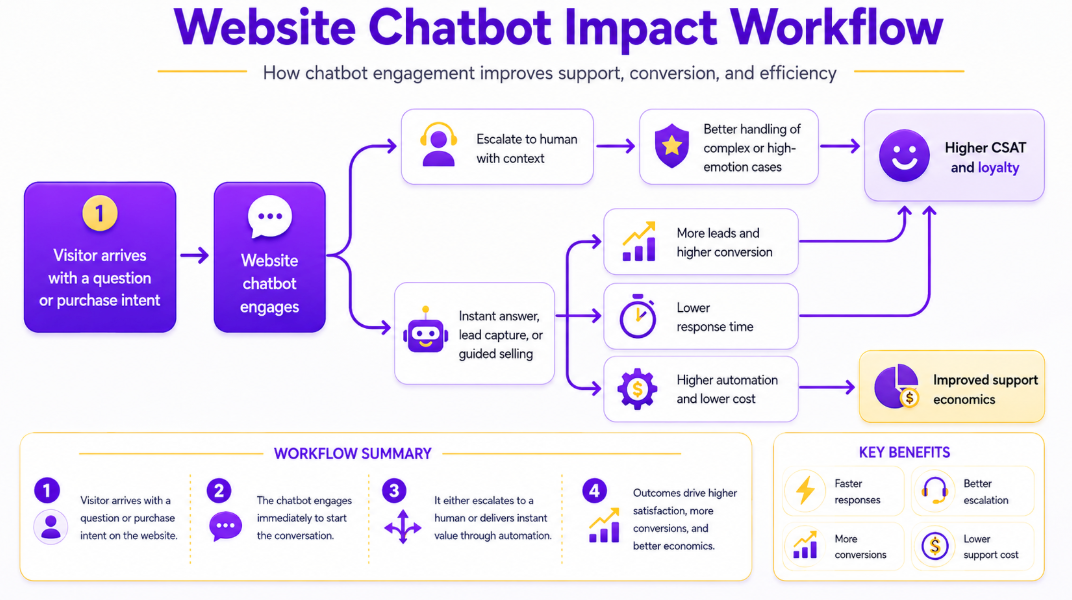
If you're running a two-person startup or a Minecraft server with 800 members, you already know the problem: the same five questions arrive every single day, always at the worst possible moment.
"How do I reset my password?" at 11pm. "What's the server IP?" at 2am. "What's included in the free plan?" on a Saturday.
A chatbot for a website handles these questions instantly, 24/7, while you sleep — so you can stop copy-pasting replies and start building. Below is the data behind that claim, and a practical guide for getting started without a large team or a perfect knowledge base.

Want to 4x your Discord engagement and get free steam games every month✌️?
The Support Bar an AI Knowledge Base Chatbot Helps You Hit
Here is the situation no one puts in a product roadmap: your users now expect faster support than they did last year. Not faster than your competitors. Faster than themselves twelve months ago.
A Zendesk CX survey found that 88% of customers say they expect faster responses than they did a year ago, and 74% now expect 24/7 support availability because of AI. That second number is the one that should stop you cold.
74% of your users have already decided that AI should be answering them around the clock. If your website goes quiet after 6pm, you're not just slow — you're behind a bar that most of your users have already mentally reset.
For a two-person startup, hitting that bar manually is arithmetically impossible. For a gaming server admin, it means new members who can't find the whitelist instructions at midnight leave and don't come back.question the moment it is asked, every hour of every day, at
A website chatbot solves this in a way that no amount of hustle can. It answers the question the moment it is asked, every hour of every day, at zero marginal cost per answer.
Five Proven Benefits of a Chatbot for Website (With Real Data)
These aren't abstract "AI transformation" promises. These are specific, audited, real-world outcomes from deployments across ecommerce, SaaS, and gaming — with numbers to back them up.
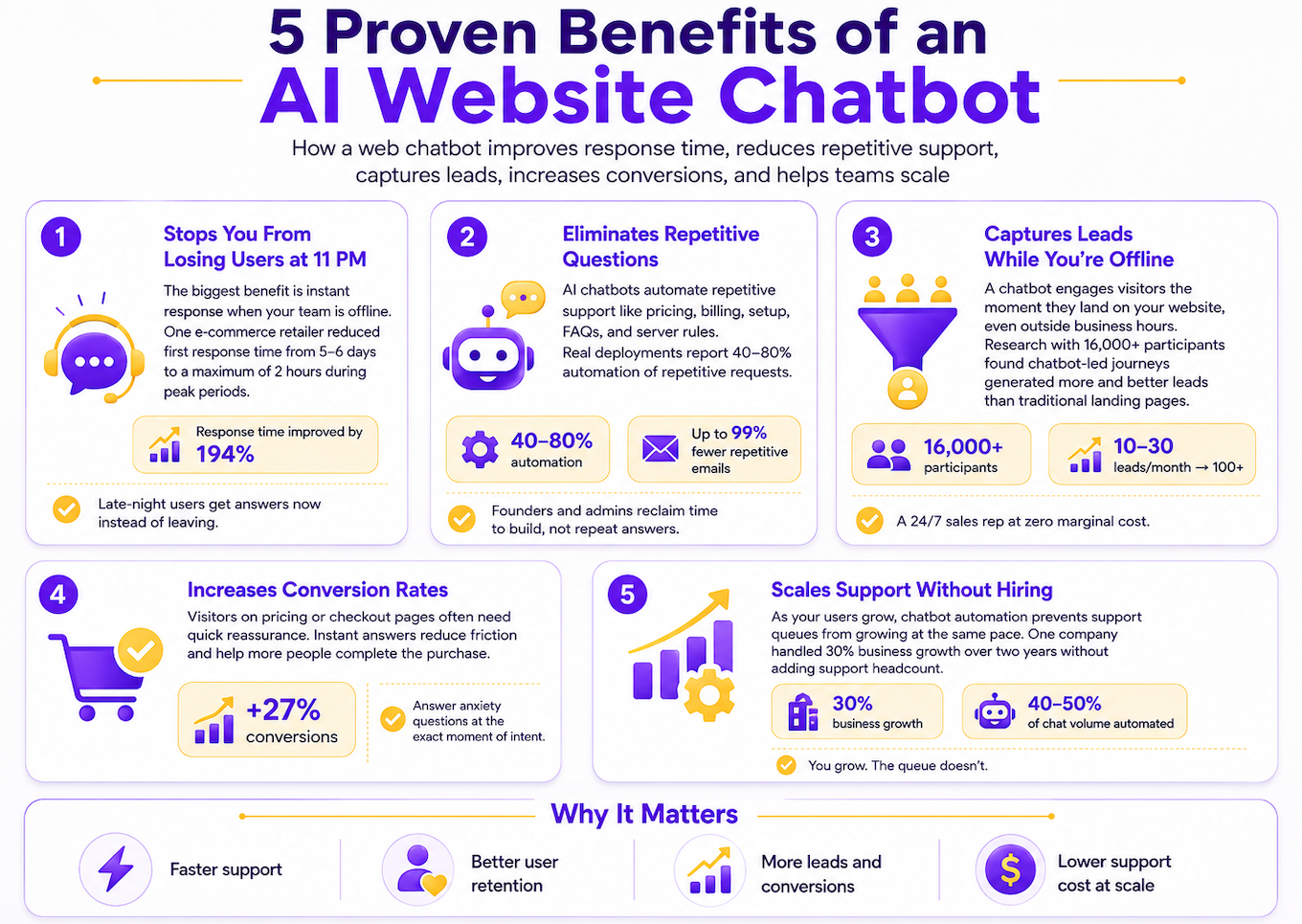
1. A Chatbot for Website Stops You From Losing Users at 11 pm
The most consistent, most repeatable benefit across every published chatbot case study is response time. An e-commerce retailer using an AI chatbot cut their first response time from 5–6 days during peak periods to a maximum of 2 hours. That's a 194% improvement in the metric that drives whether a customer comes back.
For a gaming community, this is survival arithmetic: a player who hits a wall at midnight — can't figure out the server rules, can't find the whitelist form, can't understand how the rank system works — doesn't try again in the morning. They join a server that answers them right now.
Your Spark AI web chatbot is the difference between "we'll get back to you" and "here's your answer."
2. An AI Web Chatbot Eliminates 80% of Repetitive Questions
SaaS teams and gaming server admins share one specific curse: the same questions, forever. What's the IP? How do I cancel? What do I get in the free plan? How do I report a griefer?
Real deployments show 40–80% automation of repetitive requests. In one SaaS compliance case, the bot resolution rate went from 2–3% to 53% — over half of all support conversations were fully resolved with no human involved. Another business saw a 99% reduction in repetitive invoice-type emails.
Every repetitive question the bot handles is time you get back. Multiply that across a year, and you've recovered weeks of founder time — time that should be spent building, not answering the same five questions.
3. An AI Chat Widget for Website Captures Leads While You're Offline
This is the benefit that surprises people most, and the evidence here is the strongest.
A peer-reviewed study published in the Journal of Business Research — based on two field experiments with more than 16,000 participants — found that chatbot-led journeys generated significantly more leads than traditional landing pages, and that those leads were of higher quality. One ecommerce deployment went from 10–30 leads per month to more than 100.
The mechanism is not magic. It's availability. A visitor who lands on your pricing page at 10pm with a question about your API integration gets an answer right now. Without the bot, they close the tab.
An AI chat widget for website is the closest thing to a 24/7 sales rep at zero marginal cost.
For an early-stage team with no dedicated sales function, that's not a convenience — it's a structural advantage.
4. A Chatbot for Website Increases Conversion Rates
Visitors who hesitate on a pricing or checkout page are almost never confused about the price. They're unsure about fit. Does this work with my setup? What happens after the trial ends? Can I cancel anytime?
Those are not complex questions. They're anxiety questions. And anxiety questions answered instantly convert.
One deployment saw a 27% increase in conversions after adding a chatbot to high-intent pages. The mechanism is the same every time: remove the friction at the exact moment of highest intent, and more people cross the line.
A well-placed customer support AI chatbot on your pricing page doesn't just answer questions — it closes deals you would have otherwise lost to silence.
5. Scale Without Hiring Using an AI Chat Web Widget
A gaming and media company absorbed 30% business growth over two years without adding a single support headcount — because their bot handled 40–50% of chat volume automatically.
The support queue grows linearly with users. Without a bot, so does the time required to manage it. With a bot, that relationship breaks.
You grow. The queue doesn't.
For a startup moving from 50 to 500 customers, or a Minecraft server going from 200 to 2,000 members, this is the compounding benefit most teams don't notice until they're already overwhelmed.
Why Teams Wait Too Long to Add a Chatbot for Website
Let's name the objections, because you're probably already running them.
"My community is too small." The bot doesn't need scale to be useful — it needs repetitive questions. If you're answering the same things more than twice a week, you have a use case. Size is not the threshold. Repetition is.
"I don't have enough content for it yet." You don't need a perfect knowledge base to start. You need the ten questions you get most often. The bot will then tell you what to write next — every failed query is a documentation request from a real user. We wrote an entire guide on exactly this process.
"It'll feel robotic." A bot that answers quickly and correctly builds more trust than a slow human channel. The robotic feeling comes from bots that don't know anything — not from bots that answer well. The fix is documentation, not personality.
"It costs too much." The first response-time improvement alone — from days to hours — is worth the cost at almost any usage level. Modern platforms don't require enterprise contracts to get started.
The cost of doing nothing compounds invisibly every week you wait.
Every missed lead at 11pm, every user who bounced because they couldn't find the answer, every evening you spent copy-pasting the same reply — those are real costs. They just don't show up on an invoice.
How to Actually Do It
Start Here — Building Your AI Knowledge Base for Chatbot
Before you install a widget, clean up your content.
A website chatbot is only as smart as the documentation behind it. A bot without a knowledge base answers confidently from nothing, which is worse than no bot at all. A bot with a strong knowledge base answers correctly, at scale, 24/7.
The good news: you don't need a comprehensive documentation site before you start. You need answers to the ten questions you get most often, written as short, direct articles.
We published a detailed guide on building this foundation: How to Create a Knowledge Base. The short version: write what your users actually ask, connect it to your chatbot, and let the bot's failure log tell you what to write next.
The 10 Questions to Document First for Your AI Knowledge Base Chatbot
For a SaaS or startup:
- What's included in the free plan vs. paid?
- How do I reset my password?
- How do I cancel my subscription?
- What integrations do you support?
- What happens to my data?
- How does billing work?
- Is there a free trial?
- How do I contact support for urgent issues?
- Can I upgrade or downgrade mid-cycle?
- How does onboarding work?
For a gaming community or Minecraft server:
- What is the server IP and port?
- How do I apply to the whitelist?
- What are the server rules?
- What mods or plugins are installed?
- How do the ranks/roles work?
- How do I report a rule violation?
- When does the map reset?
- How do I join the Discord?
- Where do I report bugs?
- How do I appeal a ban?
Write these. Connect them to your bot. You now have a v1 knowledge base.
Let the Chatbot Tell You What to Write Next
This is the part most teams skip, and it's the highest-ROI documentation work you can do.
CommunityOne's analytics surface every query the bot couldn't answer — ranked by frequency. That failure log is your documentation roadmap. Not what you think users want to know. What they actually asked, in their own words, at the moment they needed it.
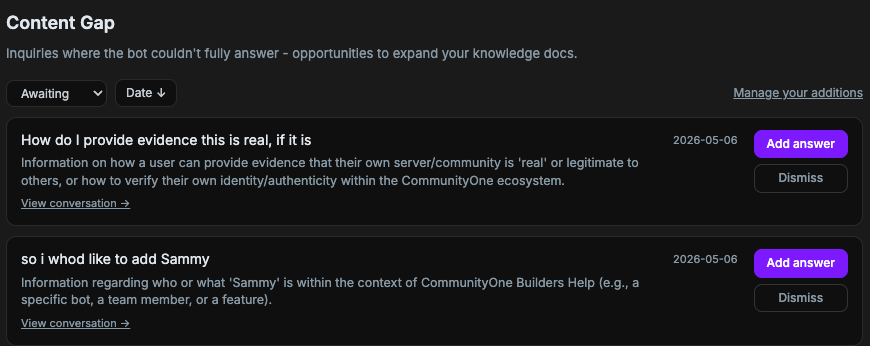
Stop guessing what users want. Start answering what they actually ask.
Every week, review the failed queries. Write the top three missing articles. In a month, your bot's resolution rate will look completely different.
Don't Fly Blind — The Analytics That Keep You in Control
Most chatbot setups give you a conversation count. That's not analytics — that's a vanity metric.
What you track should depend on where your company is. Enterprises and small startups care about very different things, and pretending otherwise is how teams end up drowning in dashboards they never open.
If you're at the enterprise level, the metrics that matter are the ones tied to risk and operational cost:
- Hallucination rate — how often the bot generates incorrect or fabricated answers. At scale, this is a brand and liability issue.
- Escalation rate — what percentage of conversations end up needing a human, and why. This tells you where your bot is weak and where your support team is bleeding hours.
- Resolution rate — how many conversations the bot fully closes without handoff.
These matters because enterprises have the headcount to act on them. Someone owns the support inbox. Someone owns documentation. Someone owns QA.
If you're a small startup or a solo founder shipping fast, most of that is noise. You don't have a support team. You're not going to triage every escalation that hits your inbox — you're busy pushing out the next release. So tracking "escalations" as a KPI doesn't change your behavior.
What actually moves the needle for you:
- Funnel from website to Discord — how many visitors you successfully pulled into your community. This is a real retention signal. A user who joins your Discord is far more likely to stick around than one who bounces off your landing page.
- What people are actually talking about — the topics, questions, and confusions surfacing in conversation. This is gold. It tells you exactly what to put in your next FAQ update, what to clarify in your docs, and how to sharpen your messaging. Your users are telling you what's unclear — you just need to listen.
- Content gaps — the questions your bot couldn't answer. If you want support to stay sustainable as you grow, you have to constantly feed your knowledge base. Every unanswered question is a small fire that will keep burning until you address it.
The point isn't to track everything. It's to track the few signals that change what you do tomorrow. For a community-led startup, that's almost always: who's joining, what are they asking, and where is your content failing them?
The Discord Bridge — Connect Your AI Chat Widget to Community
This is specific to gaming communities and Discord-first products, and it's a flow most website chatbot guides ignore entirely.
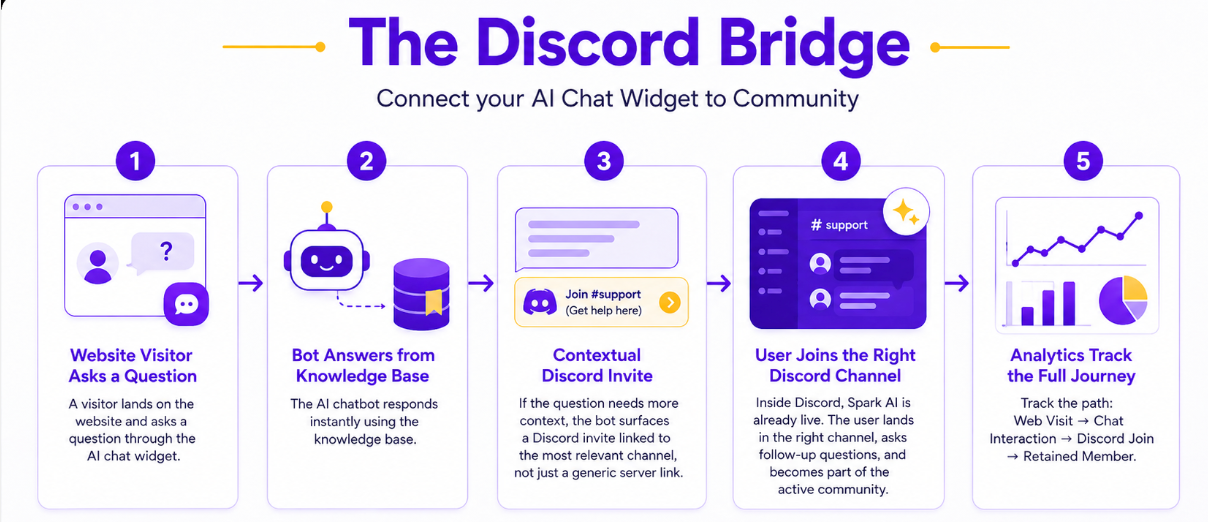
Your website and your Discord server should not be separate worlds. A visitor who finds your site is a potential community member. The question is whether your website gives them a reason and a path to join.
Here is what the flow looks like with CommunityOne:
- A visitor lands on your website and asks a question via the AI chat widget
- The bot answers from your knowledge base
- For questions that need more context, the bot surfaces a contextual Discord invite — linked to the specific channel relevant to their question, not a generic server link
- Inside Discord, Spark AI is already live — they land in the right channel, ask follow-ups, and are now inside your active community
- Analytics track the full path: web visit → chat interaction → Discord join → retained member
The website chatbot isn't an endpoint. It's an on-ramp.
What Good Escalation Looks Like for an AI Chat Widget for Website
The moment the bot doesn't know the answer is the highest-risk moment in the entire flow. If it dead-ends the user, you've lost them. If it escalates cleanly, you've kept them.
Good escalation means three things:
- Automatic triggers — low-confidence answers, repeated misunderstandings, explicit requests for a human, any high-emotion or payment-related issue
- Context passing — the user should never have to repeat what they already said
- A clear next step — a specific Discord channel, a support email, a form — not "we'll get back to you"
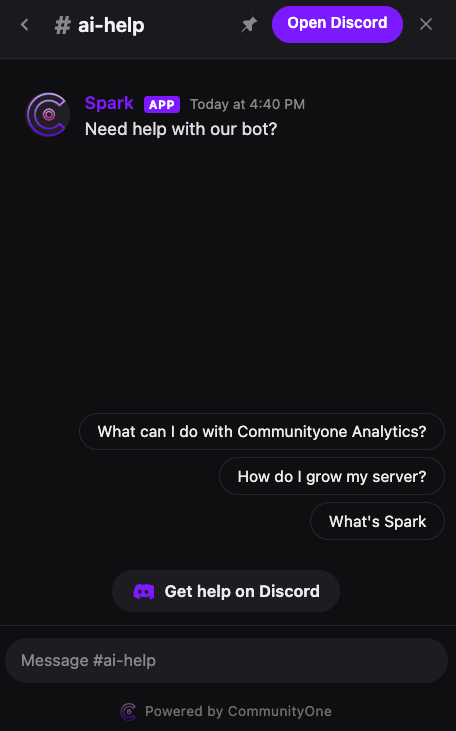
The handoff should feel like a continuation, not a redirect.
Where an AI Knowledge Base Chatbot Can Fail (And How to Fix It)
A chatbot that answers quickly but inaccurately creates more damage than a slow human channel. Fast wrong answers build false confidence, and users who discover the bot misled them are harder to recover than users who just waited too long.
The three failure modes to avoid:
Thin knowledge base. The bot answers from nothing and confabulates. Fix: document before you deploy. Even ten articles is better than zero.
No escalation path. The user hits a wall. The bot doesn't know, and there's no human option. Fix: always configure a fallback — a channel, an email, a form. The escalation path is a feature, not an afterthought.
Automating the wrong moments. High-emotion issues — account problems, billing disputes, ban appeals — need a human touch. A bot that stays robotic during a moment of genuine frustration makes it worse. Fix: configure automatic escalation on sentiment signals and high-stakes topics.
An AI chatbot is a magnifying glass for your documentation. Point it at thin content and it amplifies the gap.
FAQ: AI Chat Widget for Website & Chatbot Questions Answered
What is an AI chat widget for website and how does it work?
An AI chat widget for website is a small UI element embedded on your site that lets visitors ask questions in natural language. It connects to a knowledge base — your docs, support articles, or custom content — and returns direct answers instantly, 24/7. When it can't answer, it escalates to a human channel.
How does a customer support AI chatbot handle questions it can't answer?
A well-configured customer support AI chatbot detects low-confidence answers and escalates automatically. The user receives a clear next step — a Discord channel, a support email, a form — and never has to repeat context they already provided.
Do I need a large knowledge base before adding a chatbot for website?
No. Start with the ten questions you answer most often. Write them as short, direct articles. Connect them to the bot. The bot's failure log will then tell you exactly what to write next — ranked by how often real users asked it.
How do I connect a website chatbot to Discord?
CommunityOne's Spark AI handles this natively. The website chat widget connects directly to your Discord community, and the bot surfaces contextual Discord invites tied to the right channel based on what the visitor asked — not a generic server link.
Is a website chatbot worth it for a small community or early-stage startup?
Yes, especially at early stage. You don't need scale to have a use case — you need repetitive questions. If you're answering the same questions more than twice a week, a bot pays for itself in founder time alone. The lead capture and response-time benefits scale with traffic, but the time savings start on day one.
How much does a chatbot for website actually cost?
The cost depends on the platform and usage volume, usually it's around $20-$40/month to start. You can get an unlimited version for CommunityOne Spark at $14.99/month.