How to Create a Knowledge Base (And Why Engineers Must Own It)

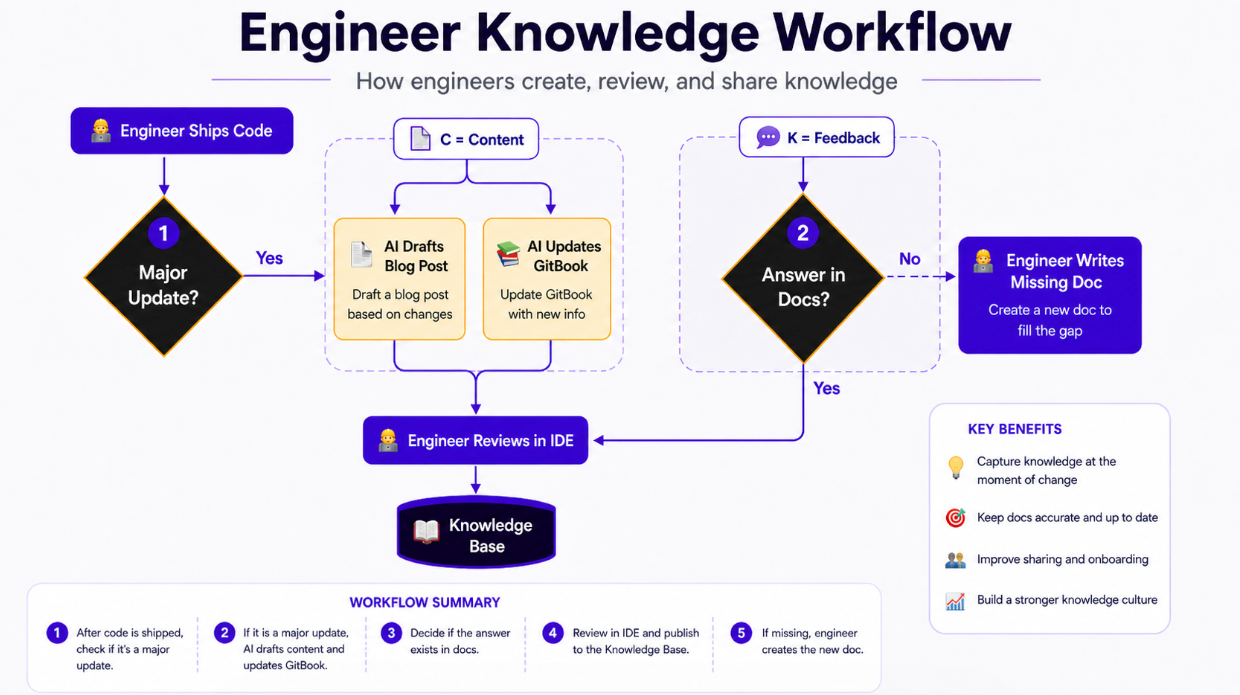
Shipping fast is incredible, but it creates a massive headache: your documentation rots the moment you push to production. If you want to create a knowledge base that actually helps users, you have to rethink who writes it.
The direct answer? To create a knowledge base that scales, assign ownership to the engineers who wrote the code. Use AI to automate the drafting process, link it directly to a user-facing chatbot to identify knowledge gaps, and update the docs every single time you ship.
We spent a lot of time rethinking our documentation pipeline. Here is how we handle it, what we learned, and why the traditional approach to technical writing is fundamentally broken.

Answer members questions automatically with AI on Discord? Try our Spark AI for free. Now on Discord & Web.
TL;DR
- Engineers need to write the docs. You are closest to the code. If no one knows how to use your feature, it doesn't matter that you built it.
- Automate the busywork. Every time we ship, our internal tools instantly draft the blog post and update our GitBook.
- Track your knowledge gaps. Our Spark AI analytics show us exactly what users are asking that our docs cannot answer.
- We only email the big stuff. If we cannot remember what we built last month, it is not important enough for a monthly product update.
Why Engineers Must Own the Technical Docs
In the era of AI, you constantly ship features and discover new use cases. The old model—build it, pass it to a technical writer, and plan a coordinated launch—is completely dead for lean teams.
If you have a small startup or a highly focused product team, the engineer has to own the documentation. You know the code, you understand the edge cases, and you know why decisions were made.
Building a feature isn't the finish line. Getting feedback is.
You probably put that new button in the wrong place anyway. If you do not explicitly document what you built and why it matters, people will not use it. They will not complain about it, and you will not get the beta feedback you need to fix it. The communities we see thriving are the ones where the builders talk directly to the users.
How to Create a Knowledge Base Workflow That Scales
Your documentation needs to be your absolute source of truth. For us, that means our CommunityOne GitBook and our blog. Our AI chat links directly to our GitBook—if a concept isn't documented there, our AI literally cannot help our users.
Because of this, we made a hard internal rule: if we ship a major update, we update the docs.
If you have time to ship code, you have time to update the docs.
But writing docs manually slows you down. We learned quickly that we needed an automated workflow. When we push an update, we feed our internal tools our specific writing instructions. The AI spits out a draft for the blog and the GitBook updates. We review it, check the facts, and publish it directly from our IDE.
You do not have to do it exactly like this, but you do need a system where updating the knowledge base is a frictionless byproduct of shipping code.
Building an AI Knowledge Base to Close Gaps
A knowledge gap happens when a user searches your documentation for an answer and comes up empty.
We recently shipped an update to our Spark analytics that flags exactly what users are asking our agent when it fails to find an answer. Zendesk research shows that connecting AI agents to your support pages resolves at least 30% of queries without human intervention—but only if the answers actually exist. In a modern AI knowledge base (or an AI knolwedge base, if you type as fast as we do), tracking these failed queries is trivial.
Stop guessing what users want. Start answering what they actually ask.
Right now, we look at those failed queries and manually write the missing documentation. It is incredibly valuable—it tells us exactly where we fail to explain the product. In fact, this post exists because we saw users asking our agent how they should handle their own documentation!
Eventually, we want our AI to scan our codebase and fill these gaps automatically. Until then, letting user confusion dictate your documentation roadmap is the highest-ROI writing you can do.
Structuring Your Communication Channels
How you distribute your updates matters just as much as writing them. Once the core docs are live, we have the AI spin up native Twitter and LinkedIn posts. We treat social media as a secondary "survey" layer. It is great for discovery and catching the attention of people who do not know us yet.
However, your blog and your core documentation will always be your primary, direct line to your users. You own those channels. Find a style that works for you on social media—some companies do viral memes beautifully, we prefer to show data and charts—but never let social media replace your actual knowledge base.
Capturing User Intent Before Writing Documentation
Sometimes, the best way to manage your knowledge base is knowing what not to build or document yet.
We rely heavily on waitlists placed at the top of our website. The true value of a waitlist isn't just the raw number of signups; it is looking at how many people clicked on the feature versus how many actually signed up.
A low conversion rate doesn't mean the product is bad—it might just mean it is a niche tool not meant for the masses. But it gives us a clear signal of user intent before we invest weeks into building and documenting a massive new feature. When the product finally ships, that highly-intent list gets an early invite, and their immediate questions form the foundation of our V1 documentation.
A waitlist isn't just a marketing tool. It is a feature validation engine.
What's Next for Automated Documentation
If you cannot remember what you built last month, it wasn't important enough to include in a monthly product update email. We keep our monthly emails 100% human-written, focusing only on the massive, needle-moving updates. Everything else lives in the automated changelog and knowledge base.
We are currently working on making our codebase-scanning AI a reality, so your docs can essentially write themselves based on your actual code, ensuring the knowledge gap stays closed permanently.
Want to see how we set up our automated GitBook pipeline or try Spark AI for your own community? Just reach out.
FAQ: People Also Ask
What is the best way to structure an AI knowledge base? Start with a central source of truth (like GitBook), ensure all articles are machine-readable, and connect it directly to an AI agent that logs every query it cannot answer.
Who should be responsible for creating a knowledge base? Engineers and builders should write the initial drafts because they understand the edge cases. AI and automated workflows should handle the formatting and publishing.
How do I keep my knowledge base from becoming outdated? Tie documentation updates directly to your shipping process. If you deploy a new feature, updating the knowledge base should be a mandatory step before closing the ticket.