Master Discord Analytics: Boost Your Community Engagement

Key Takeaways
- Utilize Discord's native Server Insights to track visitor activity, invite link sources, voice channel engagement, and user geolocation.
- Monitor daily member influx and join/leave patterns to understand growth drivers and retention effectiveness.
- Integrate Discord with other platforms like websites and social media, and employ SEO and engaging events to increase server traffic.
- Manage high member influx by focusing on smooth onboarding and retention, and implement verification processes to identify and control bot presence.
TL;DR: Leverage Discord's native analytics and external tools like CommunityOne Analytics to track key growth metrics, optimize user onboarding, and implement strategies to boost engagement and retention.

Turn your Discord emojis into organic community growth. Try our bot for free!
✨ Invite our botDiscord servers often struggle with stagnant growth and user disengagement, which can threaten long-term success. Analytics helps detect early warning signals and optimize each stage of the user journey.
In this blog, we will cover how to use CommunityOne Discord Analytics alongside native Discord analytics to improve server operations.
Start with Discord Analytics Native Server Insights
Discord offers a range of unique analytics through its native Server Insights, providing valuable data that can enhance your understanding of community dynamics. These server stats include metrics such as visitors per channel, allowing you to identify which areas of your server are most active and engaging. Additionally, you can track some of your invite links from external platforms, giving you a clear picture of where your traffic is originating.
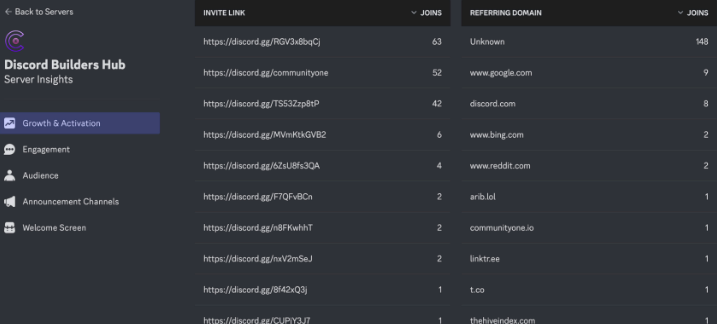
Moreover, Discord analytics extend to voice channel data, offering insights into how users are interacting in real-time conversations. Another valuable feature is the ability to track the geolocation of your users, helping you understand the geographical distribution of your community.
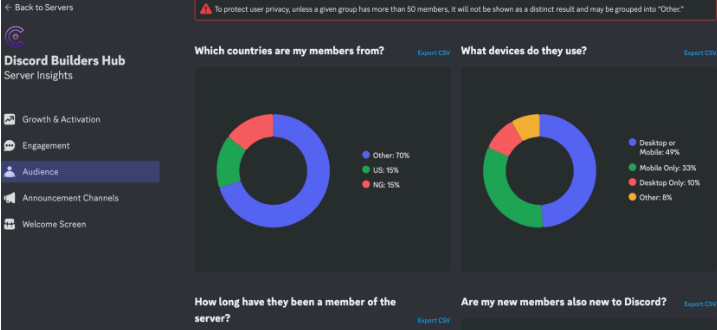
While Discord’s Server Insights may not be the most intuitive tool for daily operations (due to a 7-day data lag and availability only for servers with 500+ members), it should not be overlooked. The insights it provides can be instrumental in tailoring strategies to better meet user needs and preferences, ultimately fostering a more engaged community.
Tracking Daily Member Influx
Monitoring daily server growth is critical to understanding your community’s potential. Tracking how many users join each day provides insight into conversion opportunities and helps you refine growth strategies.
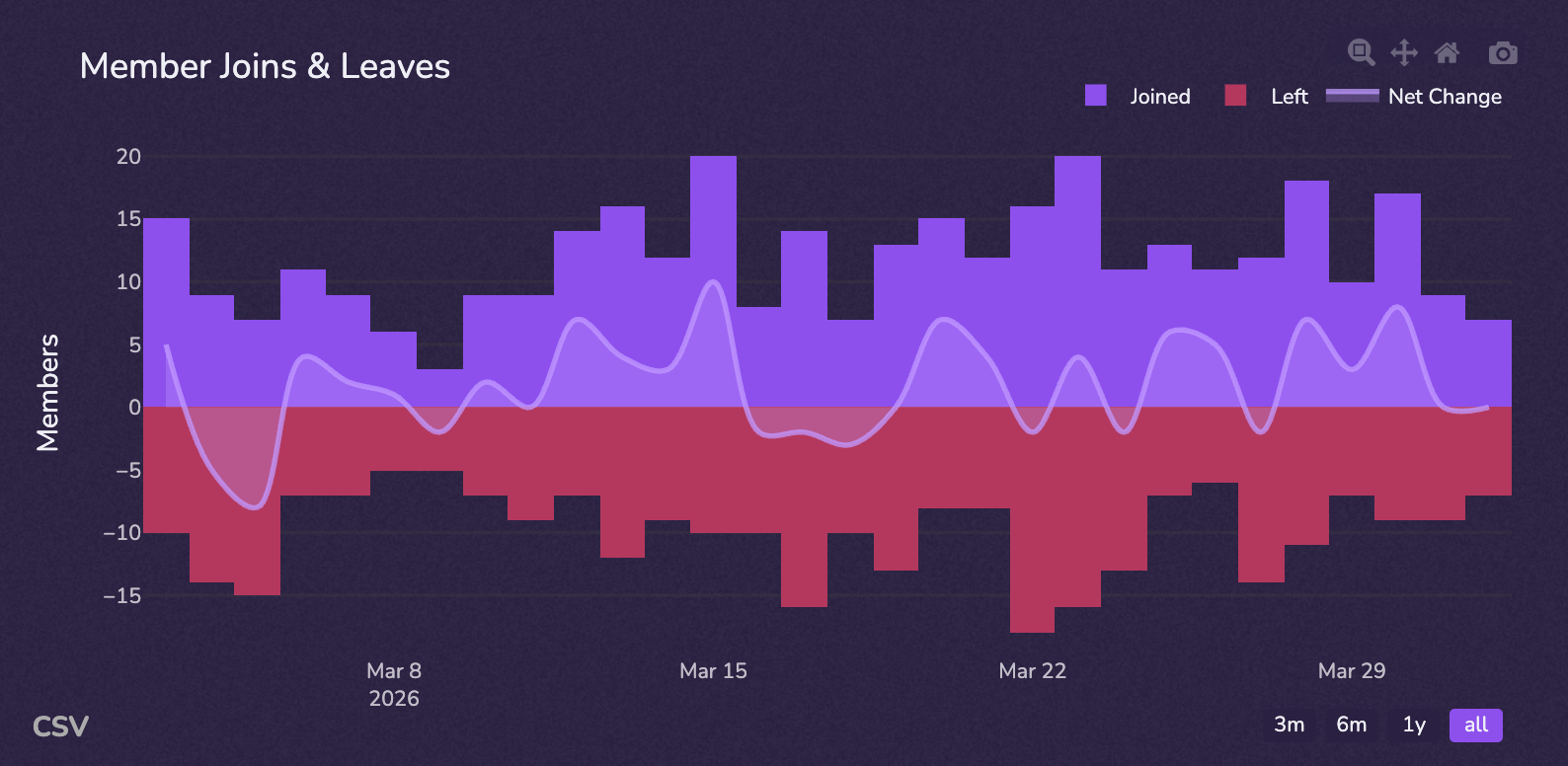
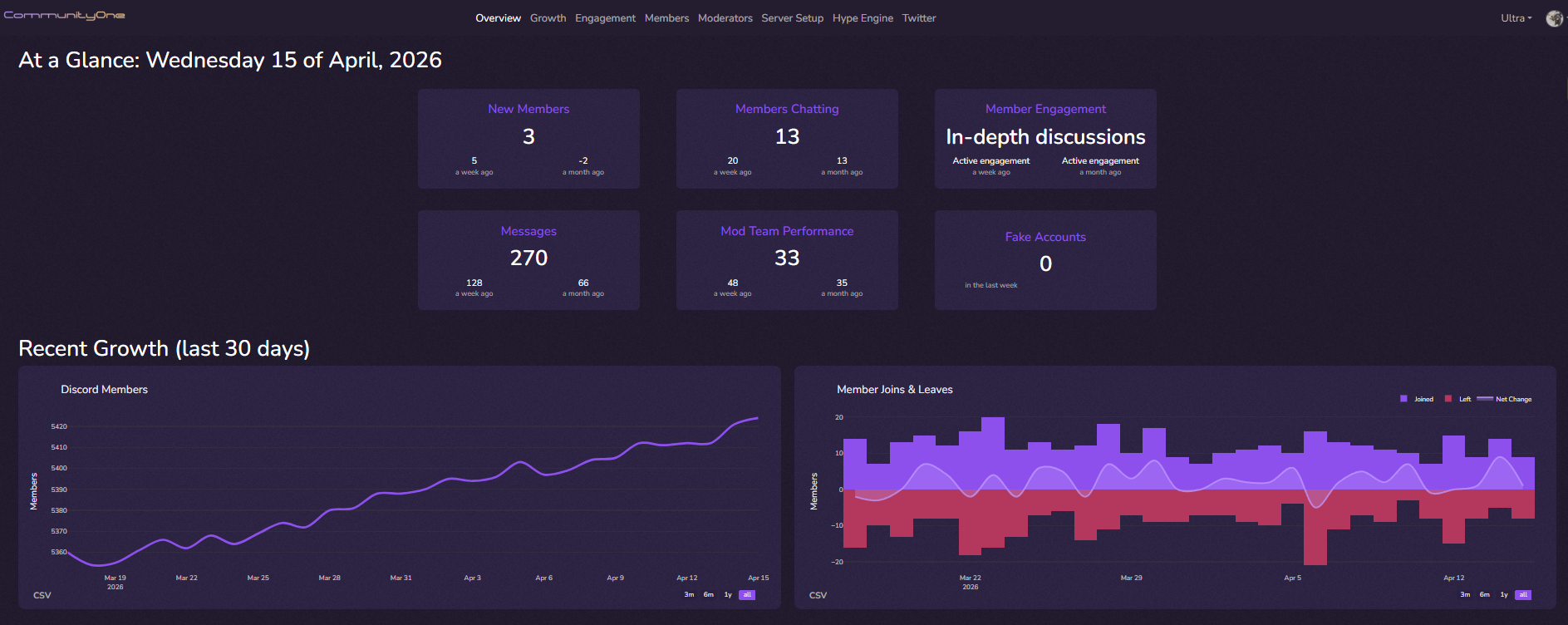
In scenarios where fewer than five individuals join each day, focus on growth strategies by integrating Discord seamlessly with your website or social media presence. Conversely, if you are experiencing a rush of new members, ensure their engagement is genuine by monitoring bot activity under the growth tab. Keep an eye on these metrics to maintain a healthy balance and propel your server towards success.
Tracking Member Joins and Leaves
Explore growth metrics daily—examining—member join and leave patterns offers insight into user acquisition and retention.
Analyzing member join and leave patterns provides insight into both acquisition and retention. When benchmarking growth, it is important to compare against the broader ecosystem. Our data shows that 86% of Discord servers have fewer than 500 members. If your server falls within this range, prioritizing high-quality onboarding is more impactful than focusing purely on top-of-funnel growth.
Understanding community growth is the cornerstone of strategizing sustainable growth and engagement.
For Discord, member fluctuation data unveils the effectiveness of your outreach strategies, as well as the inherent appeal of your current products. For example, for relatively established products with a lot of members, it is natural to see a huge influx of members everyday. Most startups will see 10-50 people coming in organically.
Capitalizing on insights from join-and-leave data—by fostering a welcoming and engaging environment—allows server owners to transform valuable insights into actionable plans for lasting growth.
Handling Low Server Influx
Providing 24/7 support is a major challenge for growing communities. We've found that the busiest time for automated community assistance is 19:00UTC. Leveraging AI tools during these peak hours ensures new members get immediate answers, drastically improving early retention rates.
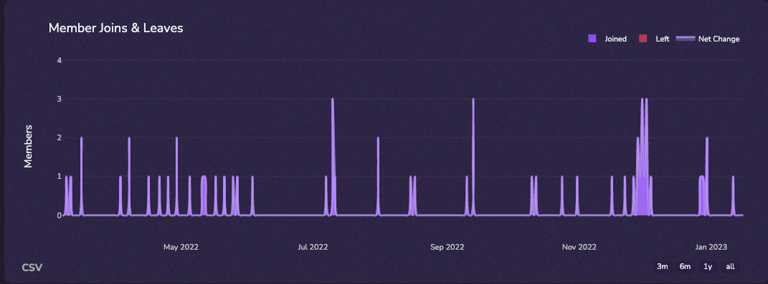
Ideally, your server should consistently gain at least 5 new members per day. When growth is lower, focus on creating a welcoming environment with clear engagement pathways.
In most organic growth scenarios, new members join primarily to seek help. Ensure there are dedicated spaces where they can ask questions and receive timely responses.
Integrating Discord with Other Platforms
Amplifying your Discord server’s reach begins by seamlessly integrating it with other platforms.
- Website Integration: Place Discord links prominently on your website, especially in support-related sections.
- E-mails and Newsletters: Include Discord links in campaigns to provide easy entry points.
Social Media Channels: Share Discord invites across platforms like X, Facebook, and Instagram, as well as server listing platforms.
Strategies to Increase Server Traffic
To boost server traffic, focus on targeted strategies that foster organic growth and member engagement.
- Optimize SEO for Online Presence: Embed Discord invite links with relevant keywords across your website and social profiles to improve search visibility. If you are using the CommunityOne Discord Bot, enable forum and announcement publishing within your server listing so your content can be indexed and surfaced on discovery pages.
- Host Engaging Events: Organize events like webinars, contests, or AMA sessions to draw interest and excitement to your server.
- Leverage Influencers and Partnerships: Collaborate with industry influencers or similar communities to extend your reach and credibility.
- Offer Exclusive Content: Provide members with access to exclusive content or perks for joining and participating in the community.
- Discord Server listing sites: List your server on platforms like CommunityOne Server Listing to reach users actively browsing for communities. This improves discoverability through categorized listings, searchable tags, and activity-based visibility signals.
Bonus – Optimize SEO for Online Presence:
Embed your Discord invite links with relevant keywords across your website and social profiles to improve search visibility. If you are using the CommunityOne Discord Bot, enable forum and announcement publishing within your CommunityOne server listing so your content can be indexed and surfaced on discovery pages. This helps your server gain consistent exposure and drive organic traffic from users actively browsing for communities.
Managing High Member Influx
A surge in member influx signifies a flourishing server, representing success in your outreach, marketing, or cross-promotional efforts. However, the well-being of your community hinges on your capacity to manage this influx with finesse.
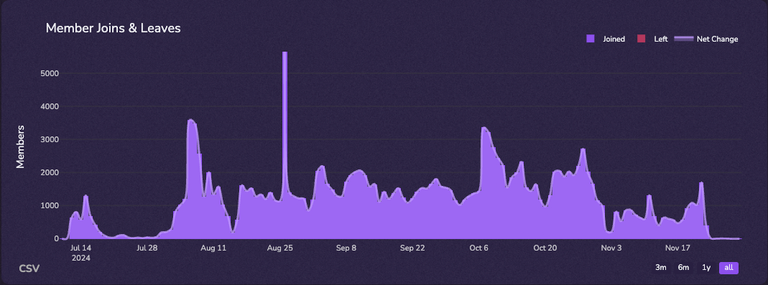
Enabling smooth onboarding processes and actively tracking engagement metrics ensures every member’s contribution is meaningful and reinforces communal growth. The game when you are in hyper growth mode is retention, which you can track in our engagement tab.
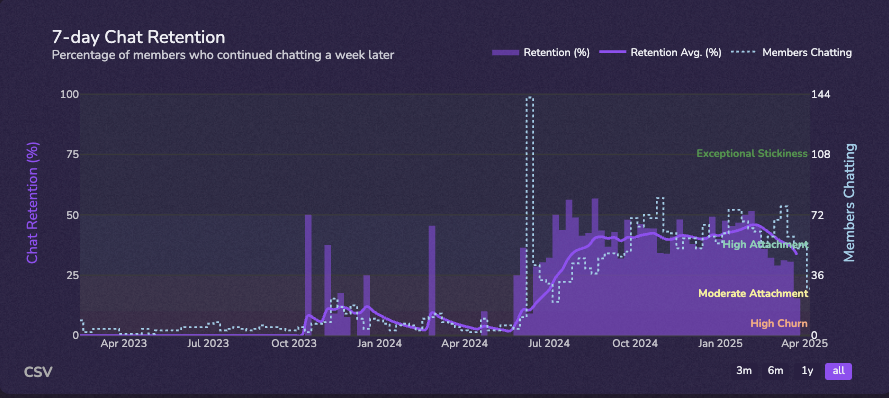
In the Web3 space, you should expect 60-80% of your daily users coming from aggressive marketing campaigns (such as Zealy Giveaway campaign) will be bots. The key is to make sure that bots don't impact real user's experience inside of your community.
Identifying and Controlling Bot Presence
Efficiently managing your community starts with understanding how to identify and control bot presence, preserving the integrity and value of authentic interactions.
Spotting inauthentic behavior early is crucial for maintaining server health. Interestingly, our platform analytics reveal that <1% of new server joiners across the network still use a default Discord avatar. While not every default avatar indicates a bot, correlating this signal with rapid join-and-leave patterns can strongly suggest automated activity.
Initially, to check suspicious accounts on a burgeoning server community, review the growth tab, locating metrics that indicate bot activity. This vigilance helps flag and weed out automated accounts, reinforcing the authentic engagement of genuine users.
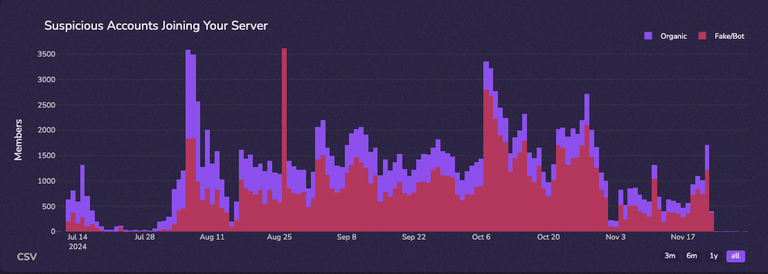
Next, employ a robust verification process to deter bot infiltration. Consider stricter measures like Wick verification, mobile phone verification, thereby ensuring every member is a real participant, enhancing the overall trust and reliability of your community.
Does it matter if your servers are filled with bots? New members tend to scrutinize you a bit harder when your server is large. However, what ultimately matters is how they feel when they first join the servers. Are people chatting interesting stuff? Did people welcome them when they first joined the servers? Those are more important questions to address vs bots.
Finally, address this potential imbalance by dynamically adjusting your marketing strategies and verification requirements to suit current needs. For example, if you are seeing a large number of new accounts joining after launching a Zealy or Gleam campaign, consider restricting access to accounts that are at least three months old. This helps filter out low-quality or automated accounts.
Consistently revisiting these strategies ensures alignment with your community goals, fostering a robust and engaged user base that flourishes authentically and sustainably. For example, take off the harsher verification rules during the quite period so that it is not too hard for regular users to join.
Refining Verification Processes
To streamline Discord interactions, it's crucial to refine your verification processes with the right Discord moderation bot, targeting a seamless yet secure onboarding. You can find a lot of verification related analytics directly on our server insights dashboard.
- Implement CAPTCHA Verifications: Use CAPTCHA challenges to affirm human engagement and deter bot intrusions efficiently. Do replace your Mee6 bot with something stronger, such as Pandez or Wick.
- Adopt Mobile Phone Verification: This method is significantly effective in confirming genuine user participation and maintaining quality engagement.
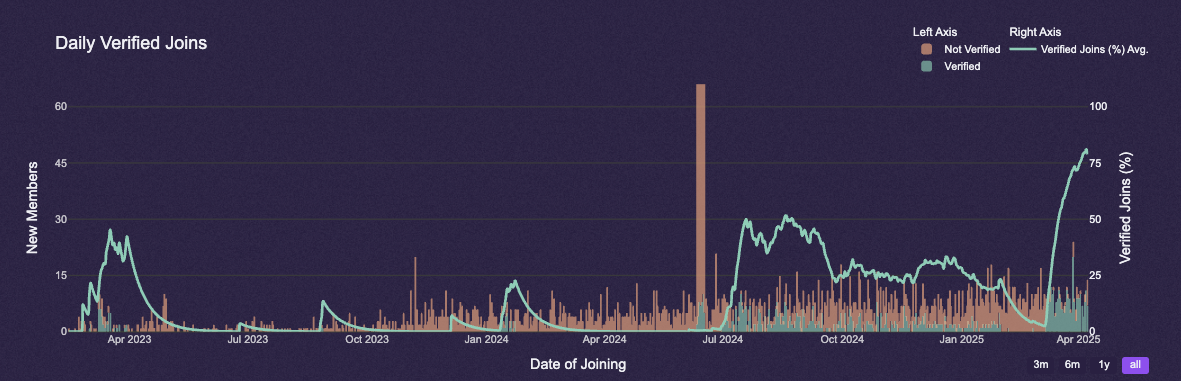
Integrate Multi-Factor Authentication: Enhance security by requiring users to verify their identity through multiple methods before gaining full access.
Optimizing verification boosts user trust, reinforces community integrity, and elevates the onboarding experience.
Tailoring verification systems in alignment with Discord's evolution empowers communities to flourish with genuine interactions.
Evaluating Initial Member Engagement
Evaluating initial member engagement is a cornerstone of nurturing an active, thriving community. Measure how many newcomers attempt to interact by sending their first message and whether verification processes hinder this. Aim for robust engagement levels, addressing barriers efficiently.
Analyzing Chatting Attempts
Understanding chatting attempts helps evaluate community vitality.
Assess the percentage of new users engaging in conversations shortly after joining. This initial interaction serves as a critical indicator of how welcoming and intuitive your server's environment is. Astonishingly, even minor modifications to the onboarding process can significantly increase these attempts, therefore amplifying the vibrancy of your community.
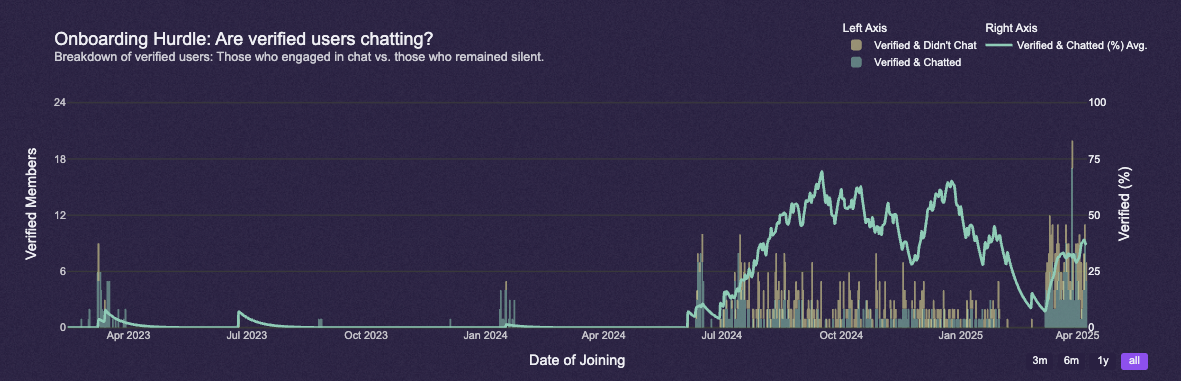
Ensuring that verification isn't overly complicated can boost engagement.
Integrate strategies such as onboarding guides or AI chat bot (you can enable our Spark feature for free) to demystify communication norms - if any single barrier impedes initial engagement, addressing it with an accessible resource could re-engage hesitant newcomers effectively.
Does #gm-gn help or hurt server engagement? The answer is complicated. In a lot of communities, we've seen users just saying gmgn and then fail to move to #general and participate in community discussion.
Improving Verification Ease
A seamless verification process is paramount for retaining new members, welcoming them effortlessly into your community. Your Discord server should not be an obstacle course but an inviting space.
Removing unnecessary hurdles from the verification process will ensure that new members can engage more quickly.
Consider implementing simple verification methods such as using in-server one click method vs external third party verification. In a normal server, make sure that it takes users less than 30 seconds to complete a simple verification and roughly 1 min to complete community onboarding process (max 3 questions).
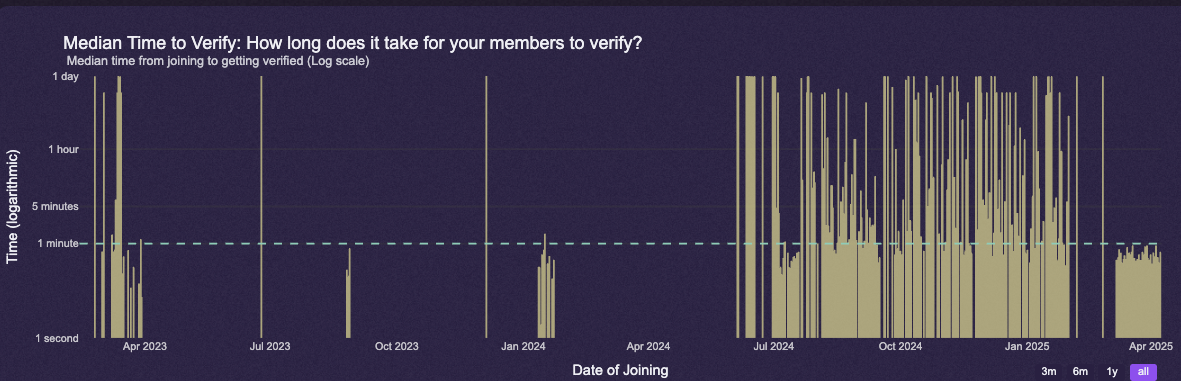
These enhancements may help streamline user experience, ensuring the journey from joining to engaging happens smoothly, fostering a lively, participatory environment.
Effective use of analytics can measure the efficacy of these improvements, ensuring your adjustments really are making the desired impact on retention and engagement.
Ultimately, the goal is to create an environment free of unnecessary friction. Simplifying verification leads to a smoother onboarding experience and encourages new members to engage immediately.
Assessing Engagement After First Message
Once a new member sends their first message, it's crucial to assess their immediate engagement.
Tools like "5-minutes retention" and "single message" statistics provide quantifiable metrics to gauge the 'welcome experience'.
Understanding 5-Minute Retention
5-minute retention provides a quick, invaluable snapshot of your community's ability to captivate and engage new members immediately.
This metric, in essence, underscores the potential of your community to naturally transition newcomers from passive observers to active participants, ensuring they spend their initial minutes engaged. By addressing any deficits in this critical area, you fortify your server culture, effectively demonstrating that your space is inviting and receptive to all voices.
If your 5-minute retention rate falls below 40%, it often indicates that new members are not receiving timely responses. A strong experience occurs when questions are answered quickly, especially during early-stage growth where moderators should actively engage with newcomers.
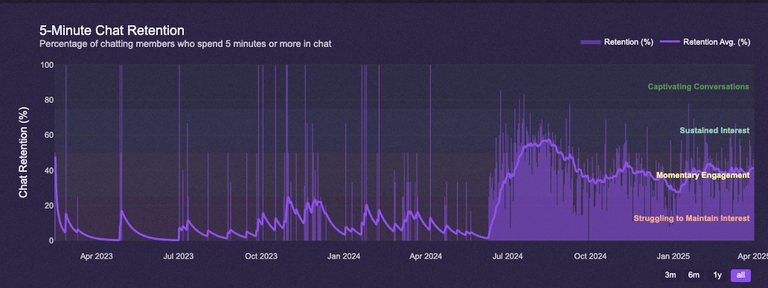
Specifically, look for signs of a healthy conversational flow within this window. An encouraging chat environment, filled with friendly exchanges and welcoming gestures, can significantly boost this vital statistic while paving the way for increased chat retention. Below, we track community reception of newcomers, ie how many people greet the new member when he/she first joins the server.
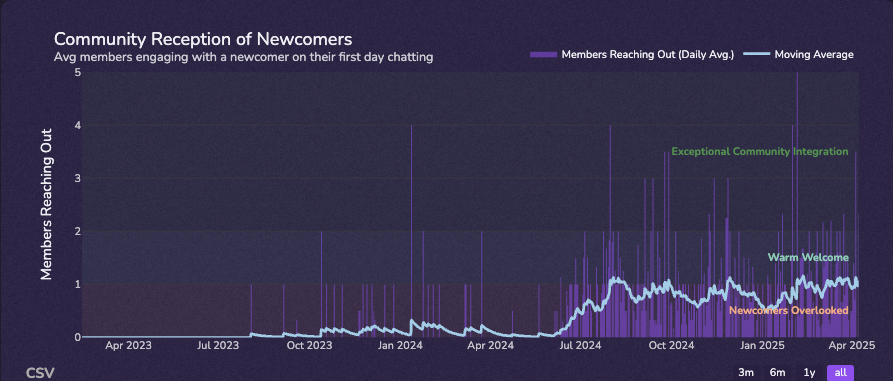
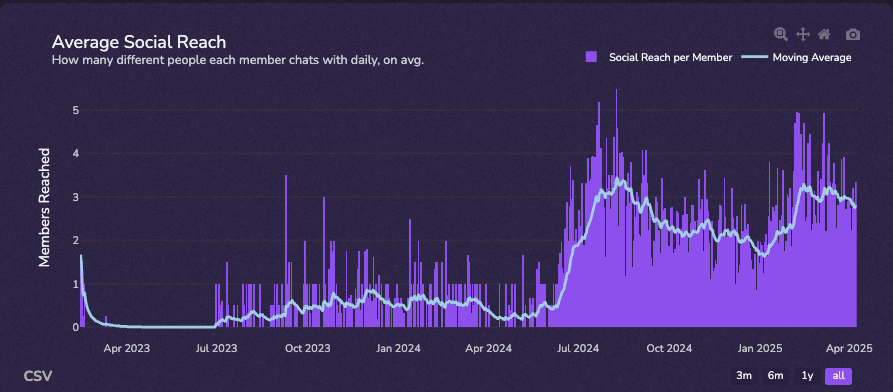
Note how our data changes drastically after June 2024? That was the first month where we introduced Hype Engine.
A concentrated focus on enhancing this initial engagement phase can transform your Discord server into a thriving hub of interaction, where novices feel both valued and inspired to contribute. Through honing the art of initiating meaningful dialogues, you not only boost retention rates but also empower community members to forge deeper connections and explore collaborative possibilities.
Reducing Single Message Dropouts
To address single message dropouts, enhancing the onboarding experience remains paramount, fostering an environment that actively invites continued engagement.
For this endeavor, we advise customizing your server’s welcome channels with interactive messages, offering clear pathways that encourage newcomers to explore various aspects of your Discord community. Equip these spaces with FAQs, community highlights, or fun introductory challenges, allowing new members to feel included and eager to delve deeper into discussions.
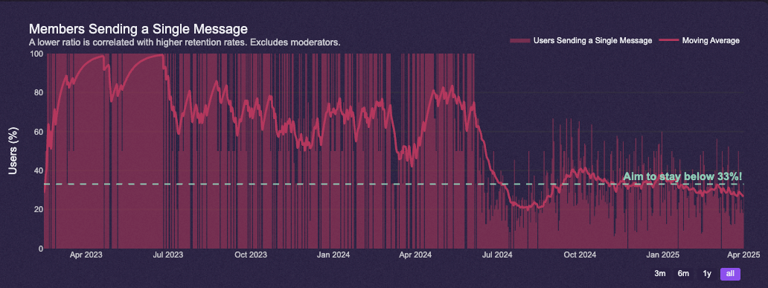
Concurrently, train your moderators to maintain a vigilant and welcoming presence at all times. By proactively engaging with new members, moderators can guide conversations with tact and warmth, reassuring them that their questions or comments will receive thoughtful responses.
Strategies to Enhance Engagement Quality
Foster meaningful interactions by empowering community leaders and moderators to initiate discussions that resonate with members. By addressing topics that align with interests, stimulate curiosity, and spur thoughtful dialogue, they pave pathways for active engagement. Additionally, incentivizing participation through recognition programs can bolster member enthusiasm, thus enhancing the overall depth of interaction.
Streamlined onboarding processes, paired with dynamic content, ensure sustained engagement by minimizing entry barriers. This seamless integration fosters a vibrant community environment, driven by mutual interest and shared goals.
Setting Valuable Discussion Topics
Creating valuable discussion topics is crucial in fostering a thriving community on your Discord server. By focusing on engaging topics, you can inspire members to actively participate. Below we show you our Engagement Quality Score KPI. It is a composite indicator including words per message, message per members, % of messages as replies, as GIFs and time spent.
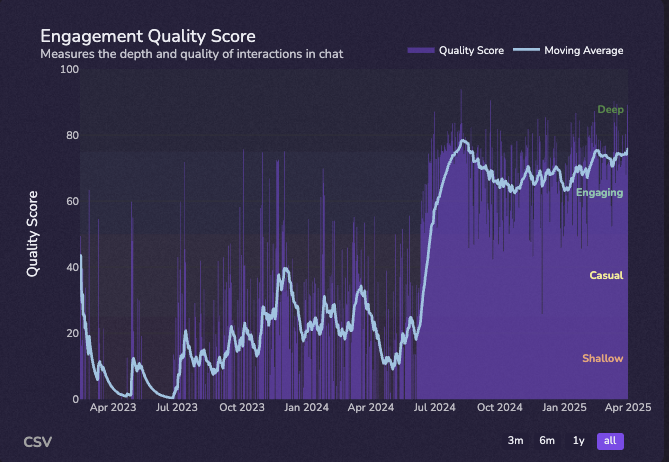
Develop conversation points based on the interests shared by your community members. Engagement can be enhanced through targeted questions, cleverly crafted (perhaps utilizing relevant contemporary events) and timely. Moderators should aim to introduce compelling conversation starters by drawing on current themes and noteworthy community developments.
The most important factor in improving chat quality is how moderators and the core team interact with regular members.
This proactive approach not only elevates engagement but also ensures discussions remain both informative and enjoyable, captivating members and inviting sustained interaction beyond the initial exchange.
Ultimately, the key to success lies in understanding what truly matters to your community. Encourage feedback loops to refine topic selections intelligently.
Avoiding Traffic Diversion Strategies
Keep engagement within your Discord, not some other external platforms.
When you're striving to cultivate a flourishing Discord server, it's imperative to focus on community-centric interactions. This means reducing unnecessary traffic diversion to external sources (especially other quest platforms such as Galxe or IG), helping to solidify a shared place for dialogue. Naturally, this aligns with the central goal of maximizing the positive impact of your server on its members.
External links can distract and dilute core interactions.
Promote in-server discussions by - in most instances - offering summaries of external content within the community, rather than redirecting members off-platform.
To maintain the seamless integration of community activities, ensure that members are drawn into meaningful exchanges, supporting their learning journey without interruptions.
Transitioning from Support to Engagement
Shift focus from being solely a support hub to fostering dynamic community interactions through enrichment, inspiration, and diverse, thought-provoking discussions, as part of a holistic strategy to breathe life into your server environment.
Encourage communal learning and meaningful conversations, transforming your server into an engaging platform for growth and connection.
Below is data from our own servers. We have gone though a transformation where people would leave a message, asking me to dm them about bot support, to where people are helping each other and talking to each other (average social reach). This is mainly thanks for our Hype Engine.
Balancing Support and Social Interactions
In many thriving Discord communities, the challenge lies in harmonizing the roles of support and social interaction. How can one seamlessly integrate these two vital facets?
Community managers, driven by necessity, realized that Discord platforms overly reliant on support often saw decreased long-term engagement, prompting a shift to a model that welcomes dialogue and camaraderie.
Thus, it's no mere chance that today's successful servers consistently strike a balance by offering support within the vibrant context of community engagement, where members find both assistance and the joy of connecting.
If you are a large server, one low hanging fruit that you can take is to redo your server layout, specifically reducing the amount of channels that people can chat. Make two categories of channels, one for support, and one for social chatting. For the social categories, name your server something casual, such as "off-topic", "game", "pets" etc etc. This will give users little hint on the kind of server culture that you want to develop. Finally, add a custom item in our custom shop via hype engine to jump start the effort.
When examining the needs of your server today, ponder over the roles that moderators play in not only addressing queries but also fostering genuine relationships and encouraging off-topic discussions, which significantly boost member satisfaction. You can use our analytics to track moderator's performance here.
Encouraging Repetitive Interactions
Fostering repetitive interactions on your Discord server necessitates a strategic blend of engagement tactics and authentic community-building techniques.
- Create Interactive Content: Design challenges or games that members can participate in regularly. Hype Engine is a great intro game bot that members can play.
- Introduce Scheduled Events: Regularly host events such as Q&As or themed discussions.
- Recognize Members: Regularly acknowledge active members to foster deeper community ties.
- Leverage Moderators: Empower them to initiate conversations and guide meaningful discussions.
- Solicit Feedback: Encourage members to voice their thoughts on various community events and topics.
Consistently deploying these strategies can fundamentally increase member retention and deepen engagement.
A well-rounded approach ensures that your server remains dynamic, inviting, and genuinely engaging for all members.
Monitoring Overall Engagement Quality
When analyzing engagement quality, a wealth of analytics provides invaluable insights and you can find most of them in our Engagement tab on our server insights. Observing server stats such as messages per member, engagement quality scores, and words per message unveils a nuanced picture of how members interact. These insights empower community managers to craft meaningful strategies.
Reviewing Messages Per Member
The messages per member metric is a vital benchmark for assessing expanding community involvement, offering a clear snapshot of how actively each participant communicates. By scrutinizing this indicator, you gain insight into the vibrancy of conversations. In general, you want message per member to be above 4. In regular web2 servers, we see message per member hovering around 20.
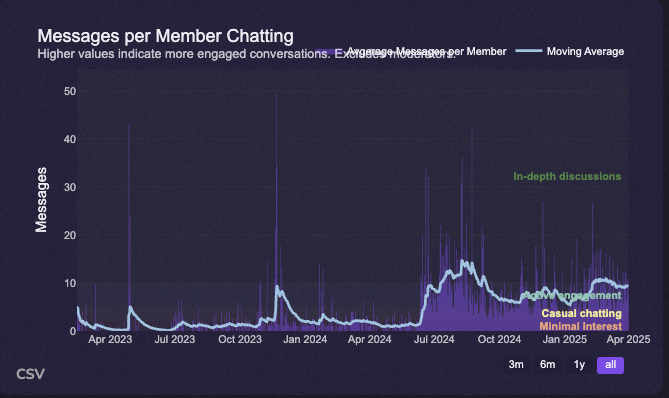
A healthy community often showcases diverse engagement patterns throughout different time frames. Such variance is expected and should energize dedicated community managers to explore methods for enhancing active participation.
Achieving a robust messages per member rate is pivotal in understanding communal dynamics, as it reflects the degree of interaction among participants. On average, users will spend roughly 30 seconds to 2 mins per new message. So anything above 20 means that they are spending 40 mins a day in your server. Cultivating an atmosphere encouraging consistent dialogue requires strategic actions, including facilitated conversations, incentives, and the introduction of compelling topics.
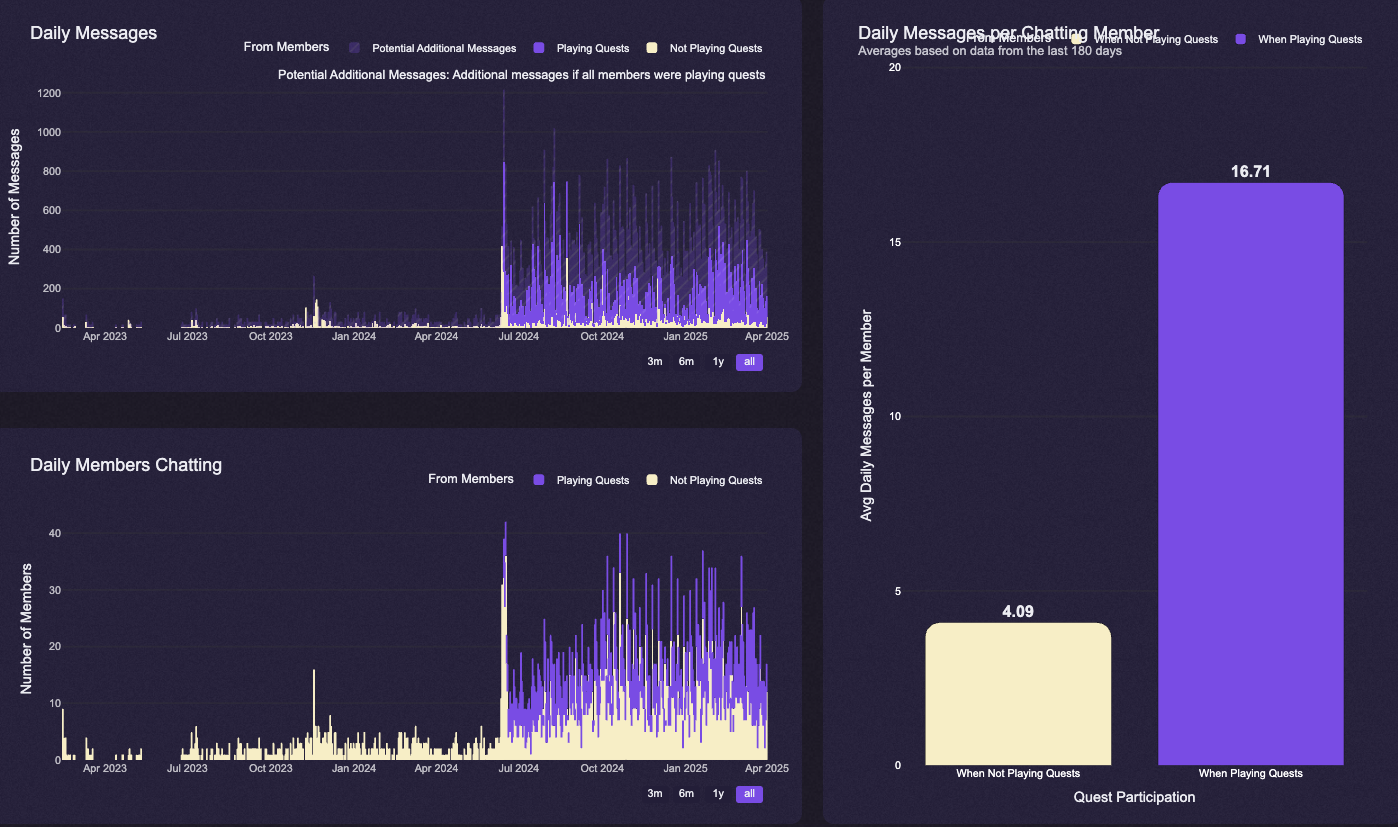
Hype Engine is a great automatic solution in improving messages per users. On average, members who pay quests do 4x more messages than regular members, or 20 messages per server. You can also find analytics of how hype engine performs in your own server.