Discord Web Presence: The SEO Guide for Server Admins

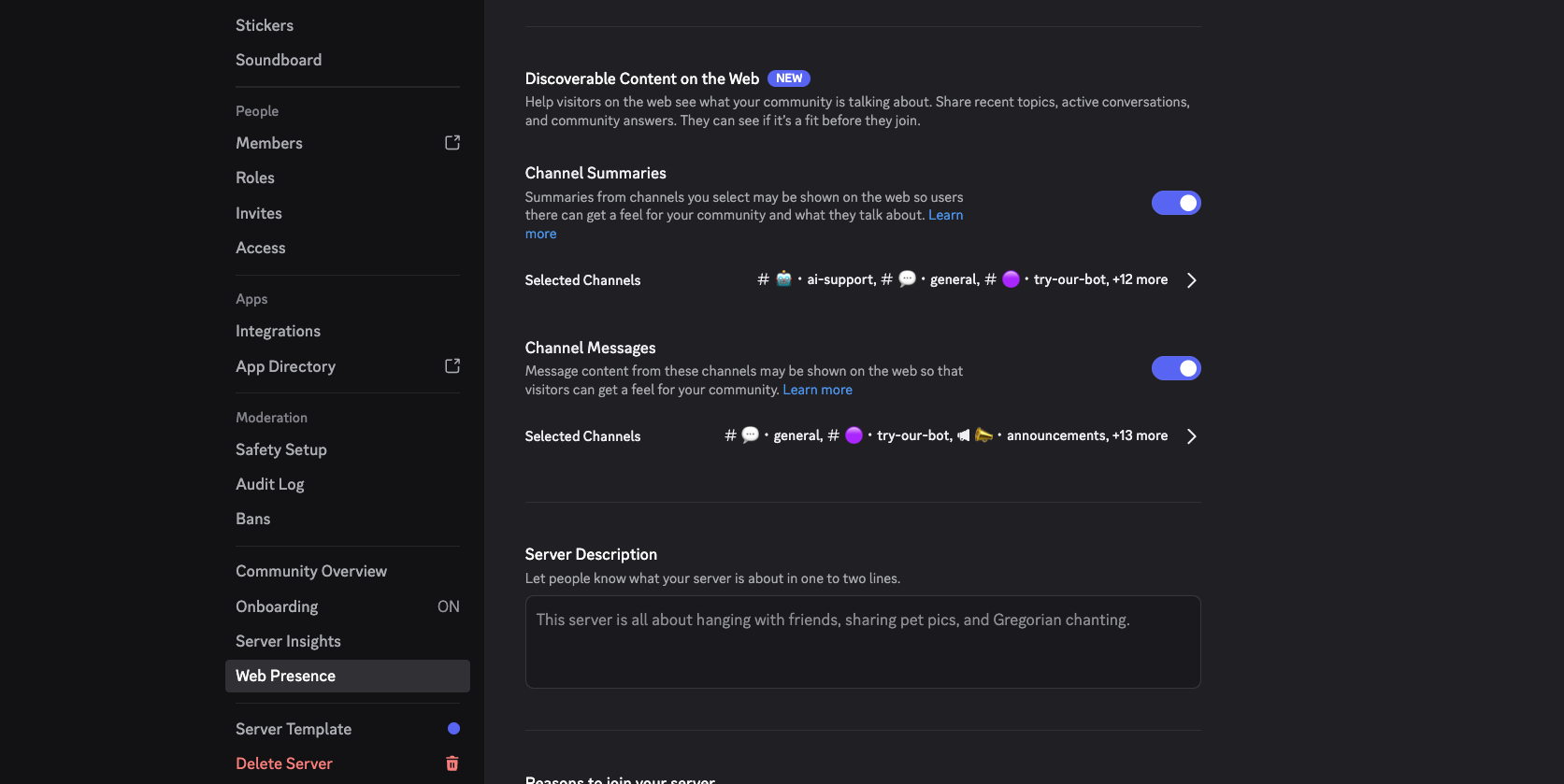
TL;DR: Discord Web Presence puts Discoverable Server content on Google starting November 16, 2026, and it’s on by default. Server Web Pages won’t move the needle unless your server name is specific. Channel Summaries and Channel Messages will, but only from coherent, well-moderated help forums and announcement channels. Set up forums, turn on Moderation, tell your members, and keep the social side of your server visible.
Key takeaways
What it is: Three features for Discoverable Servers (1,000+ members, Discovery on): a public Server Web Page and AI Channel Summaries from November 16, and individual Channel Messages in Google from mid-December. All on by default.
Server Web Pages are old news. Discovery ranks by size, so a server barely over 1,000 members gets almost nothing from it. The page only earns its keep if your name and description match a specific search phrase.
Summaries need coherent channels. AI summarizing general chat produces a summary about nothing. Pick two or three dense, on-topic channels and leave the rest off. Members can’t opt out of summaries.
Not every message deserves indexing. Low-value chatter drags down page quality in Google’s eyes. Enable messages only where the typical post is worth a stranger’s time.
Indexed means permanent. Opt-outs stop future messages only, and Google keeps caches. Turn on AutoMod with delete-on-match rules and staff your enabled channels before you enable anything.
Forums and announcements are the real opportunity. Set up help forums before December. Write announcements for the problem someone is searching, spell-check them, post weekly, and stay on topic.
Third-party bots (such as CommunityOne) are still worth running. More copies of a good answer match more queries, especially for AI. Check how each tool treats your content. Some publish messages as-is, while others restructure them. CommunityOne, for example, automatically adds AEO summaries and translations. Also check each tool’s privacy model: CommunityOne is opt-in with pseudonyms and full history, while the other tools might be default-public with opt-out. You can read more on how CommunityOne index differently vs. Discord here.
Tell your members first. Discord has always felt private. Announce which channels are going public and where the opt-out lives before they read it in the news.
AI will answer before people join. Support-only servers are the least defensible. Keep the social channels alive so the page shows a community, not just a FAQ.
Discord Web Presence is the biggest change to how Discord communities get found since Server Discovery launched. On October 27, 2026, Discord announced that content from Discoverable Servers is going on the open web. From November 16, every Discoverable Server gets a public web page with AI-written summaries of its channels. From mid-December, individual messages from public channels can appear in Google, in your members' own words.
It is also on by default. So the real decision isn't whether to participate.
Discord Web Presence is on by default. The question isn't whether to participate. It's whether to participate deliberately.
We've spent most of 2026 publishing Discord forum threads to the web for communities of every size, so we have opinions about what works and what goes wrong. This guide covers what Discord is publishing, who controls it, which parts will actually bring people in, and the moderation and privacy work to do before any of it goes live.

Want to 4x your Discord engagement and get free nitros & steams every week✌️?
✨ Invite our botWhat Is Discord Web Presence?
Discord Web Presence is a set of three features that publish content from Discoverable Servers to the open web: a public Server Web Page for every Discoverable Server, AI-generated Channel Summaries shown on that page, and individual Channel Messages that can appear in Google and other search engines. It applies only to servers with 1,000 or more members that have Server Discovery turned on.
| Feature | Live from | What goes public | Who controls it |
|---|---|---|---|
| Server Web Page | November 16, 2026 | Name, description, categories, languages, join button | Admins edit it; can't turn it off while Discoverable |
| Channel Summaries | November 16, 2026 | AI summaries of selected public channels | Admins only; no member opt-out |
| Channel Messages | Mid-December 2026 | Individual messages from selected public channels, text only, no usernames or avatars | Admins pick channels; members have one account-wide setting |
Discord's own explanation tells you what the feature is for. Server Discovery helps people find servers, not answers. The answers live inside channels where search engines can't reach them, and Discord now wants admins to make specific channels findable from the web. Full details are in Discord's help center article on Discoverable Server Web Presence.
Which Discord Servers Get Web Presence?
Web Presence applies only to Discoverable Servers. To qualify, a server must:
- Be a Community Server with 1,000 or more members
- Be at least eight weeks old
- Meet Discord's activity and safety requirements, including 2FA for moderators
- Have Server Discovery turned on in Server Settings → Access → Discoverable
Discord says more than 63,000 servers meet the bar, and Verified servers qualify automatically. Private servers, invite-only Community Servers, DMs and group DMs are not affected.
If your server is under 1,000 members, none of this reaches you yet. Skip to the section on third-party indexing such as CommunityOne for what you can do instead, and see our guide to growing a Discord server from 0 to 1,000 members for the rest.
The Three Web Presence Features, Ranked by SEO Value
The three features are not equally valuable for search. Here's each one, what Discord says about it, and our honest read on what it will do for you.
Server Web Pages: Why Discord Server Discovery Won't Be Your Growth Engine
Every Discoverable Server gets a page at discord.com/servers/your-server. Anyone can see it without a Discord account, search engines can index it, and visitors can join directly from the page. If you haven't built one, Discord generates a default from your Server Profile.
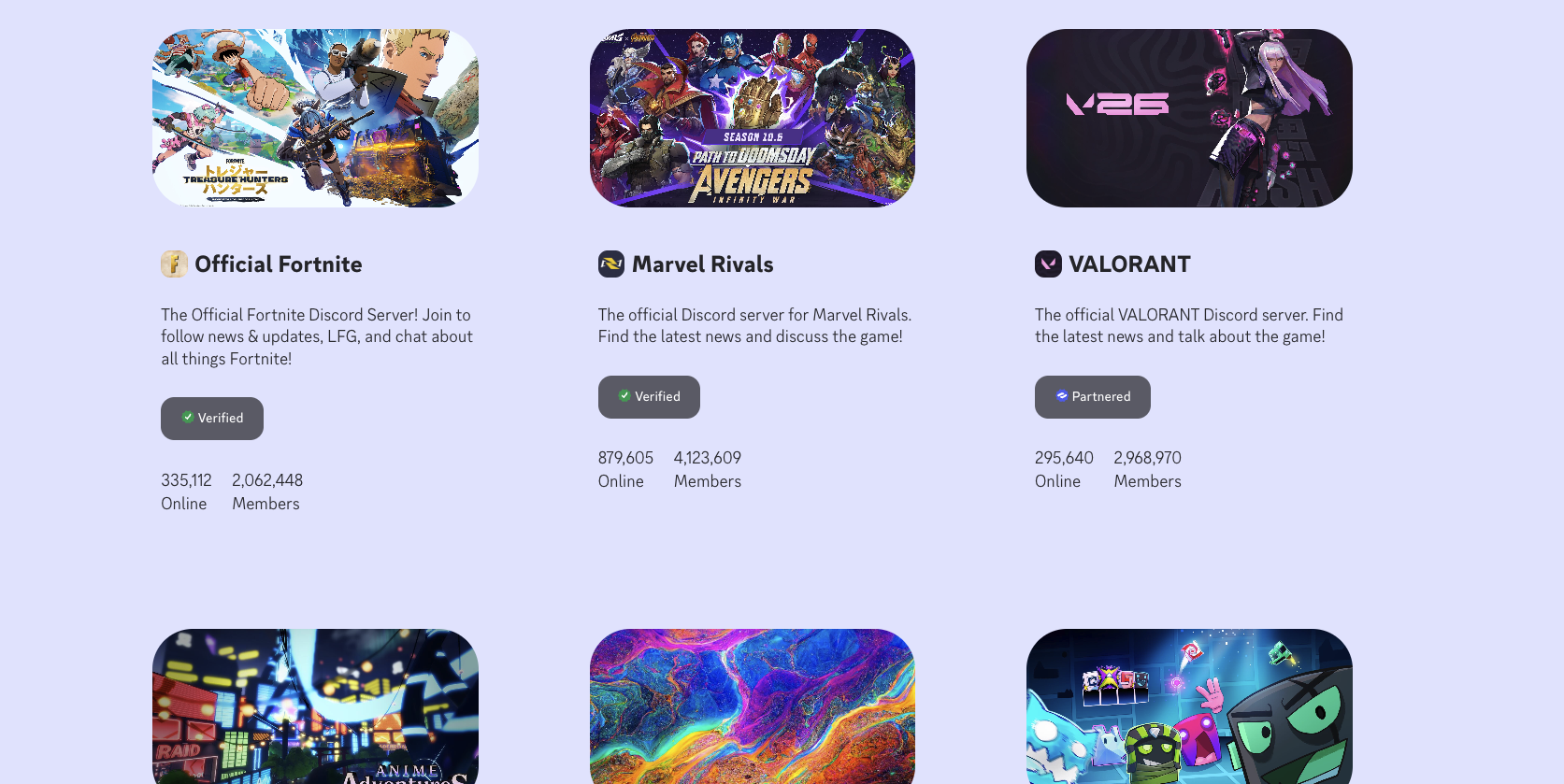
This is the least new part of the announcement. Server pages have existed for years, and they've been indexed for years. If you've had one, you already know what it does for you, which for most servers is not much.
The reason is structural. Discord Server Discovery ranks servers largely by size and activity. If you're barely over 1,000 members, you're competing against servers with hundreds of thousands, and your chance of being surfaced by Discovery's own browsing is close to zero. The web page inherits the same problem: a thin profile page for a mid-sized server has very little to rank for.
Where the page does earn its keep is specificity. A server whose name and description match what people type into Google can rank for that exact phrase. "Elden Ring Seamless Co-op help" is a query. "Chill gaming hangout" is not.
Your Discord server description is now a meta description. Write it for the stranger searching, not the member who already joined.
If your server has a specific title, a specific game, tool, topic or city, the web page is your chance to own that phrase on a domain Google already trusts. Name it. Say who it's for. Say what people get.
Channel Summaries: Coherent Channels Get Useful Summaries
Channel Summaries are AI-generated summaries of active conversations in your public channels, shown on your Server Web Page. They cover discussions from November 16 onward. Admins choose which channels feed them, can curate what's shown, or turn them off. Usernames and avatars are not included.
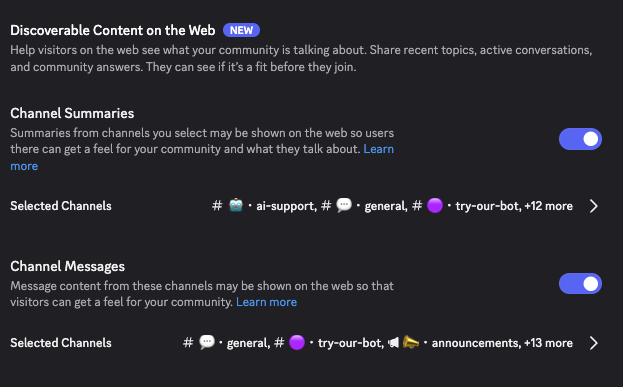
Discord's help center is candid that summaries "may not always be accurate," and that members have no individual opt-out. Only admins control them.
Summaries have the most interesting SEO implications and the most unknowns. Discord hasn't said how often a channel gets re-summarized. That matters, because a page that keeps changing is better for search than one written once and left alone. But a fresh summary only helps if it says something, and that takes a real volume of conversation underneath it. A channel with twelve messages a week will produce a summary that's either empty or embarrassing.
The second implication is coherence. An AI summarizing a general-chat channel where people discuss a game, a TV show, somebody's cat and the weather will produce a summary about nothing in particular. Google and the AI search engines will read it the same way.
A general-chat channel summarized by AI is a summary about nothing.
If you want a channel summarized well, the channel needs to be about one thing. That's an argument for topic-specific channels with clear names and clear expectations. Pick two or three channels where the conversation is dense and on-topic. Leave off anything where a context-free AI paraphrase could misrepresent your community, because the mistake will carry your server's name.
Channel Messages: Not Every Message Deserves to Be Indexed
Channel Messages are actual messages from your public channels, which can appear on your Server Web Page and in web search. Discord frames these as "answers to questions your members sent in public channels." Usernames and avatars are hidden. Text only for now, though a pilot with partner communities has shown images and video.
Two details matter for forum-style communities. Threads and forum posts are included if the parent channel is public and enabled. And only messages sent after the feature goes live are eligible. Nothing from before mid-December 2026 will ever be published, whatever settings anyone changes later.
Here's the part Discord's announcement doesn't dwell on: indexing the wrong messages costs you. Google judges quality at the page and site level, not per message. A help forum where most threads are a real question followed by a real answer looks like a valuable resource. A channel padded with "lol," "same" and a hundred one-line reactions looks like low-value content, and that judgment drags down everything published alongside it.
There's a human version of the same problem. Some members will see their words in a Google result and regret it. Most will shrug, a few will delete the message, and in the worst case somebody leaves your server over it. It's rare, but it's one more reason to be selective. Every channel you enable should be one where the typical message is worth reading to a stranger.
Who Controls Discord Web Presence Settings
Think of this as three switches on three different people.
Discord decides whether your server is eligible at all. Its Trust & Safety team can remove summaries or pages that violate the Discovery Guidelines.
Admins control Web Presence from Server Settings → Community → Web Presence. Only the owner and members with Administrator permission can change it, and only on desktop or browser. Bots can't change it. Channel Summaries and Channel Messages have separate toggles and separate channel lists. When you create a new public text channel, the creation dialog now includes a Discoverable section with four options: All Content, Summaries Only, Messages Only, or Off. Private and role-restricted channels are never included.
Members control their own messages with one account-wide setting: User Settings → Data & Privacy → "Show my message content from Discoverable channels on web pages." It applies across every Discoverable Server they're in, not per server. Channels that participate show an icon in the channel header, and a pop-up appears before someone posts in a newly enabled channel.
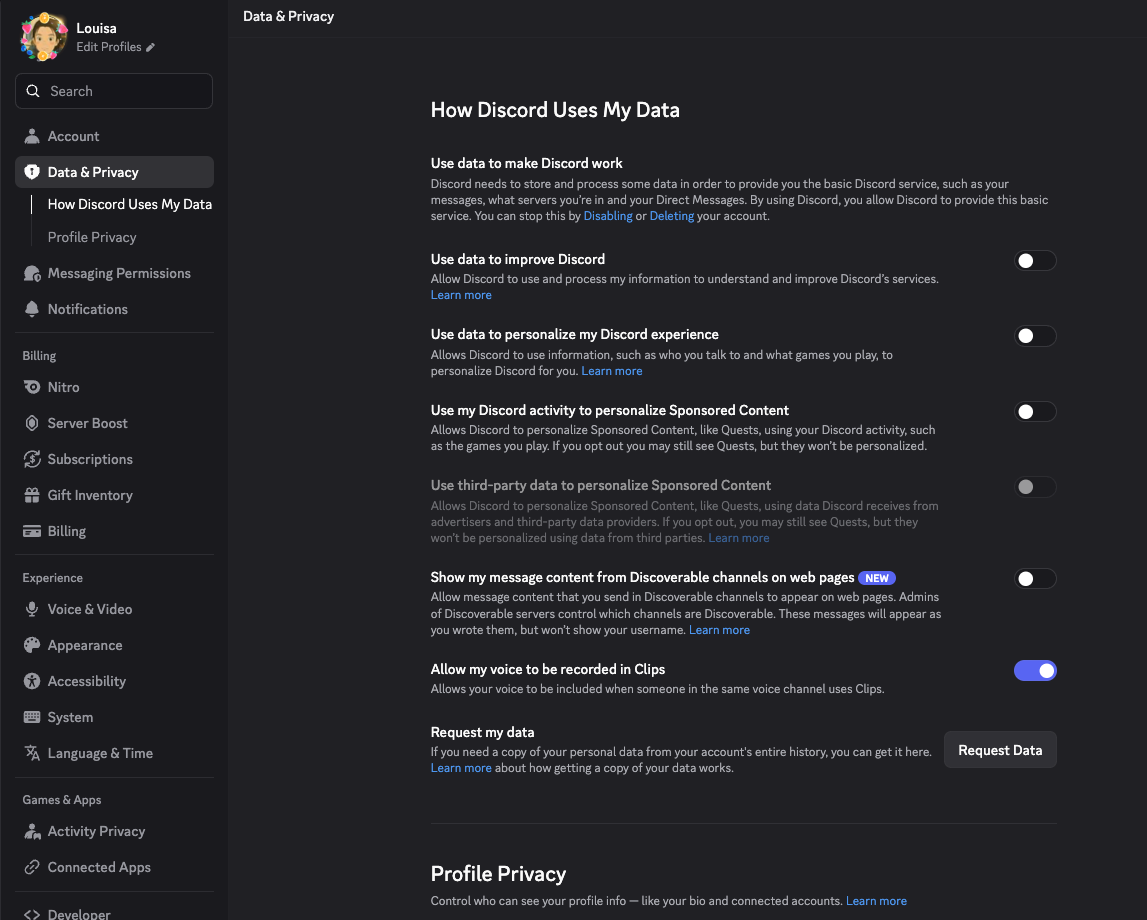
The defaults will generate the most confusion. Everything is on unless somebody turns it off:
- Public channels are included by default.
- The member setting is on by default for adults in most regions.
- It is off by default in the EU/EEA, UK, Canada, Brazil, Australia and South Korea.
- Teen accounts are excluded entirely and can't opt in.
If your community skews European, a smaller share of your messages will be eligible than the channel list suggests.
Indexed Discord Messages Are Permanent: Moderate Before You Optimize
Read this before you enable anything.
A member who turns the setting off stops future messages from being eligible. It does not pull back messages already sent while it was on, even ones that haven't appeared on the web yet. The only way to remove a specific message is to delete it in Discord. The same is true at the server level: toggling off Channel Messages or Summaries stops new content, but "content already published may remain visible until individually removed."
Discord also says plainly that it doesn't control search engine caches. A deleted message disappears from Discord's pages, but Google may keep a copy until it recrawls or someone files a removal request.
Once a Discord message is indexed, treat it as public forever.
This changes what moderation means. Today, a slur or a scam link in your help channel is a problem for the people who saw it before a mod deleted it. From mid-December, if that message sits in an enabled channel long enough to be picked up, it's a problem with your server's name on it in a search result.
So the most important preparation step isn't SEO. It's making sure nothing bad survives long enough to be published:
- Turn on Discord Moderation for every channel you enable, with word, link and spam rules that delete on match rather than flag for review. Our Discord AutoMod guide with regex and banned-word lists has ready-made rules. You can also use our own AI moderation tool free for more flexible, content-based messages.
- Staff the enabled channels with active human moderators across your community's main time zones, with a norm of deleting rather than warning. See our guide to building a Discord mod team.
- Enable messages only where this is already true. A help forum that's been clean for a year is a safe candidate. A general channel that gets raided every few weeks is not, however good the conversation is between raids.
If you can't confidently say your enabled channels are safe, leave Channel Messages off until they are.
The Two Discord Channels Worth Indexing: Forums and Announcements
Strip away the novelty and the Web Presence launch comes down to two kinds of content that will actually rank: help forums and announcements. Everything else is noise, and some of it is risk.
Discord Forum Channels: Set Them Up Before December
If your server doesn't have forum channels, set them up now. Forums are the right structure for the web for three reasons:
- Every post has a title, which is what a search engine matches a query against.
- Every post is about one thing, which is what a summarizer and a ranking algorithm both want.
- The structure tells members what the channel is for: ask a question, get an answer, don't chit-chat.
Point your forums at help. "How do I," "why does," "is it possible to" and "anyone else getting" are the queries Google's Discussions and forums module exists to answer. Ahrefs analyzed 145 million US search results in August 2026 and found that module on 11.7% of them, almost entirely (98.7%) on informational queries, and especially on queries of five or more words. Reddit appears in 83.9% of those modules, and the top three sites account for 76.75% of all the links.
The bottom line: there is enormous demand for conversational answers and a very short list of places Google trusts to supply them. Discord is about to join that list, and your help forum is the content that qualifies.
Tidy the forums you turn on. Channel names are part of what Discord publishes and part of what Google reads, so "#help-and-questions" beats "#❓・halp." Pin a short guide to asking good questions with a descriptive title. Nudge members to ask in the public forum instead of DMing a moderator, because every answer that stays in DMs is an answer the web never sees. When a thread is solved, say so in the thread.
Discord Announcement Channels: Write for the Stranger Searching
This is the opportunity most admins will miss, because announcements feel like something you write for the members you already have.
Think of your announcement channel as a blog that happens to live inside Discord. It's a stream of fresh, first-party content about your topic, written by the people who know it best. For a search engine, that's close to ideal, but only if it's written for someone who hasn't found you yet.
Write for the problem, not the feature. The instinct is "We shipped X" or "New event Saturday." The version that ranks starts from what a person would search for: "If you've been hitting [problem], here's how [X] fixes it." AI search engines read differently from your members. They match a stranger's question to your text, so your text should start where the stranger's question starts.
Write for a public audience. Spelling, grammar, complete sentences, no inside jokes in the first line. Your members will forgive a sloppy announcement. A search result that reads "Evnet tonight!!1 be there" will not help you.
Post on a schedule. Freshness is one of the few ranking signals entirely within your control. A regular cadence of real announcements tells Google and the AI engines this is a live page about a live community. Weekly is good. Whenever you remember is not.
Stay on topic. If your server is about League of Legends, your announcements should be about League of Legends. Search engines try to work out what a page is an authority on, and a focused announcement history is how you tell them. A scattered one tells them you're an authority on nothing.
Should You Also Use a Third-Party Discord Indexing Bot?
If you're already big enough for Web Presence, you may wonder whether tools like CommunityOne and other indexing tools still have a job. Here's our view, with the obvious disclosure that we make one of them.
From your side, there's no harm in letting more than one system publish your content, and real upside. The more places a good answer lives, the more queries it can match. AI search engines in particular care less about which domain has the highest authority score (as long as the site is on the first page) and more about which text answers the question most cleanly. Discord's copy of a thread will usually rank first for a head term on Google. That leaves a lot of long-tail, translated and AI-answered queries on the table.
Two things to understand before you add a bot:
How each one treats member privacy. This used to be a niche concern. Now that Discord itself is publishing messages, it's your responsibility to know what each tool shows and to tell your members. Most third-party tools' default for new servers is to treat every message in an indexed channel as public, with members able to opt out through a slash command, and posts appear under the member's Discord identity. CommunityOne works the other way around: members explicitly opt in, and nothing from a member who hasn't is ever published. Because they opted in, we can publish a member's whole history in your selected channels, including threads from before Discord's cutoff, under a stable pseudonym rather than their Discord name.
How each one differentiates its copy. If the same thread exists on discord.com and a third-party site, the third party has to earn its place. Ours is to publish an AEO summary alongside each thread: a cleaner, more concise version of the question and answer, written so an AI engine can lift it as a direct citation. We also translate published pages into six more languages on their own URLs, which Discord doesn't do. And our longer-term goal is for that traffic to pay your community back through revenue sharing.
For a server under 1,000 members, this isn't a choice at all. Web Presence doesn't exist for you yet, and a publishing bot is the only way your forum content reaches the web. Turn it on now; when you cross the threshold and add Discord's features, your archive will already be indexed.
CommunityOne publishes forum threads from Discord servers of any size. Members opt in, their posts appear under pseudonyms on your public listing page, and the whole thread history gets indexed, not just new messages. Each thread ships with an AEO summary, structured data, sitemaps and translations. See how forum publishing works →
How to Tell Your Members About Discord Web Presence
Discord has historically been a private place. Many of your members still think of it that way, and some will learn their messages are on Google from a news story before they hear it from you. That's the scenario to avoid, because an angry "I didn't agree to this" post in your help channel is itself a message, and if the channel is enabled, it's an indexed one.
Whatever you decide to enable, announce it first. Say which channels, what's hidden, what's not, where the opt-out lives, and what the opt-out doesn't do. Something like this, in your announcements channel:
Starting mid-December, Discord may show messages from some of our public channels on our server's web page and in Google. Usernames and avatars are hidden. We've turned this on for #help and #guides only, so that the answers you share can help people who haven't found us yet. Nothing posted before mid-December is included. If you'd rather your messages stay off the web, go to User Settings → Data & Privacy and turn off "Show my message content from Discoverable channels on web pages." That setting covers every server you're in, and it only applies to messages you send after you change it.
If you also run a third-party publishing bot, cover it in the same announcement so members hear about everything once, from you.
Plan around the regional defaults, too. If many of your members are in the EU, UK, Canada, Brazil, Australia or South Korea, their messages won't appear unless they opt in. You can ask, but don't expect most people to change a privacy setting.
AI Search Will Answer Before People Join
One more thing to consider before you build your whole community around being a help desk.
AI search is already cannibalizing web traffic, and it will do the same to Discord's pages. We've watched it happen to ours. Someone has a question, an AI engine answers it, and even when the engine cites your server page as the source, the person already has what they came for. They can click through and join, or they can close the tab. Many close the tab.
This is inevitable, and it's not a reason to stay off the web. Being the cited source still beats being invisible. But it changes what makes a community defensible.
A server that is purely a support channel is the least defensible kind. Once the answers are on the web, there's no remaining reason to join. A server where people also hang out, find friends, argue about the meta and plan things together is a different proposition. The searcher who lands on that page sees an answer and a place, and "it looks like interesting people are in there" is the one thing an AI can't deliver. In our experience, click-through from a server page to an actual join is far higher when the page shows a community rather than a FAQ.
The answers get people to your page. The people get them to join.
So don't optimize everything into a help desk. Put your best help forum on the web. But keep the social channels alive, and make sure your Server Web Page and summaries show that side too.
How to Measure Discord Web Presence Results
The pages live on discord.com, so they won't appear in your Search Console, and Discord hasn't said whether admins get analytics for them. What you can do:
- Search
site:discord.com/servers/your-slugperiodically to see what's been indexed. - Watch join sources in Server Insights after November 16 and again in late December.
- Ask new members where they found you.
Discord Web Presence Checklist
- Before November 16: open Server Settings → Community → Web Presence. Rewrite your Server Web Page description around the specific phrase you want to rank for. Pick two or three dense, on-topic channels for Channel Summaries.
- Before mid-December: set up forum channels for help if you don't have them. Turn on AutoMod with delete-on-match rules in every channel you'll enable. Enable Channel Messages for help and Q&A forums only.
- Now: start writing announcements for the stranger who hasn't found you yet, on a weekly cadence, on topic.
- Now: post the member announcement above, covering Discord's setting and any third-party bot you run.
- Late December: search for your own server, see what the web sees, and prune anything you wouldn't want a stranger to read first.
FAQ: Discord Web Presence
What is Discord Web Presence? Discord Web Presence is a set of features that publish content from Discoverable Servers to the open web: a public Server Web Page, AI-generated Channel Summaries, and individual Channel Messages that can appear in Google and other search engines. It was announced on October 27, 2026 and rolls out from November 16.
Which servers are affected by Discord Web Presence? Only Discoverable Servers: Community Servers with 1,000 or more members, at least eight weeks old, that meet Discord's activity and safety requirements and have Server Discovery turned on. Private servers, invite-only servers, DMs and group DMs are not included.
Can my Discord messages show up on Google? Yes, if you post in a public channel of a Discoverable Server where the admin has enabled Channel Messages, and your account setting "Show my message content from Discoverable channels on web pages" is on. It's on by default for adults in most regions and off by default in the EU/EEA, UK, Canada, Brazil, Australia and South Korea. Only messages sent after mid-December 2026 are eligible.
How do I stop my Discord messages from appearing on Google? Go to User Settings → Data & Privacy and turn off "Show my message content from Discoverable channels on web pages." This applies to every Discoverable Server you're in, but only to messages you send after you change it. To remove a specific message, delete it in Discord.
Does Web Presence show usernames or avatars? No. Channel Summaries and Channel Messages are published without usernames or avatars. Server Web Pages show the server's own profile, not members.
Are forum posts and threads included? Yes, if the parent channel is public and the admin has enabled it for Web Presence.
Can members opt out of Channel Summaries? No. Only admins control summaries by choosing which channels feed them or turning them off.
How is Web Presence different from Discord Server Discovery? Server Discovery is the in-app directory that helps people find servers. Web Presence puts your server's page, summaries, and messages on the open web, where search engines can index them. You need Server Discovery turned on to get Web Presence.
Can a bot turn Web Presence on or off? No. Only the server owner and members with Administrator permission can change it, and only on desktop or browser.
What if my server is under 1,000 members? Discord's Web Presence isn't available to you. A third-party publishing tool such as CommunityOne's forum publishing is the only way to get your forum content onto the web until you cross the Discoverable threshold.