Understanding Discord Member Count Dynamics

A growing Discord server can feel exciting at first. New members are joining, the number beside your server is going up, and it starts to look like the community is gaining momentum.
But member count can also be misleading.
A high number does not always mean the server is active. A smaller number does not always mean the community is weak. What matters is understanding the difference between total members, visible members, online members, and actually engaged members.
That is where Discord member count dynamics become important. Once you know what each number really means, you can make better decisions about growth, retention, moderation, and community health.
Why Your Discord Member List Looks Smaller Than Expected
One of the most common points of confusion is the member list on the right side of Discord.
Server owners often look at the sidebar and think, “Why does this look smaller than my total member count?”
The answer is simple: the sidebar is not always showing your full community.
In many cases, Discord prioritizes the members who are online or visible in that channel. On larger servers, offline members may not appear in the sidebar because showing every inactive or offline account would make the list harder to use.
This means your visible member list is not the same as your true server size.
Your server could have hundreds or thousands of members, but the sidebar may only show the people who are currently active, online, or visible based on role and channel permissions.
How to Check Your True Discord Member Count
Discord now makes the member list easier to access from the main server sidebar.
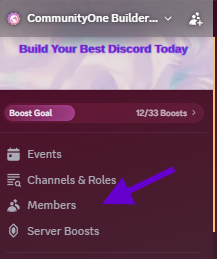
To check your member count:
- Open your Discord server.
- Look at the server menu on the left side, above your channel list.
- Click Members.
- Review your server’s member list from there.
This is the better place to check your actual server roster instead of relying on the visible member list on the right side of Discord.
The right-side member list is useful for seeing who is active or visible in the current channel, but it does not always represent your full community. The Members page gives admins and moderators a cleaner view of the server’s actual members.
For small servers, this may be enough. You can manually check your members and get a sense of growth. But as your server grows, checking this manually becomes less useful.
At that point, the better question is not just “How many members do we have?”
It becomes:
“How many of these members are active, retained, and contributing to the community?”
Why Total Member Count Is Only One Part of Growth
Member count is useful, but it is not the full story.

A server with 10,000 members and quiet channels may have a weaker community than a server with 1,000 members and daily conversations. Growth only matters when people stay, participate, ask questions, answer each other, join events, or return after their first visit.
This is why server owners should track more than just total members.
Better growth signals include:
- How many new members join each week
- How many members leave
- How many new members send their first message
- Which channels create the most activity
- Whether events or announcements lead to conversations
- How many members return after joining
- Whether your server is growing through real community interest or passive joins
This is where CommunityOne’s view of Discord growth is different.
We do not treat member count as the finish line. We treat it as the first signal. The real value comes from understanding what happens after someone joins.
Should You Use a Member Counter Bot?
A member counter bot can be helpful if you want to display your server size publicly.
These bots usually create a locked voice channel or visible counter that updates automatically. For example, you might show:
Members: 4,250
Online: 612
Bots: 24
This can be useful for social proof, especially if your server is public, partnered with creators, or trying to show activity to new visitors.
But member counters have limits.
They show size, not quality. They can tell people that your server is growing, but they cannot tell you whether your members are engaged, whether your onboarding is working, or whether people are leaving after a few days.
Use member counters for visibility. Use analytics for decisions.
What Changes When Your Discord Server Gets Bigger
As your server grows, member count becomes harder to manage manually.
At a certain point, you need to start thinking less like a server owner checking numbers and more like a community operator managing a system.
Bigger servers need:
- Clear onboarding so new members know where to go
- Better moderation workflows
- Cleaner channel structure
- Activity tracking across channels
- Better visibility into what content drives engagement
- Better retention tracking
- More context on which growth efforts are working
Discord’s built-in Server Insights can help Community Servers with more than 500 members understand activity, engagement, and retention. But many teams still need a more practical way to connect those numbers to daily community decisions.
For example, if your member count is growing but chat activity is flat, you may have an onboarding issue. If announcements get views but no replies, your content may need stronger prompts. If many people join but never speak, you may need a better welcome flow, clearer first steps, or more accessible discussion channels.
How CommunityOne Helps You Understand Growth Beyond Member Count
CommunityOne helps server owners look at the health of a Discord community, not just the size of it.
Instead of only asking how many people joined, you can look at what those members actually do after they arrive.
With CommunityOne, you can better understand:
- Which channels are creating activity
- How engagement changes over time
- What content brings members back
- Whether new members are participating
- Which moments create spikes or drops
- How your community compares week to week
- Whether your growth is turning into real participation
This matters because member count alone can hide problems.
A server can look strong from the outside but still have weak retention. Another server can look small but have a loyal, active core. The difference only becomes clear when you track the right signals.
A Better Way to Think About Discord Member Count
Your Discord member count is not useless. It is still one of the easiest ways to measure growth at a glance.
But it should not be the only number you care about.
Think of member count as the top layer of your community health. It tells you how many people have entered the server. It does not tell you whether they feel welcomed, whether they found value, or whether they will come back tomorrow.
A healthy Discord server needs both growth and activity.
So track your member count, but pair it with engagement, retention, channel activity, and member behavior. That is how you move from simply growing a server to actually building a community.
Final Takeaway
If your Discord sidebar looks smaller than expected, it does not always mean your server count is wrong. It usually means Discord is showing a limited view of your members based on visibility, online status, or server size.
To see your full roster, check the Members Page in Server Settings. To understand whether your server is actually growing in a healthy way, look beyond the total number.
The strongest communities are not just the ones with the biggest member count. They are the ones where people keep showing up, talking, helping, and returning.
That is the number worth tracking.

Your member count tells you how many people joined. CommunityOne helps you understand what happens next.
Track growth, activity, retention, and channel performance so you can build a Discord server that is not just bigger, but healthier.