Beyond Support: How Our Spark Web Widget Turns Visitor Questions Into Growth

Key Takeaways
- Website chatbots can be more than just support tools; they offer valuable insights into user needs and confusion.
- CommunityOne AI Spark chatbot offers extensive customization for its visual appearance and conversational voice to align with your brand.
- AI Rules allow for natural language "if this, then that" instructions to handle specific user scenarios without coding.
- A human-help fallback option with Spark AI seamlessly routes users to human support channels when needed.
- Analytics focus on actionable metrics, such as valuable questions and content gap analysis, providing clear insights for improvement.
TL;DR: CommunityOne Spark web widget transforms support into a growth engine by offering deep customization, actionable analytics, and a unique content gap identification system.

Use AI to get instant support on Discord & web now. Try our bot for free!
✨ Invite our botAs you might know, CommunityOne has been building AI support bots for Discord for the past two years. In fact, we shipped our first version before the ChatGPT API even existed. Today, I am proud to say we still have one of the best support chatbots on the market—and if you are looking for a free option, we are the only viable support chatbot on Discord right now.
When the AI boom happened, we saw a massive surge of general AI chatbots on Discord acting as virtual friends. While their growth was exponential, we stayed true to our core mission: Support. We fundamentally believe that communities should be reserved for human connection, and that AI is best used as a utility tool to protect and enhance that space.
That is still our fundamental belief. However, after speaking with many of you over the past year, one key realization stood out: for most of you, Discord is a "secondary" platform.
Whether your main hub is a YouTube channel, a website, or a SaaS product, Discord is where you engage with your superfans. They are already converted. But what happens to the brand-new user who just landed on your front page?
We want to help you grow across the board. From greeting that first user on your website and helping convert them, to bringing them into the magic of your community—all while giving you the time to focus on treating every member with passion.
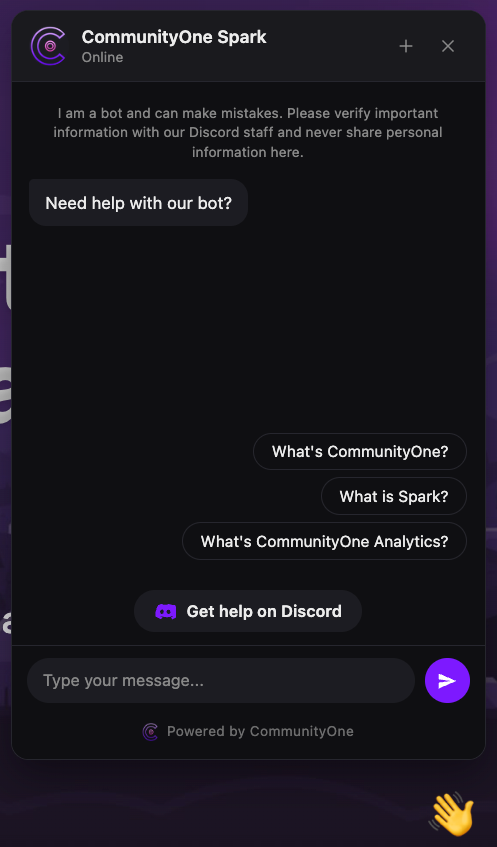
To bring this mission to life, we are launching the Spark Web Widget.
We’ve personally tried a lot of web chatbots out there, and frankly, they all fall short. They aren’t customizable enough. They leave potential customers hanging even when they are practically screaming for a real person. Their chat logs are full of noise, making it impossible to discover valuable user feedback unless you spend hours digging—or they charge you 500/month just to access basic analytics.
Because the existing tools weren't good enough, we decided to build it ourselves.
Spark is a highly customizable chatbot that provides exceptional support and seamlessly hands conversations over to a human when needed (because as founders, we always have time for our customers). It’s an AI designed not just to answer questions, but to extract insights, make your product better, and help you grow with zero extra effort.
A Bot That Looks, Feels, and Talks Like You
A chat widget is a tiny piece of UI, but it sits in a really high-stakes spot — the bottom-right of every page on your site. If it looks generic or off-brand, it actively hurts trust. We want to give you as much flexibility as we can.
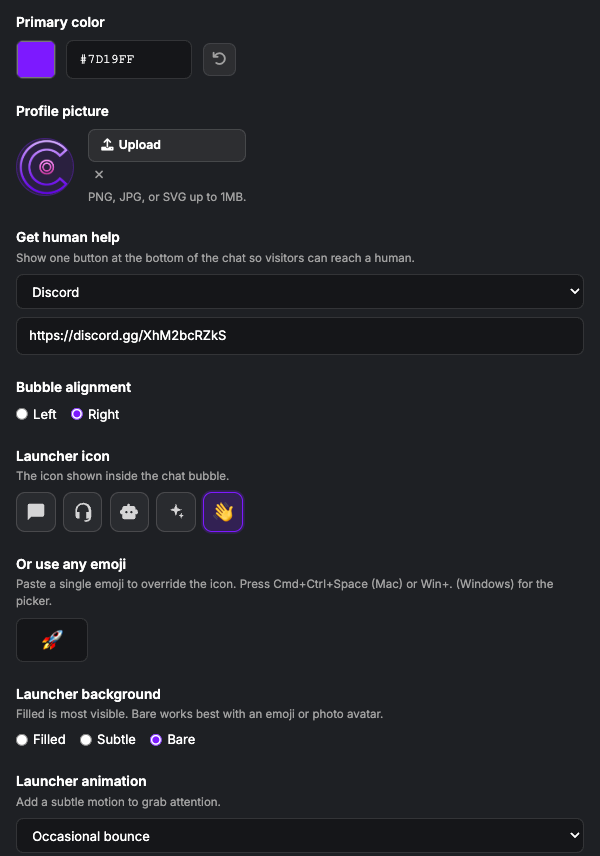
The visual layer. You get full control over Light or Dark theme, a hex color picker for your primary brand color, custom avatar uploads (PNG, JPG, or SVG up to 1MB), and bubble alignment on the left or right side of the screen. The launcher itself — that little floating button — has its own playground: pick from a curated set of SVG icons (chat, headset, robot, sparkle, waving hand) or paste any emoji you want as a one-character override (🚀, 👋, 🦊 — anything from the picker works). On top of that, choose a launcher background (Filled for max visibility, Subtle for understated, Bare when you want just an emoji or photo to float), and add a launcher animation — a one-time wave on page load, a gentle pulse, or an occasional bounce to grab attention without being annoying. There's a live preview pane next to the form so you see every change in real time before you save.
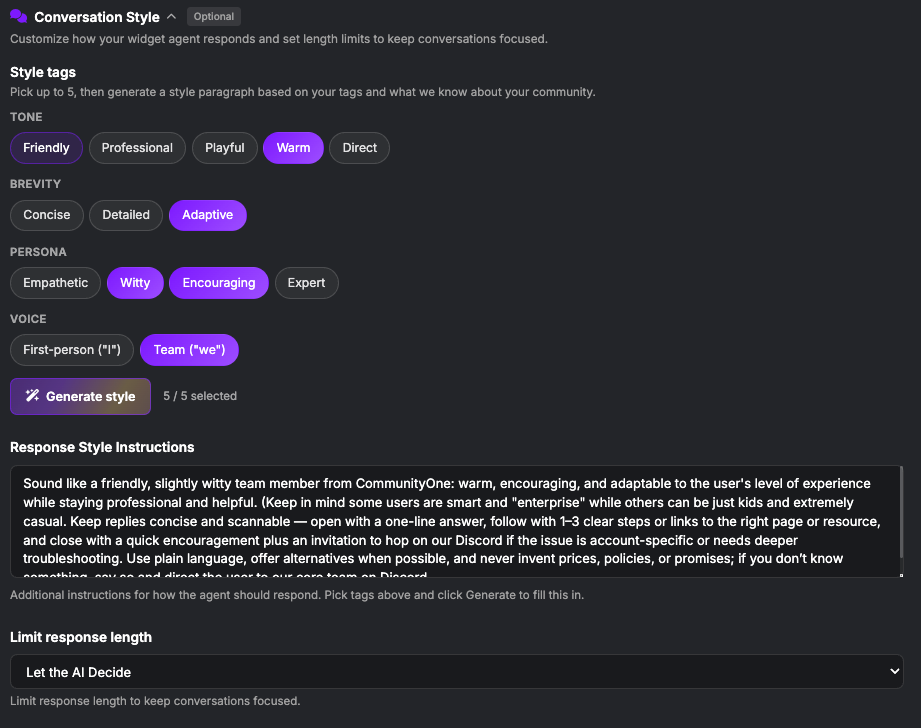
The voice layer. This is where most AI supprt chatbots don't care. Start with a custom prompt (up to 4,000 characters) that tells the agent who it is. Then refine the personality with Style Tags — pick up to 5 from groups like Tone (Friendly, Professional, Playful, Warm, Direct), Brevity (Concise, Detailed, Adaptive), Persona (Empathetic, Witty, Encouraging, Expert), and Voice (First-person "I" vs. Team "we"). Hit Generate Style and we use what we already know about your community plus the tags you picked to write a complete style paragraph for you — no blank-page anxiety. You can also cap response length (under 3 sentences, under 5, or let the AI decide) so your bot never bores someone with a wall of text on a quick question.
One thing we learned running this on Discord at scale: when people set up an agent, they're way more likely to configure Style than to upload Knowledge — picking a few tags feels easy, writing a custom prompt from scratch feels like homework. So we flipped the order of operations to match how people actually want to work. Pick your tags first; we'll turn them into a real, working prompt you can keep, tweak, or use as the starting scaffold for the longer custom prompt. The blank textbox is no longer the first thing you have to defeat — by the time you open it, there's already a draft in there based on your tags and what we know about your community. Most of our users never need to write a prompt from zero again.
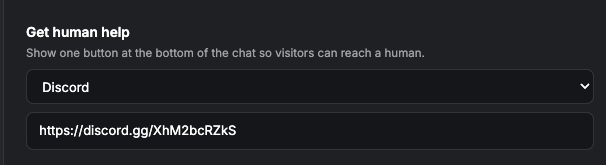
A human-help fallback. Sometimes the bot isn't the right answer, and pretending otherwise loses trust fast. Sometimes your users will scream at your bot looking for human help. We added a Get Human Help button at the bottom of the chat that routes high-intent users to wherever your humans actually live: Discord, Instagram, Facebook, Telegram, Discourse, an email address, or any webpage you choose. One config field, one click for the user.
Analytics That Actually Matter
Most chatbot dashboards are a wall of vanity metrics — "12,438 messages this month" — and that's it. A big number you can't act on. We took a different approach: every chart and table in Spark Analytics is built to answer a specific question you'd want to ask about your community.
A unified picture across surfaces. Your bot lives in two places — Discord and your website widget — and most platforms force you to context-switch between two dashboards. We merge them. You can filter by platform when you want to drill in (e.g. "show me only website conversations"), or filter by depth ("show me only multi-message conversations" — these are the high-intent leads) without leaving the page.
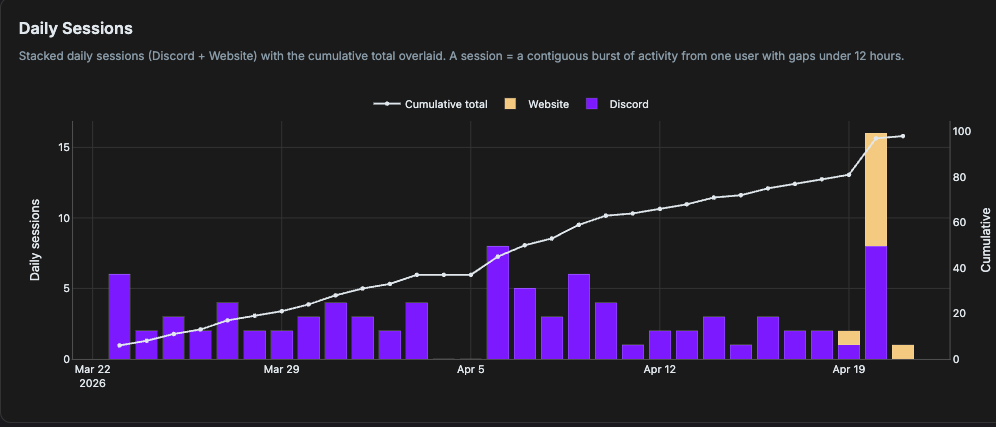
One pattern we keep seeing in the data is worth flagging: Discord users and website users behave very differently. People on Discord are chill — they ask all sorts of questions, joke around, riff on whatever's happening in the server. People on your website are purpose-driven; they showed up for a reason and they're trying to figure something out right now. That means your most valuable, high-intent questions almost always come from the website widget — but the people who come to your Discord are there to hang out with your community, and that's a different (and equally important) kind of value. Seeing both side-by-side keeps you from optimizing one at the cost of the other.
Questions, ranked by what actually matters. Beyond "how many," we built a topic engine that extracts keywords from your knowledge docs and ranks every user question by how many of those keywords it touches. The questions most aligned with your business surface to the top. We also detect when the same user asks multiple related questions in one session and group them as siblings, so you don't drown in duplicates — you get one row per intent, with everything they asked tucked underneath. Click any question and you jump straight into the full transcript.
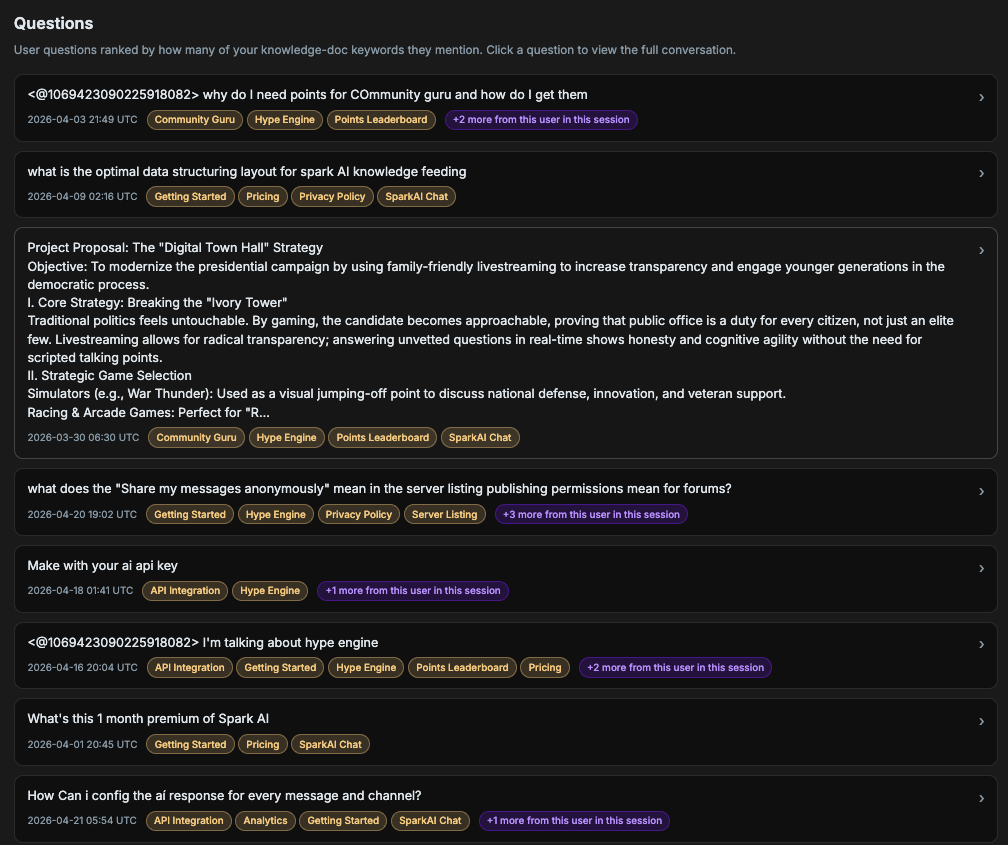
The throughline: the metrics aren't there to make you feel good about a number going up. They're there to give you the next thing to do.
Content Gap: From "I Don't Know" to a Documented Answer
Most chatbots quietly fail. A user asks something the bot can't answer, the bot apologizes, and that question disappears forever. To us, that moment is the single most valuable signal in your entire analytics stack — and it deserves a first-class workflow.
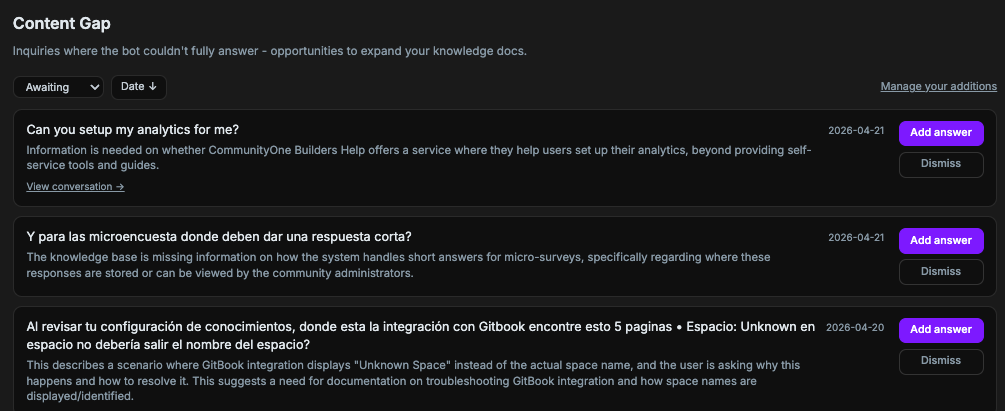
That's why we built Content Gap. Every time the bot can't fully answer an inquiry, we capture it, score it with a confidence number (how sure we are it really was a gap, not just an off-topic chat), and surface it in your dashboard with a clean status workflow: Awaiting → Resolved → Dismissed. Nothing gets lost.
What you can actually do with a gap
A gap row isn't just a complaint to read and move on from. Each one is an actionable card with three paths:
- Add Answer: write a short title + description that answers the question. We save it as a
KNOWLEDGE_GAP_FILLdocument in your knowledge base — meaning your bot will use it the next time someone asks a similar question. The gap automatically flips toresolved. - Polish with AI: rough draft? Hit polish, and Gemini rewrites it into a cleaner, more concise Q+A. We use Gemini 2.5 Pro for premium servers and Flash for free — same workflow, different tier of editor. The AI is instructed to never invent facts or add marketing fluff; it only tightens what you wrote.
- Translate: if your community speaks more than one language, translate your answer in one click before saving. Your bot's knowledge base becomes multilingual without you ever leaving the dashboard.
- Dismiss: not every "I don't know" is worth answering. Spam, off-topic chatter, or one-off questions can be dismissed in one click and they stop cluttering your queue.
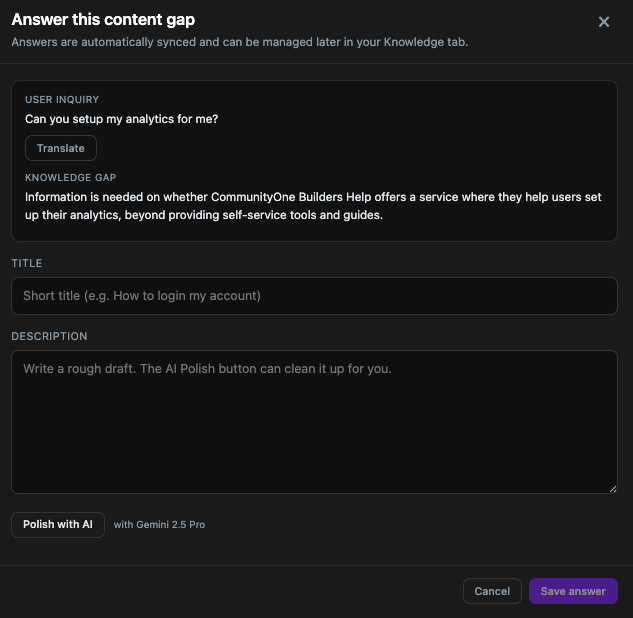
There's also a "Manage your additions" view so you can come back, edit, or delete any answer you've written — your gap-fill knowledge is editable forever, not write-once.
Why this matters more than you'd think
This is where the philosophy from the previous section becomes concrete. Every resolved gap is doing four jobs at once:
- Improving the bot today: the next visitor with the same question gets a perfect answer instantly, instead of another "I'm not sure."
- Building your documentation backlog: a resolved gap is a fully-formed, AI-polished Q+A. That's a draft FAQ entry, doc page, or blog post sitting there waiting for you.
- Telling you what your customers actually care about: gaps are ranked by recency and you can sort and filter them. Patterns emerge fast — five gaps about "pricing for teams" tells you something your roadmap survey never will.
- Closing the loop with SEO: paired with the Questions section above, you now know both what people ask successfully (good content) and what they ask that you fail at (content gaps). One gives you keywords to double down on; the other gives you the next thing to write.
The Philosophy: Support Is the Growth Engine
For small and mid-sized businesses, "support" shouldn't be an expense line — it should be the most direct insight pipeline you have into what your customers actually care about. We built the entire widget around that conviction, and it shows up in two very practical ways.
Every conversation is a lead. The "Get Human Help" button routes high-intent users straight to where your humans actually live — Discord, Telegram, Instagram, Facebook, email — turning support queries into real relationships instead of dead-end tickets. A "deflected ticket" is a missed introduction. We'd rather hand you the introduction.
Every conversation is content. Instead of guessing what to write about, the bot captures exactly what people are asking. Polish those answers (Content Gap), publish them, and you compound long-term SEO momentum and brand authority — one keyword, one gap at a time. The same workflow that improves your bot also writes your next FAQ entry, blog post, or doc page.
For startups especially, it's "grow or die." Talking to early users is critical, and leveraging AI is how you scale that conversation without scaling headcount. This is a major part of our roadmap, too — every feature we ship next gets sharpened against the same question: does this turn another support moment into a growth moment? That's the lens for all the integrations, automations, and analytics still in flight.
Future Roadmap: The Path to Community Integration
The perfect user journey looks like this: A user asks a question on your site -> the bot doesn't know the answer -> it prompts them to ask in your community (Discord, Discourse, etc.) -> a real human helps them -> they make friends -> they become a loyal core customer.
Discord is incredible for mid-conversation bonding, but this strategy applies to Facebook groups, Telegram, or any platform where you care for your users. Our goal is building more integrations and mechanisms to seamlessly convert anonymous website visitors into loved, engaged members of your core community.